
Есть отдельный сорт сетевой поломки, который сводит с ума именно своей избирательностью. Пинг идёт. DNS резолвится. curl -I возвращает заголовки. Страница открывается — и замирает на середине. SSH подключается, но git clone виснет на «Receiving objects». В браузере — половина картинок и вечный спиннер.
Почти всегда это MTU. Не «интернет плохой», не «сервер тормозит», не «провайдер режет» — просто где-то на пути пакет больше, чем можно передать, и механизм, который должен был об этом сообщить, промолчал.
Разберём: почему так выходит, как за три команды поставить диагноз и что именно чинить — потому что чинить можно в трёх разных местах, и правильное место зависит от того, ваш это туннель или чужой.
Откуда берутся «лишние» байты
Стандартный кадр Ethernet несёт 1500 байт полезной нагрузки. Каждый слой инкапсуляции откусывает свою часть.
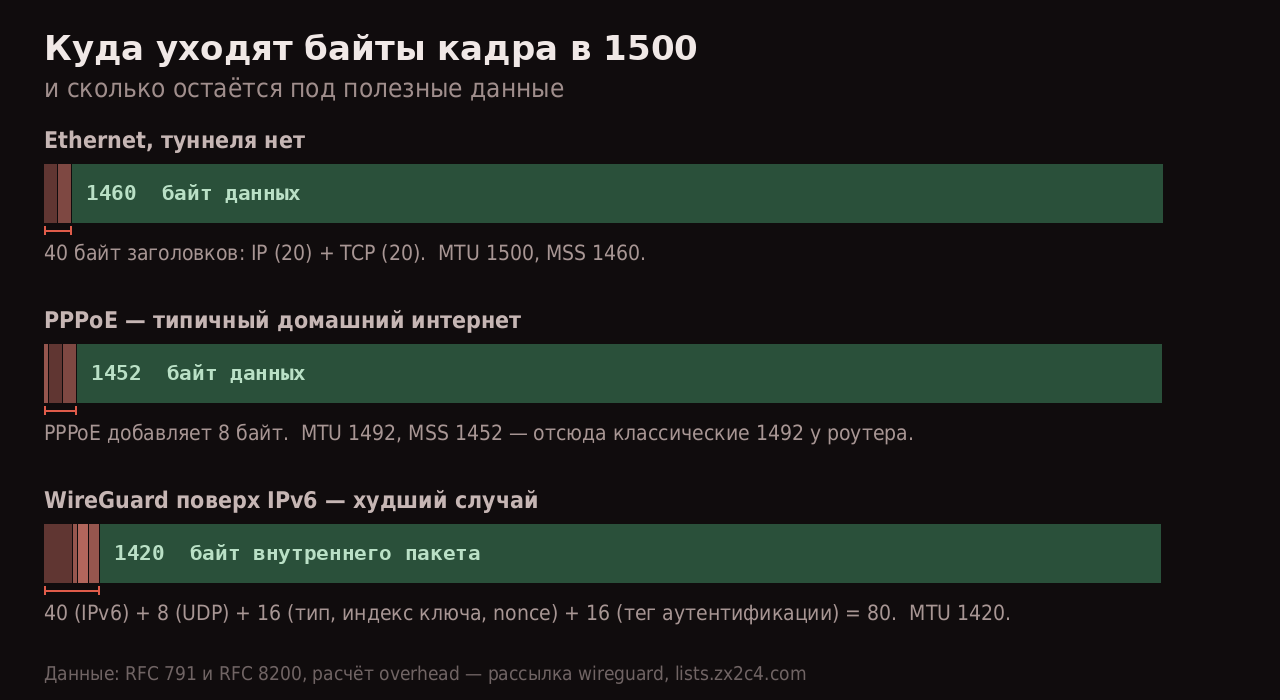
Схема на основе RFC 791 и RFC 8200, расчёт overhead WireGuard — из рассылки разработчиков
Для WireGuard официальный расчёт из рассылки проекта выглядит так: «20-byte IPv4 header or 40 byte IPv6 header, 8-byte UDP header, 4-byte type, 4-byte key index, 8-byte nonce, N-byte encrypted data, 16-byte authentication tag». Итого 60 байт накладных расходов поверх IPv4 и 80 поверх IPv6 — отсюда и значение по умолчанию 1420, взятое по худшему случаю.
Дальше эти вычитания складываются. PPPoE-подключение дома (1492) плюс WireGuard поверх него (−60) даёт 1432. Добавьте туннель внутри туннеля — и вы уже на 1372, а на интерфейсе по-прежнему стоит 1420.
MTU и MSS — разные вещи, и путать их дорого. MTU — максимальный размер IP-пакета, свойство интерфейса. MSS — максимальный объём данных в TCP-сегменте, о котором две стороны договариваются при установке соединения.
Связь простая: MSS = MTU − 20 (IP) − 20 (TCP). Для 1500 это 1460, для 1420 — 1380. MSS согласуется один раз, в SYN-пакете; MTU может измениться в любой момент посреди маршрута.
Почему проблема проявляется избирательно
Ответ на вопрос «почему пинг идёт, а сайт не грузится» — в размерах. Пинг по умолчанию отправляет 56 байт данных, служебные запросы вроде DNS и TLS-хендшейка тоже мелкие. Всё это пролезает в любой MTU. А вот пакеты с полезной нагрузкой — тело HTTP-ответа, содержимое картинки, объекты git — идут полными сегментами и упираются в ограничение.
В нормальном мире это лечится само: маршрутизатор, которому пакет слишком велик, отправляет ICMP-сообщение «Fragmentation Needed» (тип 3, код 4), отправитель уменьшает размер и повторяет. Это Path MTU Discovery.
Ломается ровно одна вещь: администраторы, которые «на всякий случай» режут весь ICMP. Без ICMP тип 3 отправитель не получает сигнала, продолжает слать пакеты того же размера, они молча пропадают, TCP их ретранслирует — и соединение зависает вместо того, чтобы вернуть ошибку.
Это состояние называют «чёрной дырой PMTU». Оно всегда выглядит как «сеть работает, но не до конца», и почти никогда — как явный отказ.
Диагностика: три команды
Команда первая. Найти реальный MTU до узла
ping -M do -s 1472 -c 3 example.com
-M do запрещает фрагментацию, -s задаёт размер данных. К нему добавляется 8 байт ICMP-заголовка и 20 байт IP, поэтому полный пакет = -s + 28. То есть -s 1472 — это ровно 1500.
Прошло — MTU не меньше 1500. Не прошло («Message too long» или «Frag needed and DF set») — уменьшайте: 1444 (→1472), 1414 (→1442), 1392 (→1420), 1352 (→1380). Первое прошедшее значение плюс 28 и есть ваш MTU.
Команда вторая. Посмотреть, где именно теряется
tracepath example.com
tracepath показывает не только маршрут, но и обнаруженный по пути pmtu, причём без прав root. Строка вида pmtu 1420 в выводе прямо называет узел, на котором размер упал.
Команда третья. Проверить, что стоит у вас
ip -br link show          # MTU всех интерфейсов
ip route get 8.8.8.8      # каким интерфейсом уходит трафик
ss -ti dst 93.184.216.34  # реальный MSS и счётчик ретрансмитов у соединения
Последняя — самая недооценённая. В выводе ss -ti видны поля mss и retrans. Растущий retrans при живом соединении — почти диагноз.
Если проблема воспроизводится только для одного сайта или одного сервиса — это, скорее всего, не MTU, а фильтрация. MTU-проблемы избирательны по размеру пакета, а не по адресату: страдает всё, что передаёт большие объёмы, и не страдает ничего мелкого. Если под описание «мелкое работает, крупное виснет» попадает только один хост — смотрите в другую сторону.
Лечение: три места, где можно вмешаться
Место первое: MTU на своём интерфейсе
Самое честное решение, если туннель ваш.
# разово
ip link set dev wg0 mtu 1380

# постоянно, в конфиге WireGuard
[Interface]
MTU = 1380
Значение подбирается по результату первой команды: берёте найденный MTU до цели и вычитаете накладные расходы своего туннеля. Универсальной цифры нет — 1380 и 1360 популярны просто потому, что с запасом переживают большинство комбинаций.
Место второе: MSS clamping на маршрутизаторе
Когда MTU клиентов вы не контролируете (домашняя сеть, роутер с туннелем, сервер, раздающий доступ), правильный инструмент — подмена MSS в проходящих SYN-пакетах.
# nftables
nft add rule inet filter forward tcp flags syn tcp option maxseg size set rt mtu

# iptables
iptables -t mangle -A FORWARD -p tcp --tcp-flags SYN,RST SYN \
  -j TCPMSS --clamp-mss-to-pmtu
По документации iptables, у цели TCPMSS есть два режима: --set-mss value («Set the MSS clamp value») и --clamp-mss-to-pmtu («Automatically clamp MSS to the path MTU»); использовать их вместе нельзя.
Два ограничения, из-за которых правило чаще всего «не работает».
Первое: «This target can only be used in the FORWARD, OUTPUT and POSTROUTING chains, and only for packets with the SYN bit set». В INPUT оно просто не применится, а без фильтра по SYN — не сработает как задумано.
Второе, более коварное: clamping правит только TCP. QUIC, DNS поверх UDP, сам WireGuard, игровые протоколы — всё это UDP, и MSS у него нет. Если после clamping веб-страницы ожили, а условный видеозвонок по-прежнему разваливается — вы починили половину проблемы, и вторую половину придётся чинить через MTU.
Место третье: заставить ядро зондировать самостоятельно
Если ICMP режет кто-то по пути и повлиять на это нельзя, у Linux есть запасной механизм — PLPMTUD, определение MTU на уровне пакетизации, без опоры на ICMP.
sysctl -w net.ipv4.tcp_mtu_probing=1
Документация ядра описывает значения так: «0 - Disabled, 1 - Disabled by default, enabled when an ICMP black hole detected, 2 - Always enabled, use initial MSS of tcp_base_mss».
Единица — разумный выбор для сервера: механизм включится сам, когда обнаружит чёрную дыру, и не будет мешать в остальное время. Двойка нужна редко и стоит производительности на старте соединений.
Порядок действий, если не хочется думать: сначала измерить, потом менять. Подобранный вслепую MTU в 1200 «чтобы точно работало» действительно чинит симптом — и одновременно раздувает накладные расходы примерно на четверть, потому что на те же данные уходит больше пакетов. Разница между 1380 и 1200 не видна в браузере, но отлично видна в скорости загрузки больших файлов.
Короткая карта соответствий
| Признак | Что это скорее всего |
|---|---|
| Пинг идёт, крупные файлы виснут | MTU/PMTU, чёрная дыра ICMP |
SSH подключается, scp виснет |
то же самое |
| Проблема появилась после поднятия туннеля | MTU туннеля выше реального |
| Через туннель нормально, напрямую — нет | MTU провайдера (PPPoE, 1492) |
| Не работает только один сайт, любые размеры | не MTU — фильтрация или DNS |
| Веб починился clamping-ом, звонки — нет | UDP-трафик; лечится только MTU |
Отдельная тема — проброс доступа к домашнему серверу, где MTU всплывает уже на этапе выбора маршрута: Серый IP и CGNAT: пять маршрутов к домашнему серверу.
Источники
- Рассылка WireGuard: расчёт накладных расходов — 60 байт для IPv4, 80 для IPv6, откуда берётся 1420
- man iptables-extensions(8) — цель
TCPMSS,--clamp-mss-to-pmtu, ограничение по цепочкам и SYN - Документация ядра Linux, ip-sysctl — значения
tcp_mtu_probing,tcp_base_mss,ip_no_pmtu_disc
Какое значение MTU в итоге прижилось у вас в туннеле и как вы его выбирали — измеряли или взяли «то, что у всех»? И встречался ли кому-то провайдер, который режет ICMP тип 3 на своей стороне так, что чинится только через tcp_mtu_probing?