У Remnawave вышел geocheck — утилита, которая одной командой проверяет вашу точку выхода: как выглядит адрес, где вас считают географически, насколько прямо идёт трафик и что из сервисов откроется. Версия v0.3.0 от 18 августа, лицензия MIT.
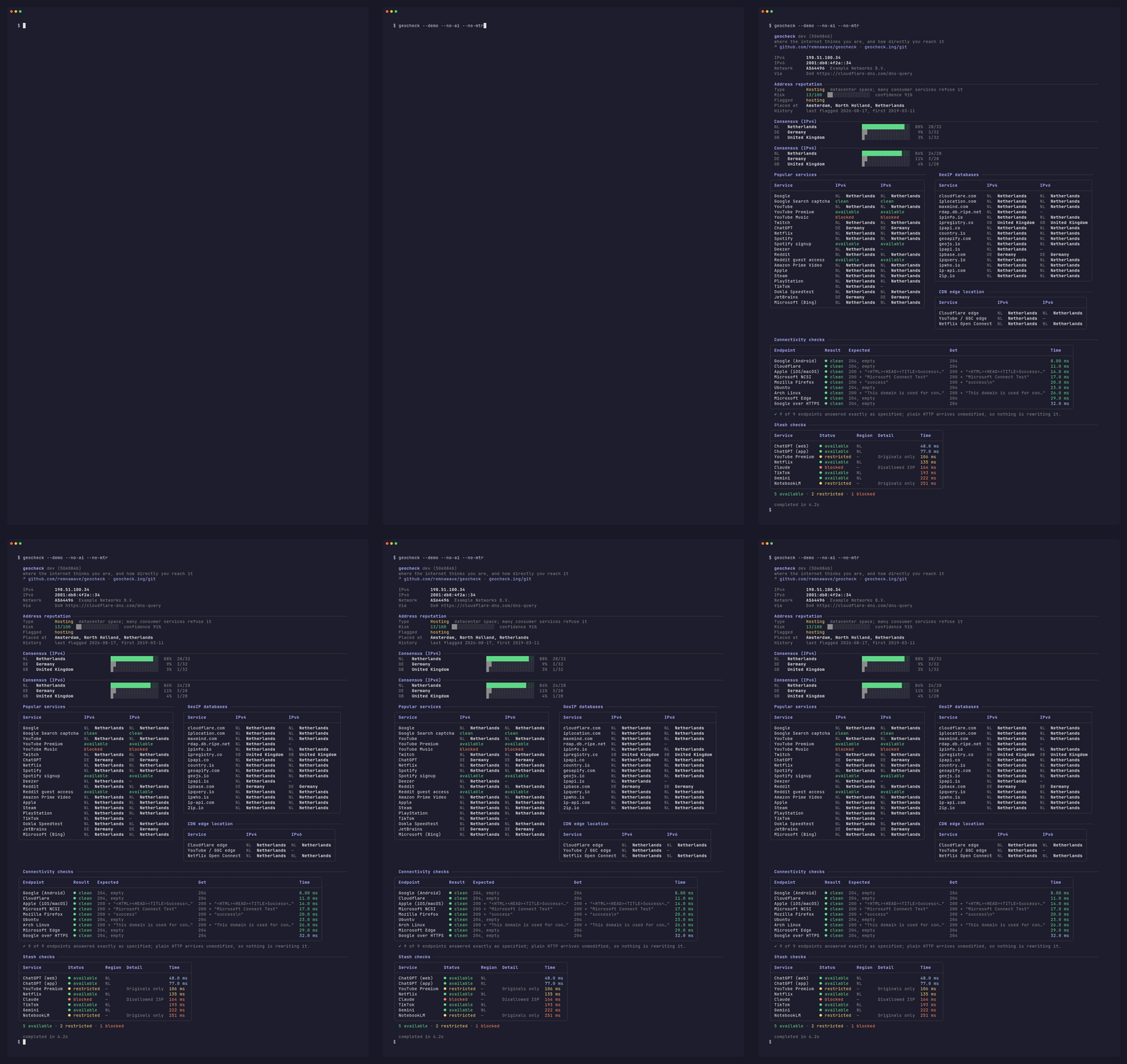
Демонстрация из документации проекта
Запуск
# самый быстрый способ — лаунчер сам выберет Docker, Podman или бинарник
curl -fsSL https://geocheck.ing | sh

# через Docker напрямую
docker run --rm -it --network host remnawave/geocheck:ing

# собрать из исходников
go install github.com/remnawave/geocheck/cmd/geocheck@latest
Флаги для лаунчера передаются после -s --, например curl -fsSL https://geocheck.ing | sh -s -- -4 --detail.
--network host обязателен. Без него замеры пойдут через мост Docker и покажут не ваш шлюз, а внутреннюю сеть контейнера.
Для трассировки по хопам нужны сырые сокеты. В Docker они выдаются сами, для Podman добавьте --cap-add=NET_RAW, для бинарника на Linux — sudo setcap cap_net_raw+p ./geocheck, на macOS — запуск через sudo. Без этого утилита работает, но показывает только задержку до цели, без промежуточных хопов.
Что в отчёте
Пять блоков, каждый отключается своим флагом:
- Репутация адреса — дата-центр или жилой, числится ли как VPN/прокси, оценка риска. Отключается
--no-reputation. - Геолокация — опрос примерно 40 сервисов GeoIP и то, где они расходятся. Отключается
--no-geo. - Связность — те же точки проверки, что использует ваша ОС: Google, Apple, Microsoft. Ловит captive-портал. Отключается
--no-portal. - Путь — трассировка до крупных сетей, каждый хоп подписан номером AS. Отключается
--no-mtr. - Доступность сервисов — Netflix, ChatGPT, Gemini, NotebookLM, YouTube Premium, Claude, TikTok. Отключается
--no-access.
Вердикты по маршруту
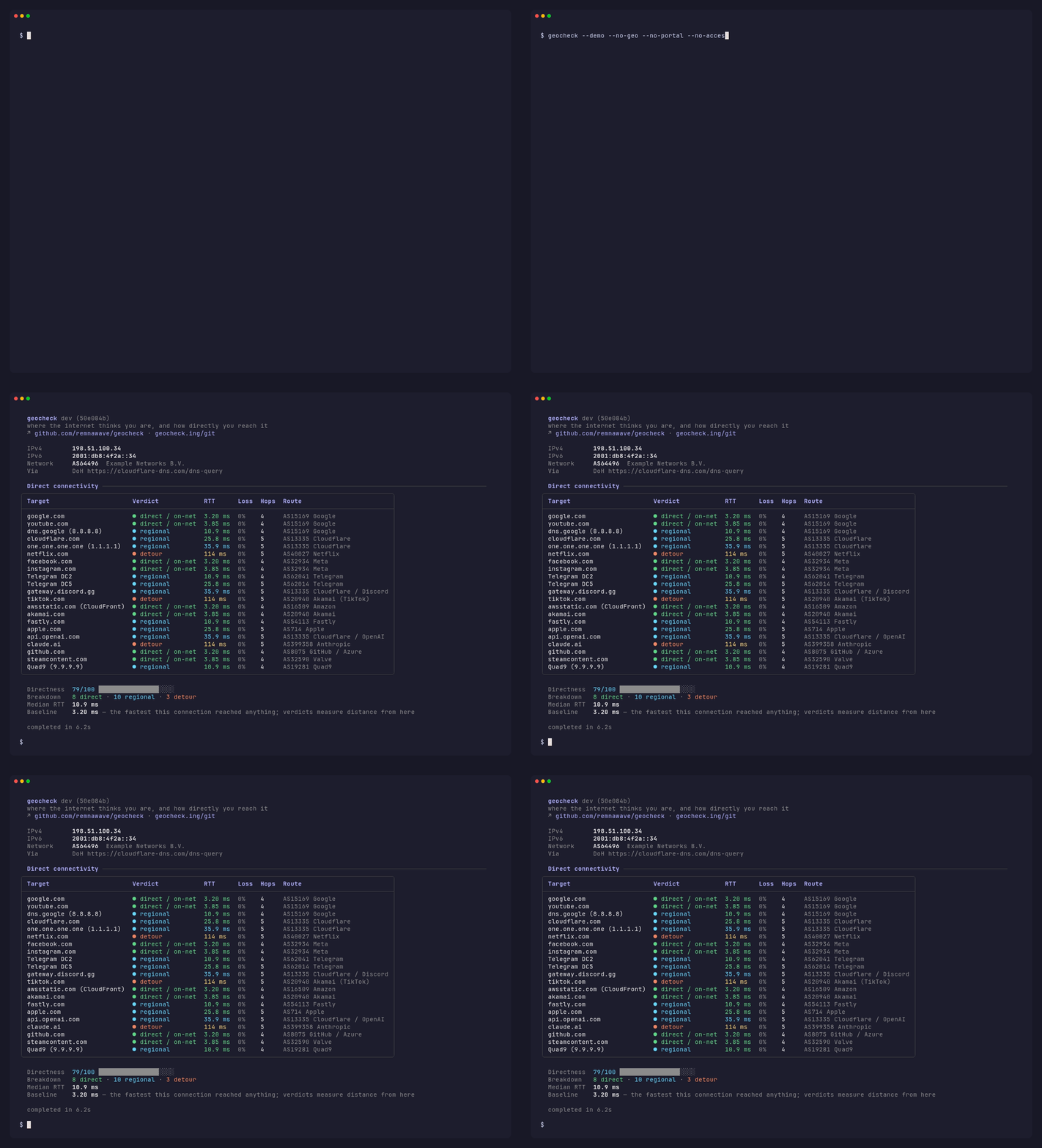
Блок анализа пути, демонстрация из документации проекта
Самая полезная часть отчёта. По каждой цели выносится вердикт:
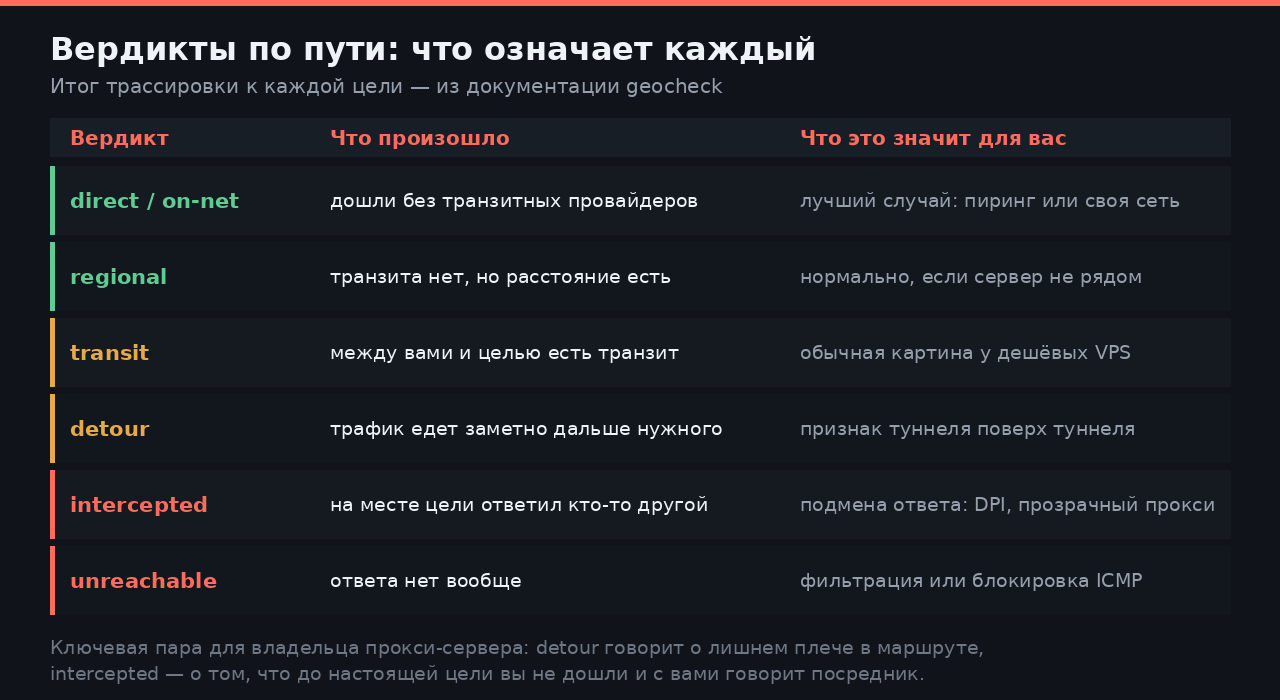
Формулировки — из документации geocheck
Как это читать. transit на дешёвом VPS — норма. detour там, где маршрут должен быть коротким, — лишнее плечо: туннель поверх туннеля или выход не там, где вы думали. intercepted — до цели вы не дошли, ответил посредник.
Команды, которые пригодятся
# проверить свой SOCKS5 — отчёт с точки зрения вашего пользователя
geocheck -p 127.0.0.1:10808

# проверить конкретный интерфейс или адрес
geocheck -i wg0
geocheck -i 203.0.113.10

# только IPv4 или только IPv6
geocheck -4
geocheck -6

# только маршрут, без опроса внешних сервисов
geocheck --no-geo --no-access --no-reputation

# полная таблица по хопам
geocheck -d

# выбрать цели: default, web, video, dns, cdn, social, messaging,
# cloud, ai, dev, gaming, google, telegram, all
geocheck -T telegram,ai

# посмотреть, как выглядит отчёт, вообще ничего не отправляя наружу
geocheck --demo

# картинкой — удобно кинуть в чат или приложить к тикету
geocheck --svg report.svg
Флаг -p HOST:PORT — главная причина держать утилиту под рукой. Поднимаете локальный клиент Xray или sing-box, направляете geocheck в его SOCKS5-порт и видите отчёт глазами того, кто ходит через вас. Точнее, чем открыть «what is my IP» в браузере.
Для скриптов есть -j:
# цели, до которых маршрут оказался непрямым
geocheck --json | jq '.connectivity.targets[] | select(.verdict != "direct") | {name, verdict, rtt_ms}'

# сводка по репутации адреса
geocheck --json | jq '.reputation | {type, risk, flags}'
Полный прогон отправляет ваш IP примерно сорока сторонним сервисам GeoIP плюс точкам проверки Google, Apple и Microsoft. Иначе такой отчёт не собрать, но знать стоит.
Флаг --mask описан как «mask the public address in the output» — он прячет адрес в выводе, а не мешает ему уйти наружу. Для скриншота годится, для приватности нет.
Проекту несколько дней, поэтому набор проверок и формат вывода ещё будут меняться. Для разовой диагностики это неважно, а вот завязывать мониторинг на JSON-схему пока рано.
Смежное: диагностика MTU и MSS за три команды и свой SOCKS5 на голом сервере — тот самый прокси для флага -p.
Кто уже прогнал на своих серверах — какие вердикты выпали? Особенно интересны detour и intercepted: на каких целях вылезли и нашли причину?
Источники
- github.com/remnawave/geocheck — README, флаги, таблица вердиктов, демонстрации
- Релизы — v0.3.0 от 18 августа
- Docker Hub — теги
latestиing, linux/amd64 и linux/arm64