ShadowSocks-решения: Marzban | Marzban Node | x-ui | 3x-ui
Этот мануал получился достаточно случайно: было обсуждение в чате по ShadowSocks, и на одном из сайтов я нашёл подсказку про использование Cloudflare WARP в качестве локального прокси-сервера. В статье покажу, как установить warp-cli на Linux-сервер и перевести его в режим proxy.
Зачем это нужно
Давайте для начала разберёмся, для чего это может быть полезно:
- Можно пустить весь трафик сервера через WARP — например, для доступа к OpenAI с тех серверов, на которых его нет.
- Можно дополнительно зашифровать весь трафик, отправив его через WARP.
Потенциальные минусы:
- Снижение скорости работы и увеличенный ping.
Установка WARP на Ubuntu
Пора к делу! На самом деле всё довольно просто, но работа в конфигурации с DWG-сборками ещё не проверялась.
Вся информация есть на официальном сайте: Announcing WARP for Linux and Proxy Mode (cloudflare.com)
Дополнительно читаем про добавление ключей: Cloudflare Package Repository (cloudflareclient.com)
А теперь реальный пример на Ubuntu.
- Добавляем GPG-ключ:
curl https://pkg.cloudflareclient.com/pubkey.gpg | sudo gpg --yes --dearmor --output /usr/share/keyrings/cloudflare-warp-archive-keyring.gpg
- Добавляем репозиторий:
echo "deb [arch=amd64 signed-by=/usr/share/keyrings/cloudflare-warp-archive-keyring.gpg] https://pkg.cloudflareclient.com/ $(lsb_release -cs) main" | sudo tee /etc/apt/sources.list.d/cloudflare-client.list
- Обновляемся:
sudo apt update
- Ставим:
sudo apt install cloudflare-warp
Настройка warp-cli
Теперь настраиваем.
- Всю помощь получаем тут:
warp-cli --help
- Нужно зарегистрироваться:
warp-cli register
- Теперь выставляем режим работы (возможные значения:
warp,doh,warp+doh,dot,warp+dot,proxy) — я выбираюproxy:
warp-cli set-mode proxy
Вы можете попробовать и другие варианты — для эксперимента.
Использование с панелью 3x-ui
- Используем. В моём случае я использовал WARP с панелькой 3x-ui: MHSanaei/3x-ui: Xray panel supporting multi-protocol multi-user expire day & traffic & ip limit (Vmess & Vless & Trojan & ShadowSocks) (github.com)
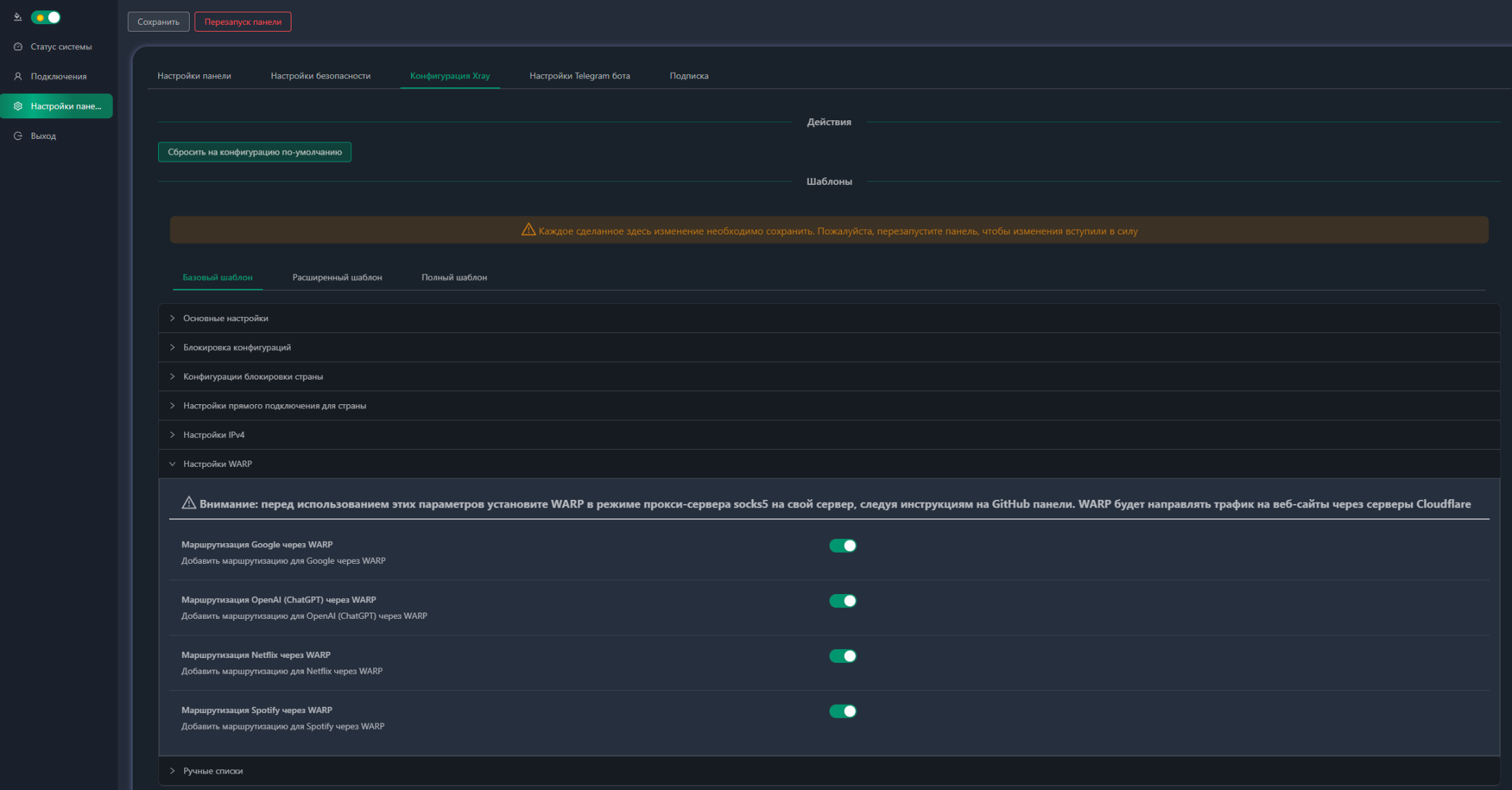
- Готово!
Теперь доступ к ресурсам, отмеченным галочкой, у нас есть.
О том, как поставить x-ui, что это такое, как использовать и как настроить, будет отдельная статья.
Статья впервые опубликована 31.05.2023 на openode.xyz; перенесена и обновлена 04.08.2026.