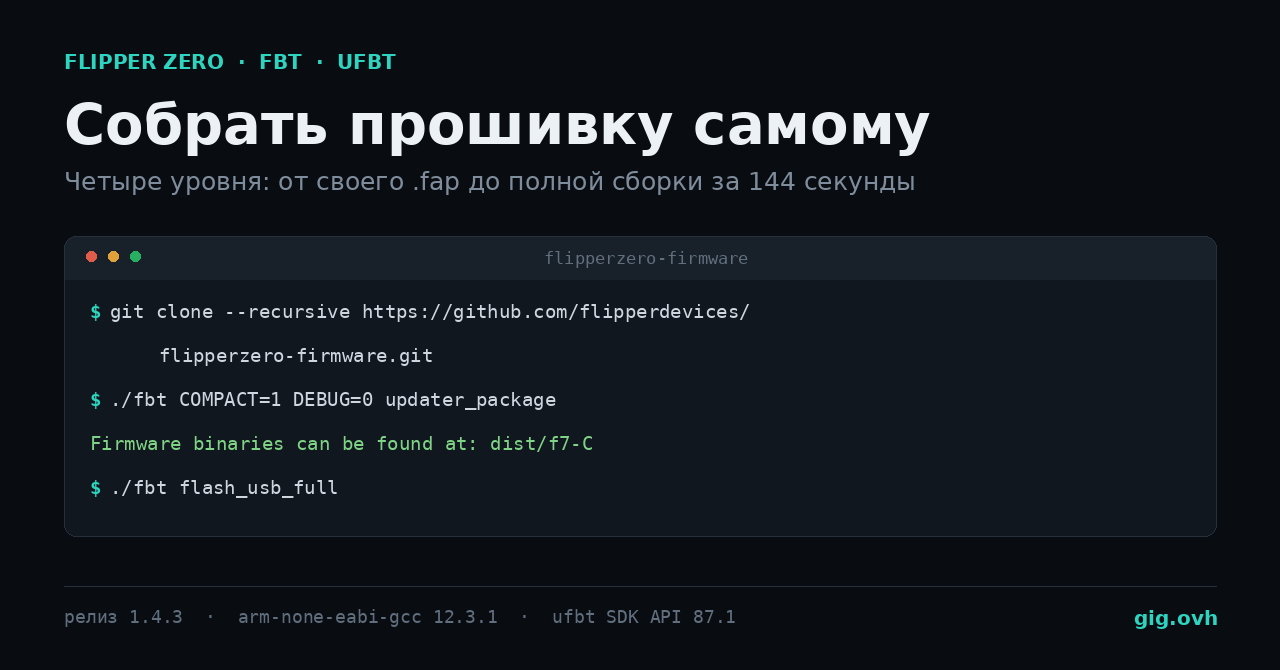
«Собрать прошивку для Flipper Zero» — фраза, за которой прячутся четыре очень разные задачи. Кому-то нужно своё приложение, кому-то — патч в системном коде, кому-то форк со снятыми ограничениями Sub-GHz, а кому-то на самом деле не нужно собирать ничего. Прежде чем выбирать между ними, стоит понять, что вообще лежит внутри и какие инструменты вы получаете вместе с исходниками.
Всё, что ниже, снято с живого стенда: официальный репозиторий на теге 1.4.3, контейнер с 2 vCPU и 7 ГБ RAM, Debian. Цифры посчитаны по дереву исходников и по api_symbols.csv из SDK, размеры файлов — с реальной сборки, приложение на C действительно скомпилировано.
Инвентаризация: что уже умеет стоковая прошивка
Начинать имеет смысл отсюда, потому что примерно половина запросов «а можно ли собрать прошивку, чтобы…» относится к тому, что уже есть.
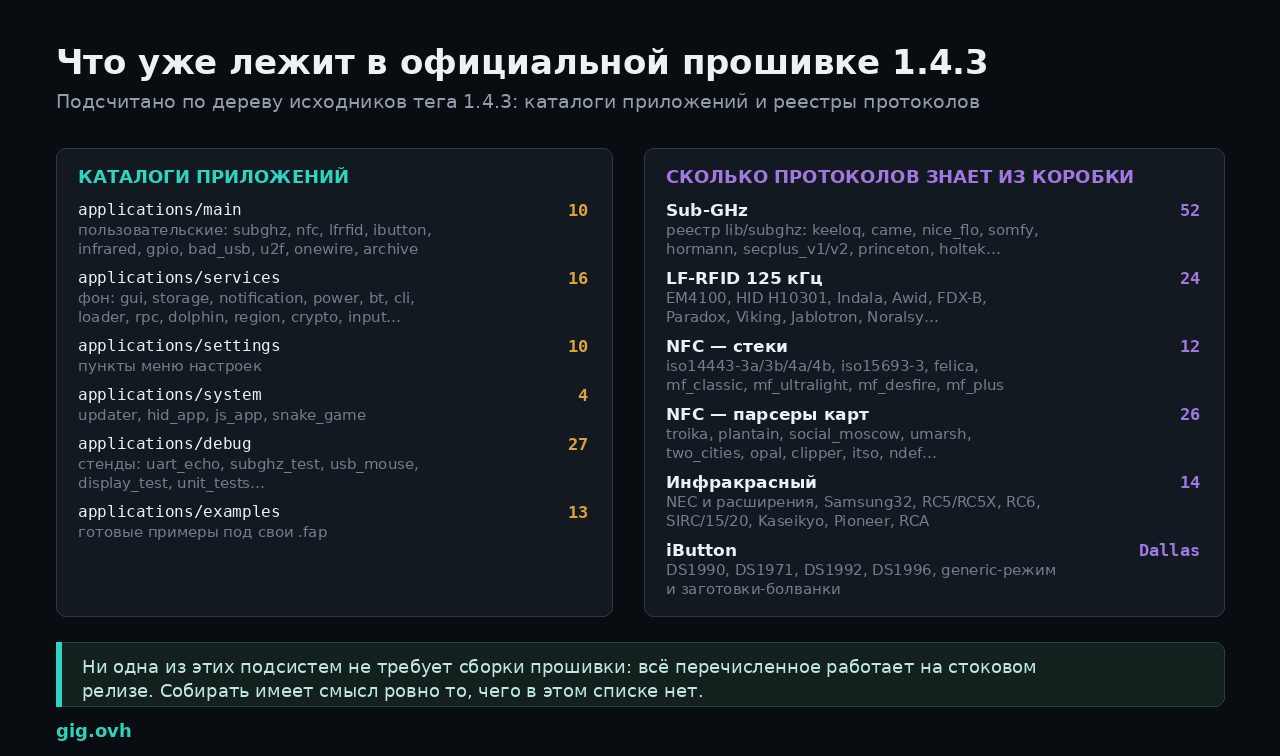
Подсчитано по дереву исходников тега 1.4.3 и реестрам протоколов
Десять пользовательских приложений в applications/main — это не десять кнопок в меню, а десять аппаратных подсистем со своими стеками протоколов:
| Приложение | Железо | Что внутри |
|---|---|---|
subghz |
трансивер CC1101, 300–928 МГц | 52 протокола в реестре: keeloq, came, nice_flo, somfy, hormann, secplus_v1/v2, princeton, holtek |
nfc |
ST25R3916, 13,56 МГц | 12 протокольных стеков (iso14443-3a/3b/4a/4b, iso15693-3, felica, mf_classic/ultralight/desfire/plus) и 26 парсеров конкретных карт |
lfrfid |
собственный аналоговый тракт, 125 кГц | 24 протокола: EM4100, HID H10301, Indala, Awid, FDX-B, Paradox, Viking, Jablotron, Noralsy |
infrared |
приёмник и передатчик ИК | 14 вариантов протоколов: NEC и расширения, Samsung32, RC5/RC5X, RC6, SIRC/15/20, Kaseikyo, Pioneer, RCA |
ibutton, onewire |
1-Wire | Dallas DS1990, DS1971, DS1992, DS1996, generic-режим, работа с болванками |
gpio |
8 линий наружу | ручное управление пинами, USB-UART мост |
bad_usb, u2f |
USB-стек STM32 | эмуляция HID-клавиатуры и аппаратного ключа U2F |
archive |
файловая система SD | браузер сохранённых карт, ключей и сигналов |
Рядом — 16 фоновых сервисов (gui, storage, notification, power, bt, cli, loader, rpc, dolphin, region, crypto, input и другие), 10 экранов настроек, 27 отладочных стендов и 13 готовых примеров приложений, которые можно взять как каркас для своего.
Практический вывод из этой таблицы: 26 парсеров карт включают troika, plantain, social_moscow, umarsh, two_cities — то есть распространённые транспортные карты уже разбираются стоковой прошивкой. Сборка ради «поддержки моей карты» нужна только тогда, когда конкретной карты в этом списке нет.
Куда всё это помещается
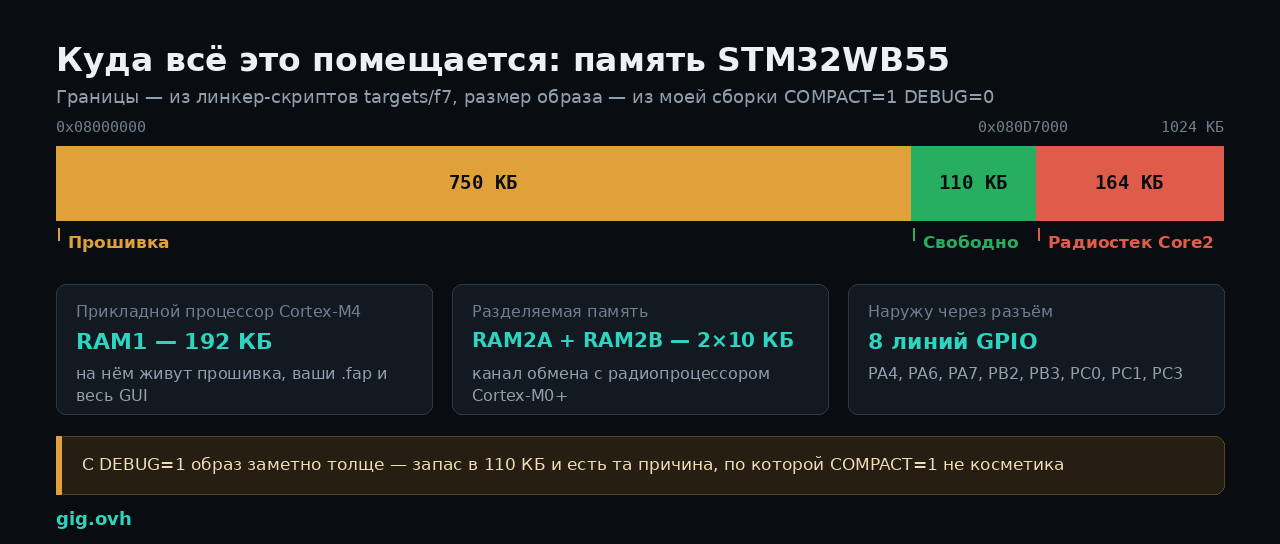
Границы — из линкер-скриптов targets/f7, размер образа — с собственной сборки
Прошивка живёт в STM32WB55 — двухъядерном чипе, где Cortex-M4 занят прикладной частью, а Cortex-M0+ крутит радиостек Bluetooth. Границы жёстко заданы в линкер-скриптах targets/f7: флеш-память 1024 КБ, из них прикладному процессору доступно всё до адреса радиостека 0x080D7000, то есть 860 КБ.
Мой образ, собранный с COMPACT=1 DEBUG=0, занял 750 КБ. Свободного места осталось около 110 КБ — и это ровно та причина, по которой флаги сборки не косметика: отладочная сборка ощутимо толще, и на форке с десятком дополнительных приложений запас исчезает быстро.
С оперативной памятью похожая история: 192 КБ в RAM1 на всё сразу — прошивку, ваши приложения и графику, плюс два блока по 10 КБ, через которые идёт обмен с радиопроцессором. Именно поэтому stack_size в манифесте приложения указывается явно и в байтах, а не «сколько надо».
Что из этого доступно вашему коду
Приложение .fap не линкуется статически с прошивкой — оно обращается к ней через таблицу экспортируемых символов. Таблица лежит в SDK файлом targets/f7/api_symbols.csv, и её можно посмотреть глазами:
head -3 ~/.ufbt/current/sdk_headers/f7_sdk/targets/f7/api_symbols.csv
# entry,status,name,type,params
# Version,+,87.1,,
# Header,+,applications/drivers/subghz/cc1101_ext/cc1101_ext_interconnect.h,,

# сколько всего чего
cut -d, -f1 ~/.ufbt/current/sdk_headers/f7_sdk/targets/f7/api_symbols.csv | sort | uniq -c
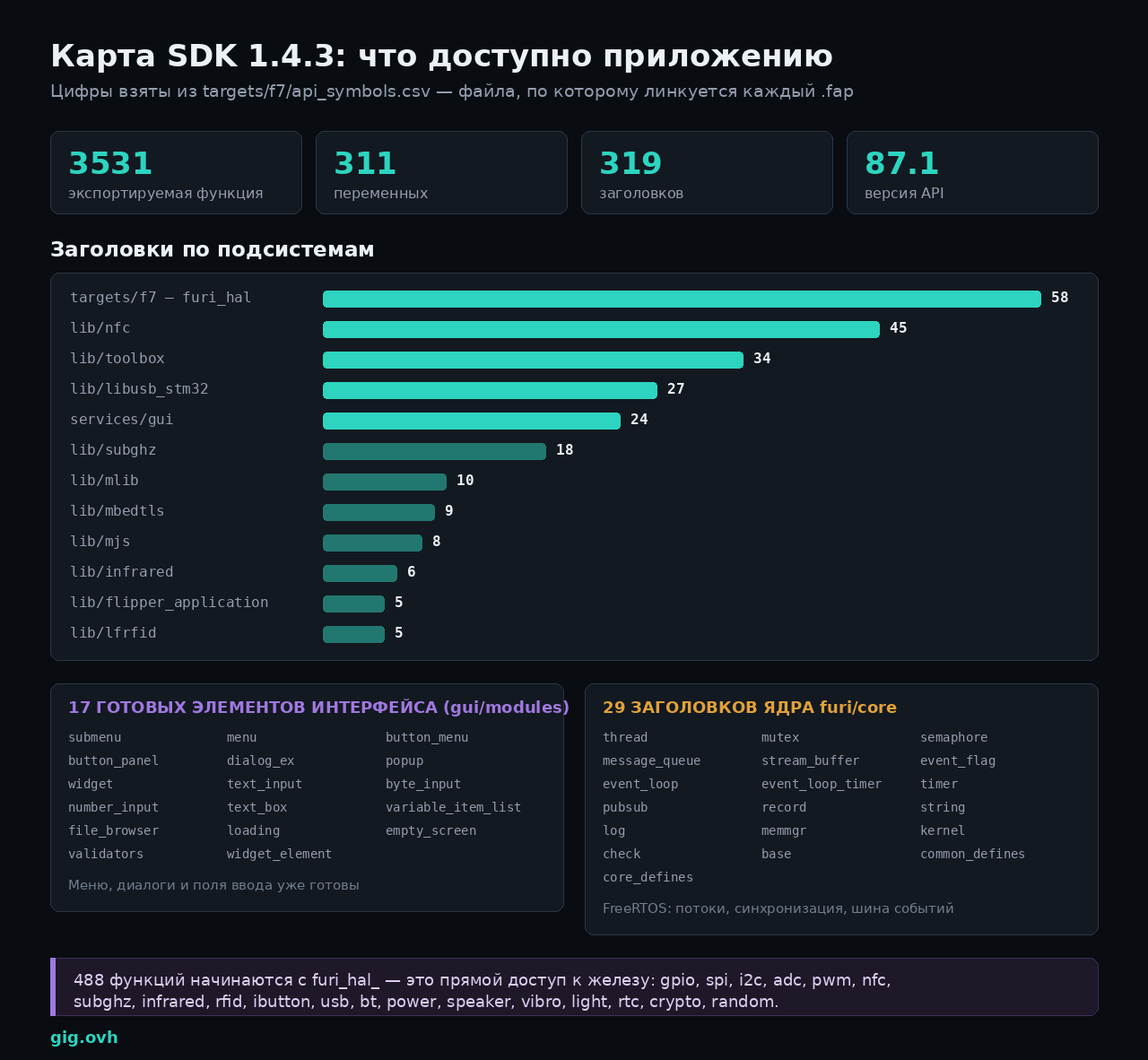
Цифры из targets/f7/api_symbols.csv — файла, по которому линкуется каждый .fap
В версии 1.4.3 это 3531 функция, 311 переменных и 319 заголовков при версии API 87.1. Разложение по подсистемам показывает, где сосредоточена мощность.
Ядро furi — 29 заголовков. Под капотом FreeRTOS, но наружу торчит собственный слой: потоки (furi_thread), мьютексы, семафоры, очереди сообщений, потоковые буферы, флаги событий, таймеры, цикл событий (furi_event_loop), шина pubsub и реестр сервисов record. Плюс furi_string — строки с подсчётом ссылок, потому что обычный char* на 192 КБ RAM быстро надоедает.
Слой железа — 47 заголовков furi_hal_* и 488 функций. Это прямой доступ к периферии: gpio, spi, i2c, adc, pwm, serial, usb (включая cdc, hid, ccid), nfc, subghz, infrared, rfid, ibutton, bt, power, speaker, vibro, light, rtc, random, crypto, flash, sd, region. Если задача формулируется как «подёргать ногой и послушать ответ» — это сюда, и прошивку пересобирать не нужно.
Интерфейс — 17 готовых элементов. submenu, menu, button_menu, button_panel, dialog_ex, popup, widget, text_input, byte_input, number_input, text_box, variable_item_list, file_browser, loading, empty_screen и валидаторы. Своё меню с нуля писать не нужно — экран 128×64 монохромный, и всё типовое уже нарисовано.
Отдельно стоит lib/flipper_application — пять заголовков, которые отвечают за загрузку и выполнение .fap во время работы, включая плагины. Именно этот механизм позволяет 26 парсерам NFC-карт быть отдельными файлами, а не частью монолита: приложение nfc подгружает нужный парсер по требованию.
Четыре уровня: где вы окажетесь
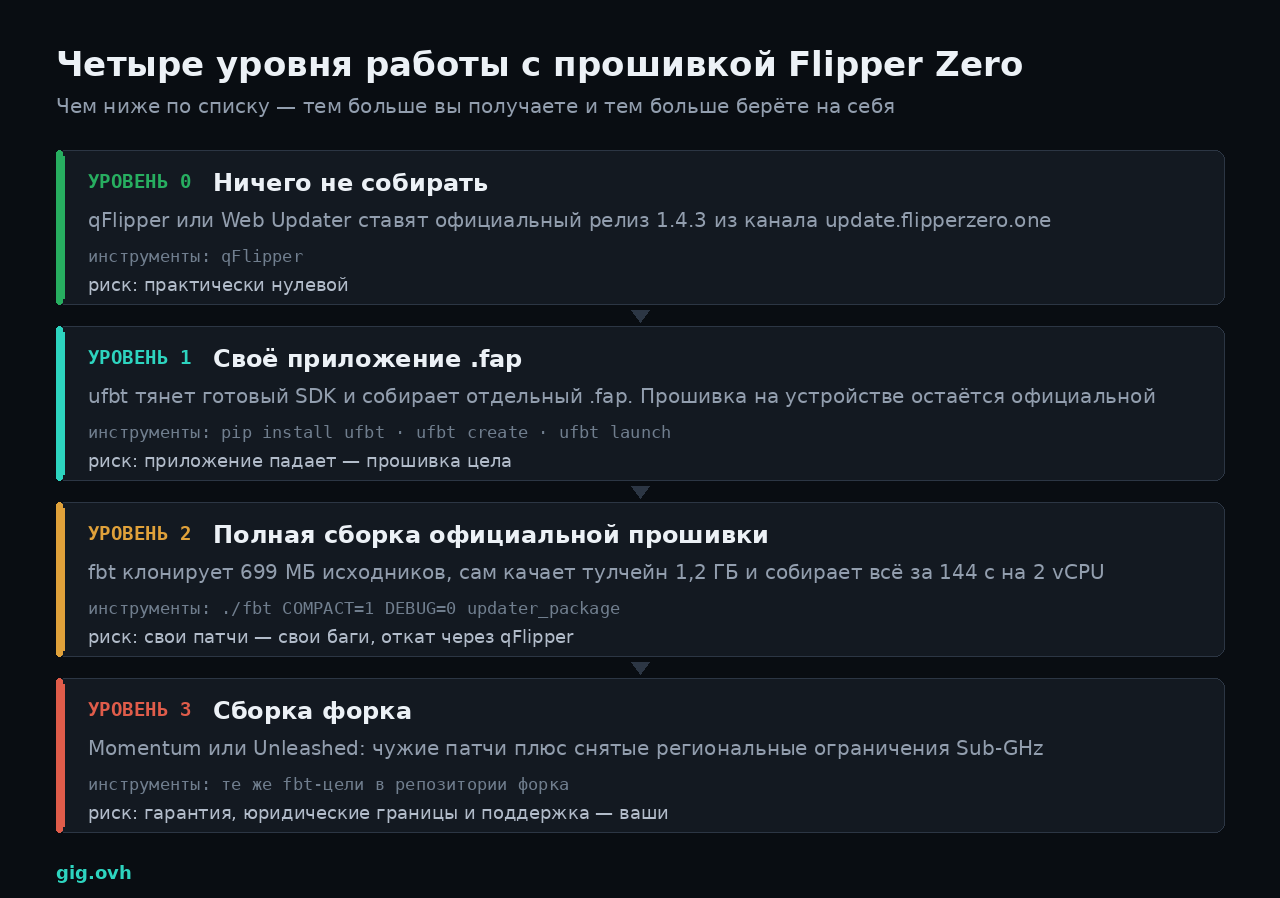
Уровни отличаются не сложностью команд, а объёмом ответственности
Что понадобится в любом случае: 64-битная Linux, macOS 12+ или Windows 10+, установленный git и Python 3.8 или новее. Компилятор ставить не нужно — обе сборочные системы Flipper тянут собственный arm-none-eabi-gcc и не трогают системный PATH.
Уровень 0. Проверить, что собирать не надо
Официальные прошивки раздаются через канал обновлений, и он же — самый честный источник правды о версиях:
curl -s https://update.flipperzero.one/firmware/directory.json \
  | python3 -c 'import json,sys;[print(c["id"], c["versions"][0]["version"]) for c in json.load(sys.stdin)["channels"]]'
development       a55e3939
release-candidate 1.4.2-rc
release           1.4.3
Стабильный канал отдаёт 1.4.3 — релиз от 5 декабря 2025 года. Если задача звучит как «поставить свежую прошивку» или «поставить чужой готовый форк», качать исходники не надо: qFlipper и веб-апдейтер сделают это за минуту, а образ будет подписан и проверен.
Уровень 1. Своё приложение .fap: пять команд
Приложения Flipper Zero — отдельные файлы .fap на SD-карте, они не входят в прошивку. Собирает их ufbt — обрезанная сборочная система, которая качает готовый SDK вместо исходников всей прошивки.
python3 -m pip install --upgrade ufbt
mkdir gig_hello && cd gig_hello
ufbt create APPID=gig_hello
Первый запуск подтягивает SDK: в моём случае — Using version: 1.4.3, распаковка в ~/.ufbt/current. После ufbt create в каталоге появляется ровно пять файлов:
gig_hello.c                  исходник приложения
application.fam              манифест сборки
gig_hello.png                иконка 10×10, 1 бит
images/.gitkeep              каталог под ассеты
.github/workflows/build.yml  готовый CI на GitHub Actions
Манифест — обычный Python-вызов. Вот что генерируется, дословно:
App(
    appid="gig_hello",  # Must be unique
    name="App gig_hello",  # Displayed in menus
    apptype=FlipperAppType.EXTERNAL,
    entry_point="gig_hello_app",
    stack_size=2 * 1024,
    fap_category="Examples",
    fap_icon="gig_hello.png",  # 10x10 1-bit PNG
    fap_icon_assets="images",
)
Важных полей три. entry_point — имя функции на C, с которой начинается приложение; оно должно совпадать с тем, что написано в исходнике. stack_size — сколько байт стека выделяется потоку приложения: 2 КБ хватает на простую отрисовку, но работа с NFC или файлами потребует больше. fap_category определяет подкаталог на SD-карте: доступны Sub-GHz, RFID, NFC, Infrared, GPIO, iButton, Bluetooth, USB, Games, Tools, Media, Debug, Examples.
Шаблонный gig_hello.c умеет только писать в лог. Заменим его на минимальное приложение с экраном и выходом по кнопке — этот код собран и проверен на SDK 1.4.3:
#include <furi.h>
#include <gui/gui.h>
#include <input/input.h>

static void gig_hello_draw_callback(Canvas* canvas, void* ctx) {
    UNUSED(ctx);
    canvas_clear(canvas);
    canvas_set_font(canvas, FontPrimary);
    canvas_draw_str(canvas, 2, 12, "GIG Community");
    canvas_set_font(canvas, FontSecondary);
    canvas_draw_str(canvas, 2, 28, "Built from source");
    canvas_draw_str(canvas, 2, 40, "Press Back to exit");
}

static void gig_hello_input_callback(InputEvent* event, void* ctx) {
    FuriMessageQueue* queue = ctx;
    furi_message_queue_put(queue, event, FuriWaitForever);
}

int32_t gig_hello_app(void* p) {
    UNUSED(p);

    FuriMessageQueue* queue = furi_message_queue_alloc(8, sizeof(InputEvent));

    ViewPort* view_port = view_port_alloc();
    view_port_draw_callback_set(view_port, gig_hello_draw_callback, NULL);
    view_port_input_callback_set(view_port, gig_hello_input_callback, queue);

    Gui* gui = furi_record_open(RECORD_GUI);
    gui_add_view_port(gui, view_port, GuiLayerFullscreen);

    InputEvent event;
    bool running = true;
    while(running) {
        if(furi_message_queue_get(queue, &event, FuriWaitForever) == FuriStatusOk) {
            if(event.type == InputTypeShort && event.key == InputKeyBack) {
                running = false;
            }
        }
    }

    gui_remove_view_port(gui, view_port);
    furi_record_close(RECORD_GUI);
    view_port_free(view_port);
    furi_message_queue_free(queue);

    return 0;
}
Обратите внимание на порядок освобождения в конце: сначала вьюпорт снимается с GUI, только потом освобождается. Если поменять эти строки местами, система продолжит рисовать уже освобождённую структуру — и это будет не ошибка компиляции, а перезагрузка устройства в руках.
Сборка — просто ufbt без аргументов:
$ ufbt
    CC      /tmp/fz/gig_hello.c
    LINK    /root/.ufbt/build/gig_hello_d.elf
    FAP     /root/.ufbt/build/gig_hello.fap
    INSTALL /tmp/fz/dist/gig_hello.fap
    APPCHK  /root/.ufbt/build/gig_hello.fap
            Target: 7, API: 87.1
Готовый файл — dist/gig_hello.fap, 2200 байт. Строка APPCHK — самая полезная во всём выводе.
Target: 7, API: 87.1 — это отпечаток, по которому устройство решает, запускать приложение или нет. Target — ревизия железа (7 — Flipper Zero), API — версия того самого экспорта из api_symbols.csv. Прошивка с другой мажорной версией API откажется запускать приложение, хотя файл скопируется без ошибок. Отсюда правило: .fap, собранный под стабильный канал, не обязан работать на форке или на dev-сборке. Переключить SDK можно, не пересоздавая проект:
ufbt update --channel=dev      # или rc, или release
ufbt update --branch=1.4.3     # конкретная ветка SDK
ufbt update --local=/path/to/flipper-z-f7-sdk-local.zip   # SDK из своей сборки
Залить и сразу запустить на подключённом устройстве:
ufbt launch
Команда копирует .fap на SD-карту в подкаталог из fap_category и стартует приложение. qFlipper при этом должен быть закрыт — он держит последовательный порт монопольно.
Откуда люди берут приложения
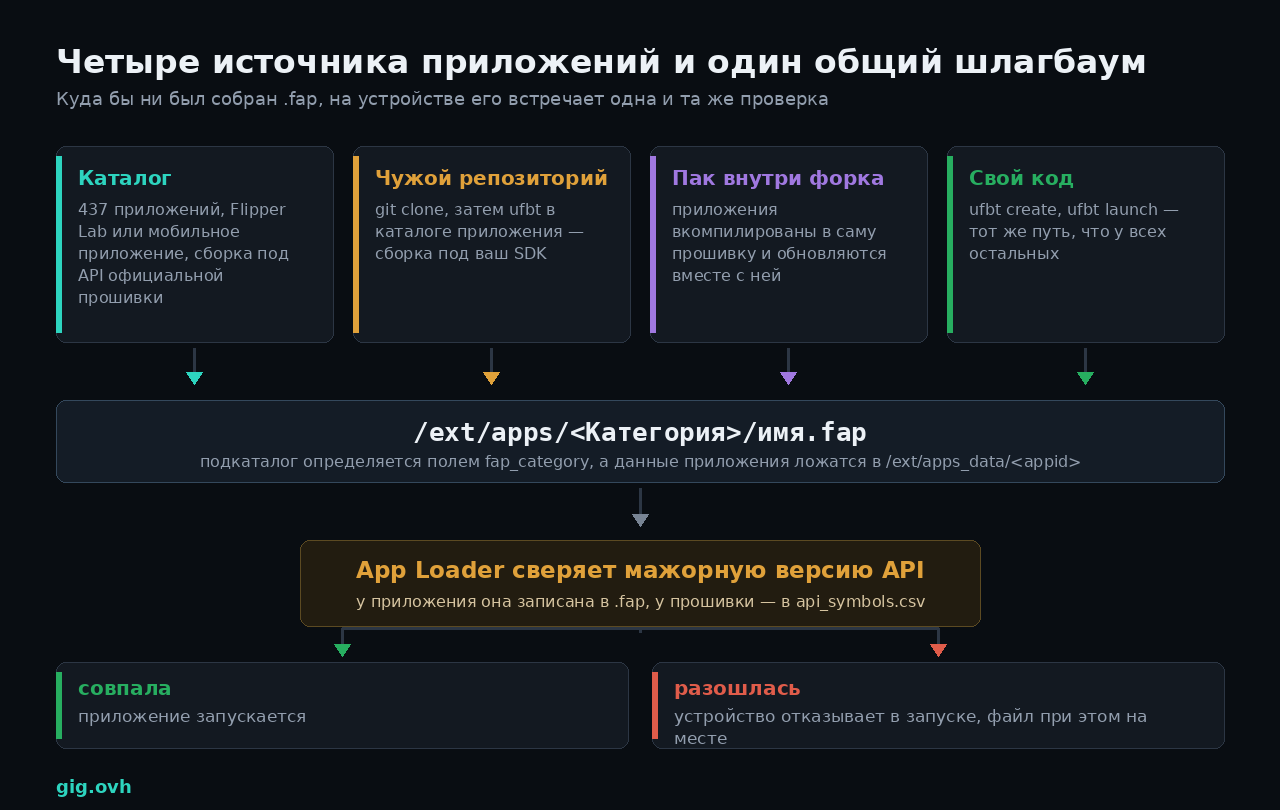
Проверку мажорной версии API проходит любой .fap, кем бы он ни был собран
Собственный код — далеко не самый частый способ получить новую функцию. Источников четыре, и различаются они не удобством установки, а тем, под какую версию API собран бинарник.
Официальный каталог: 437 приложений
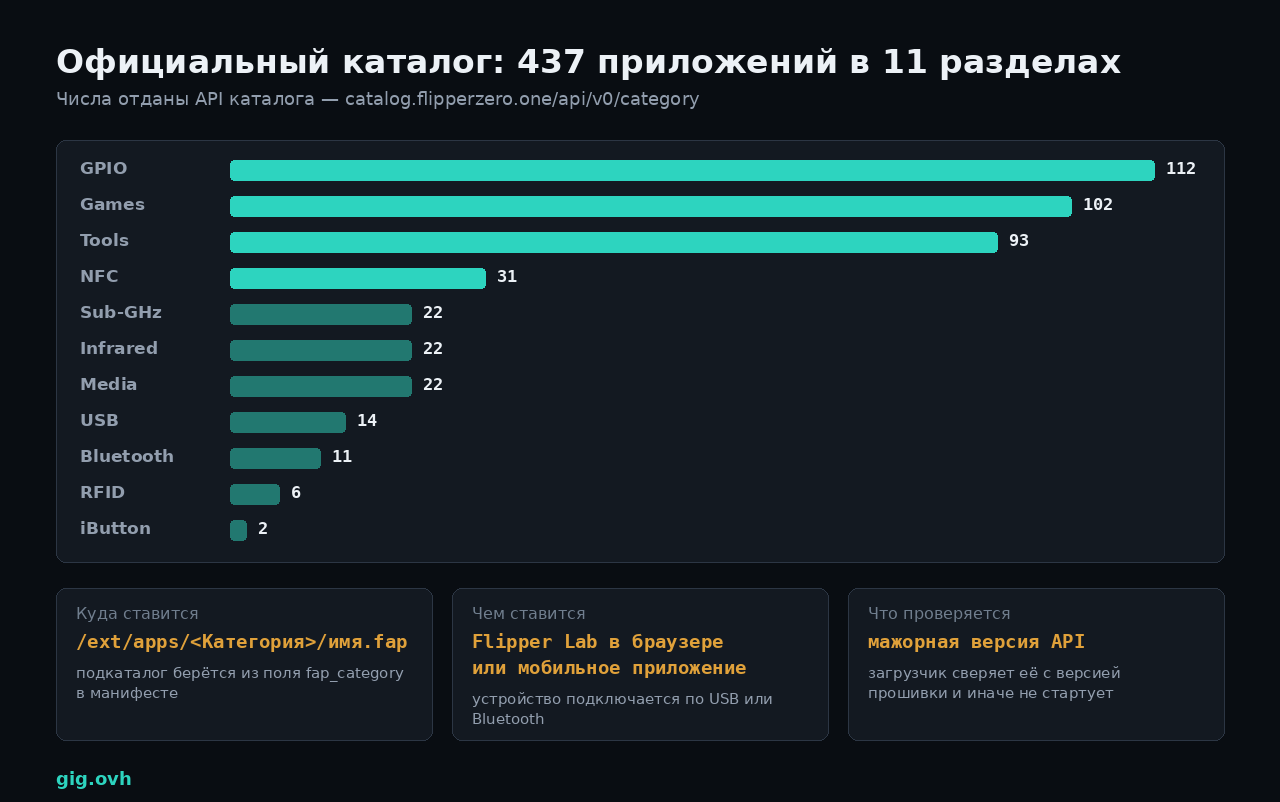
Числа отданы публичным API каталога на момент подготовки материала
Каталог живёт на lab.flipper.net, ставится оттуда прямо из браузера или из мобильного приложения, а числа по разделам отдаёт публичный API — их можно перепроверить самому:
curl -s 'https://catalog.flipperzero.one/api/v0/category?limit=50' \
  | python3 -c 'import json,sys;[print(f"{c[\"name\"]:12} {c[\"applications\"]}") for c in json.load(sys.stdin)]'
Перекос показательный: GPIO — 112 приложений, Games — 102, Tools — 93, а на весь iButton приходится два. То есть каталог живёт вокруг внешних модулей и утилит, а не вокруг радиочасти — радиочасть и так закрыта стоковыми приложениями.
Попасть в каталог можно и со своим приложением, причём исходники туда не заливаются. В репозиторий flipper-application-catalog кладётся один файл applications/<Категория>/<app_id>/manifest.yml, который лишь ссылается на ваш репозиторий и конкретный коммит:
sourcecode:
  type: git
  location:
    origin: https://github.com/example/test.git
    commit_sha: bf7019d16d7b50f6a98cc3abdac38c53952a4f30
short_description: Test app
description: "@README.md"
changelog: "@./docs/changelog.md"
screenshots:
  - screenshots/ss0.png
Собирает .fap уже инфраструктура каталога. Правила жёсткие: id должен быть в нижнем регистре и совпадать с appid из application.fam, category — соответствовать каталогу, куда положен манифест, version имеет формат «мажор.минор», а обновление с номером не выше предыдущего отклоняется. Скриншоты требуется снимать штатной функцией qFlipper.
Готовое приложение из чужого репозитория
Половина интересного в каталог не попадает и лежит просто на GitHub. Схема одна и та же: клонировать, зайти в каталог приложения, запустить ufbt.
Проверил на официальном наборе flipperzero-good-faps — 15 приложений, которые ведёт сама команда Flipper:
git clone --depth 1 https://github.com/flipperdevices/flipperzero-good-faps.git
cd flipperzero-good-faps/weather_station
ufbt          # собрать
ufbt launch   # залить на устройство и запустить
Собрались все, без единой правки. Реальные размеры:
| Приложение | Что делает | Размер .fap |
|---|---|---|
clock |
часы на экране | 3,8 КБ |
signal_generator |
генератор сигналов на GPIO | 11,8 КБ |
mfkey |
восстановление ключей Mifare Classic из перехвата | 37,6 КБ |
nfc_magic |
запись на «магические» карты с перезаписываемым UID | 92,4 КБ |
weather_station |
приём беспроводных метеодатчиков на 433 МГц | 101,9 КБ |
Там же — dap_link (превращает Flipper в отладочный зонд CMSIS-DAP), avr_isp_programmer (программатор AVR), spi_mem_manager (чтение и запись SPI-флешек), air_mouse (мышь по гироскопу), mass_storage, music_player, nfc_rfid_detector, video_game_module_tool, flip_tdi, air_arkanoid.
Собирать чужое приложение самому обычно правильнее, чем качать готовый .fap из чата: сборка идёт под тот SDK, который стоит у вас, и вопрос совместимости снимается на месте. Разница в трудозатратах — две команды.
Почему приложение из каталога не запускается на форке
Официальная документация формулирует правило коротко: загрузчик приложений сверяет мажорную версию API у .fap с мажорной версией API прошивки, и при расхождении приложение не запускается. Мажорная версия растёт, когда из экспорта убирают функцию или меняют сигнатуру, минорная — когда добавляют новую.
Отсюда следствие, которое обычно обнаруживают опытным путём: каталог собирает бинарники под API официальной прошивки, поэтому на форке со своим набором изменений часть приложений оттуда просто не стартует. Именно поэтому форки везут собственные паки приложений внутри самой прошивки — это единственный способ гарантировать совпадение версий.
Уровень 2. Полная сборка прошивки: fbt
Здесь клонируется весь репозиторий вместе с сабмодулями. Ключ --recursive не опция, а обязательное условие: без него сборка упадёт на отсутствующих библиотеках.
git clone --recursive https://github.com/flipperdevices/flipperzero-firmware.git
cd flipperzero-firmware
./fbt COMPACT=1 DEBUG=0 updater_package
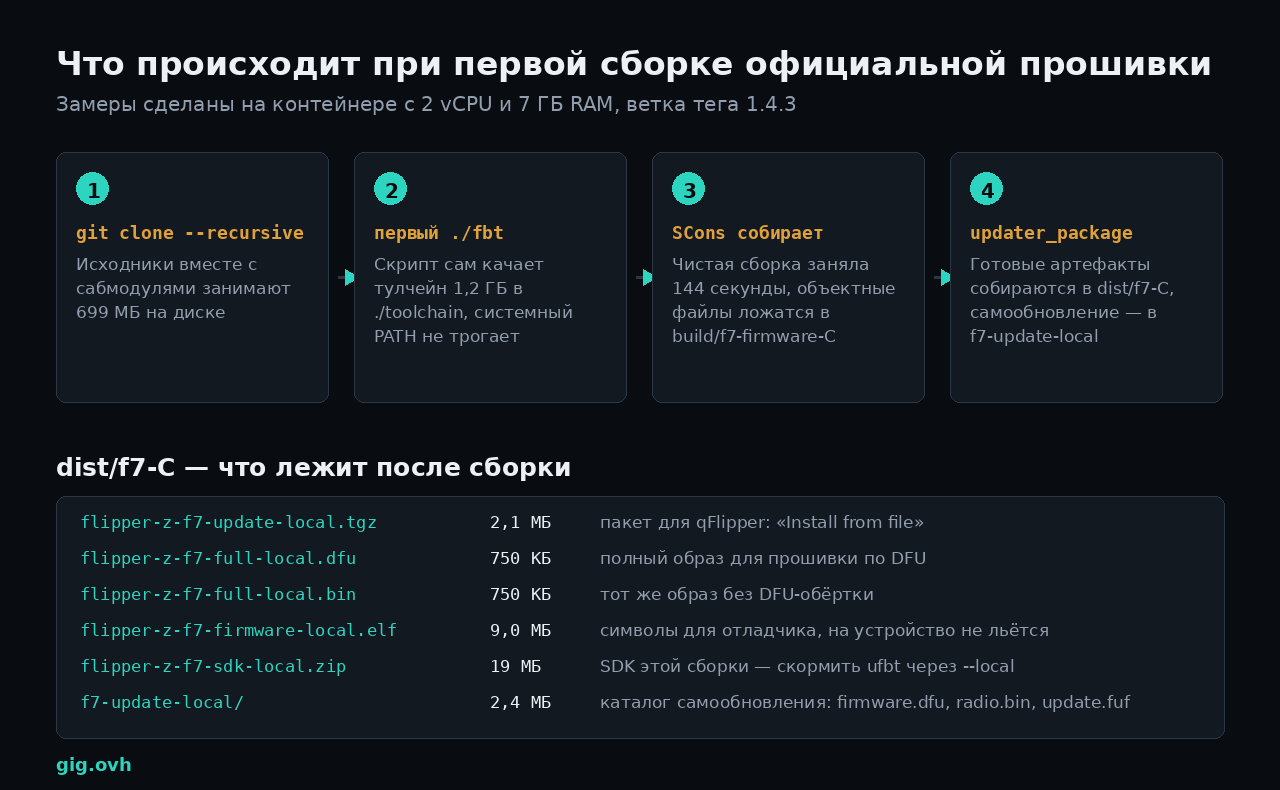
Замеры с живой сборки тега 1.4.3 на контейнере с 2 vCPU и 7 ГБ RAM
Первый запуск ./fbt выглядит так, будто ничего не происходит: скрипт проверяет tar и curl, качает архив тулчейна и распаковывает его в ./toolchain внутри репозитория. Системные пакеты не ставятся — компилятор живёт рядом с исходниками, и снести всю сборочную среду можно удалением одного каталога. Версия, которая приехала у меня, — arm-none-eabi-gcc (GCC) 12.3.1.
Чистая сборка после ./fbt -c заняла 144 секунды на двух ядрах. Это ощутимо меньше, чем принято ожидать от прошивки на 700 МБ исходников, — большую часть объёма занимают сабмодули, которые в целевой образ не попадают.
Что означают COMPACT и DEBUG
Значения по умолчанию лежат в fbt_options.py:
TARGET_HW = 7
COMPACT = 0
DEBUG = 1
DIST_SUFFIX = "local"
FIRMWARE_APP_SET = "default"
FBT_TOOLCHAIN_VERSIONS = (" 12.3.", " 13.2.")
То есть «из коробки» вы собираете отладочную некомпактную сборку — она больше и медленнее, зато с ней работает пошаговая отладка. Для прошивки, которой собираетесь пользоваться каждый день, нужны как раз COMPACT=1 DEBUG=0.
Не правьте fbt_options.py — он под контролем версий и будет конфликтовать при каждом git pull. Создайте рядом fbt_options_local.py, его сборка подхватывает автоматически:
COMPACT = 1
DEBUG = 0
DIST_SUFFIX = "gig"
FIRMWARE_APP_SET = "default"
DIST_SUFFIX попадает в имена артефактов и в поле Info внутри пакета обновления, так что свои сборки потом легко отличить от официальных. FIRMWARE_APP_SET переключает набор встраиваемых приложений — например, значение unit_tests собирает прошивку-стенд вместо обычной.
Куда лечь артефактам и чем их залить
Каталог dist/f7-C из моей сборки содержит 11 файлов, разбор — на схеме выше. Найти его можно, не запоминая суффиксы:
ls -1 dist/*/ | head -20
Способов доставить сборку на устройство три, и они не равнозначны.
./fbt flash_usb_full     # по USB, с ресурсами и радиостеком
./fbt flash              # через SWD-программатор: ST-Link, J-Link, CMSIS-DAP, Wi-Fi devboard
Третий — руками через qFlipper: взять dist/f7-C/flipper-z-f7-update-local.tgz, открыть qFlipper и выбрать «Install from file». Этот путь предпочтительнее, если вы не уверены в сборке: qFlipper проверит целостность пакета до того, как начнёт писать во флеш.
Не отключайте кабель и не давайте ноутбуку уснуть во время flash_usb_full. Обновление радиостека Core2 — отдельная фаза, и прерывание именно на ней превращает устройство в кирпич надёжнее, чем что-либо ещё в этом руководстве.
Полный набор целей fbt
./fbt — не одна команда сборки, а зонтик над несколькими десятками целей. Ниже те, что реально пригождаются.
| Группа | Цель | Что делает |
|---|---|---|
| Сборка | fw_dist |
собрать прошивку и разложить в dist (цель по умолчанию) |
updater_package / updater_minpackage |
пакет самообновления; минимальный — только DFU, полный — плюс радиостек и ресурсы SD | |
copro_dist |
собрать бандл Core2 FUS и стека для qFlipper | |
faps |
собрать все внешние приложения как .fap |
|
fap_<appid> |
собрать одно приложение по его идентификатору | |
fap_dist |
разложить внешние приложения в dist |
|
| Прошивка | flash_usb, flash_usb_full |
залить по USB |
flash, firmware_flash |
залить через SWD; выбор адаптера — SWD_TRANSPORT=…, серийник — SWD_TRANSPORT_SERIAL=… |
|
jflash |
залить через J-Link с помощью JFlash | |
| Отладка | debug |
собрать, залить и сразу присоединить gdb с загруженным .elf |
updater_debug |
то же самое, но с .elf апдейтера |
|
debug_other |
gdb без загрузки символов — символы добавляются вручную через add-symbol-file |
|
blackmagic, openocd, get_blackmagic, get_stlink |
обвязка вокруг отладочных зондов | |
devboard_flash |
обновить Wi-Fi devboard, ARGS="-c dev" для канала |
|
cli |
открыть консоль устройства по USB | |
| Качество | lint, format |
clang-format по исходникам на C |
lint_py, format_py |
black по скриптам сборки и манифестам | |
lint_img, format_img |
проверка и нормализация PNG-ассетов | |
lint_all, format_all |
всё сразу | |
doxygen, doxy |
сгенерировать документацию по API и открыть её в браузере | |
| Ассеты | resources, icons, proto, proto_ver |
пересобрать ресурсы SD, иконки из PNG и protobuf |
| Служебное | firmware_list, updater_list |
листинг исходник + ассемблер |
firmware_cdb, updater_cdb |
сгенерировать compile_commands.json без полной сборки |
|
vscode_dist |
развернуть конфигурацию VS Code с задачами сборки и отладки |
Отдельно — работа с одним приложением, когда прошивку пересобирать не хочется:
./fbt launch APPSRC=applications_user/my_app   # собрать, залить и запустить
./fbt build APPSRC=applications_user/my_app    # только собрать
./fbt -c fap_my_app                            # почистить артефакты этого приложения
Инструменты, которые идут в комплекте
Помимо целей, сборочная система приносит несколько вещей, о которых обычно узнают случайно.
Оболочка с тулчейном. Тот самый arm-none-eabi-gcc, gdb и objdump можно получить в свой шелл, не прописывая пути:
source scripts/toolchain/fbtenv.sh     # Linux и macOS
. `./fbt -s env`                       # то же самое короче
scripts\toolchain\fbtenv.cmd           # Windows
Переменные окружения, которые меняют поведение сборки:
| Переменная | Эффект |
|---|---|
FBT_NOENV=1 |
не настраивать тулчейн, брать всё из системного PATH (только *nix) |
FBT_TOOLCHAIN_PATH |
держать тулчейн в общем каталоге, а не по копии на клон |
FBT_NO_SYNC=1 |
не обновлять сабмодули автоматически |
FBT_VERBOSE=1 |
показать полные командные строки компилятора |
Ключи командной строки. --extra-define=NAME=VALUE пробрасывает define в компилятор глобально, --extra-ext-apps=app1,app2 заставляет собрать перечисленные приложения как внешние, --options другой_файл.py подменяет файл конфигурации целиком, --proxy-env=VAR1,VAR2 прокидывает переменные окружения в дочерние процессы — по умолчанию fbt окружение санирует.
Отладка на железе. Поддерживаются Wi-Fi devboard от самих Flipper Devices, ST-Link v2/v3, J-Link и любые CMSIS-DAP-совместимые зонды, включая Raspberry Pi Debug Probe. Цель debug собирает, прошивает и открывает gdb с уже подгруженными символами, SVD-файл для регистров периферии тоже идёт в комплекте.
CLI: второй интерфейс к устройству
Про эту часть забывают чаще всего, а она даёт доступ ко всем подсистемам без единой строки кода. Консоль поднимается по USB:
./fbt cli          # из репозитория
ufbt cli           # из проекта приложения
Базовый набор команд, зарегистрированных в прошивке: help, ?, !, device_info, info, uptime, date, free, free_blocks, top, log, sysctl, power, sleep, vibro, led, input, gpio, i2c, storage, crypto, bt, js, factory_reset, update, unit_tests, start_rpc_session, reload_ext_cmds.
Работа с радиочастью подключается внешними плагинами из /ext/apps_data/cli/plugins — если после установки приложения команда не появилась, её подхватит reload_ext_cmds. Наиболее полезные подкоманды:
| Подсистема | Команды |
|---|---|
| Sub-GHz | rx, tx, tx_from_file, rx_raw, decode_raw, rx_carrier, tx_carrier, chat, encrypt_keeloq, encrypt_raw |
| NFC | scanner, field, raw, apdu, iso14a, iso14b, mfc (rdbl, wrbl, dump), mfu, mfp, felica, slix, st25, emulate |
| LF-RFID | read, write, emulate, raw_read, raw_emulate, raw_analyze |
| Инфракрасный | rx, tx, decode, raw, universal, list |
| iButton / 1-Wire | read, write, emulate, search |
Прежде чем писать приложение, попробуйте решить задачу через CLI. Команда subghz rx пишет принятое в файл, nfc scanner показывает всё, что попадает в поле, а gpio дёргает пины. Скрипт на хосте, разговаривающий с устройством через последовательный порт, часто закрывает вопрос без единой строки на C — и без разбирательств с версиями API.
JavaScript, если C избыточен
В прошивке живёт js_app — интерпретатор на базе mJS, и это отдельный уровень между «нажать в меню» и «писать на C». Скрипт кладётся на SD-карту и запускается из меню или командой js в консоли.
Доступные модули: badusb, gpio, serial, storage, notification, math, event_loop, flipper, gui и tests. Модуль gui при этом не игрушечный — из скрипта доступны те же элементы, что и из C: submenu, menu, button_menu, button_panel, dialog, popup, widget, text_input, byte_input, number_input, text_box, file_picker, loading, empty_screen.
В репозитории лежат 18 примеров — applications/system/js_app/examples: от badusb_demo.js и uart_echo_8e1.js до event_loop.js, gpio.js, storage.js и gui.js. Для одноразовой автоматизации этого хватает с запасом, а порог входа несопоставим со сборкой прошивки.
Уровень 3. Форк — и что вы вместе с ним берёте
Momentum и Unleashed собираются теми же целями fbt, что и официальная прошивка: ./fbt updater_package для TGZ и ./fbt flash_usb_full для прямой заливки. Технически разницы почти нет — вы клонируете другой репозиторий и запускаете те же команды.
Разница в содержимом. Ниже — то, что заявлено в собственных описаниях проектов.
| Momentum | Unleashed | RogueMaster | |
|---|---|---|---|
| База | официальная прошивка плюс наработки Unleashed | официальная прошивка | форк Unleashed |
| Sub-GHz | расширенные диапазоны 281–361, 378–481, 749–962 МГц; «сабдрайвинг» — сохранение координат GPS вместе с сигналом | сняты региональные TX-ограничения, добавлены протоколы, сохранение и отправка прыгающих кодов (FAAC SLH, BFT Mitto с ручным созданием), поддержка внешнего CC1101 | наследует изменения Unleashed |
| NFC и RFID | поддержка Type 4 и NTAG4xx, дополнительные парсеры карт | разбор EMV, расширенный словарь Mifare Classic, произвольный UID, фаззеры для LF-RFID и iButton | наследует плюс собственные наборы |
| Ввод и USB | Bad-Keyboard с настраиваемыми параметрами USB и Bluetooth | BadKB — тот же BadUSB, но по Bluetooth, с раскладками | наследует |
| Встроенные приложения | Momentum App для настройки прошивки, BLE Spam, FindMy Flipper, NFC Maker, Wardriver, поиск файлов по SD | плагины сообщества и игры в сборке | заявлено более 150 игр плюс десятки плагинов |
| Оформление | система Asset Packs: анимации, иконки и шрифты меняются без пересборки | свои анимации и часы на рабочем столе | тематические наборы анимаций и ассетов |
| Прочее | блокировка при загрузке, сброс при неверном пин-коде, подмена имени, MAC и серийного номера, настройка RGB-подсветки, операции с файлами и монтирование образов дисков | текстовый курсор, редактор байтов, блокировка по пин-коду, dev-сборки на dev.unleashedflip.com |
в описании прямо сказано: сначала поставить сток, и удалять приложения перед обновлением |
Asset Packs у Momentum — отдельный механизм, который стоит знать даже тем, кто форк не ставит: паки лежат на карте в /ext/asset_packs/<Имя>/ с подкаталогами Anims и Icons, переключаются из настроек прямо на устройстве, а собираются скриптом scripts/asset_packer.py из репозитория. То есть менять анимации, иконки и шрифты можно без пересборки прошивки вообще.
Есть и техническая цена. Каждое дополнительное встроенное приложение съедает часть тех самых 110 КБ запаса во флеш-памяти, а собственная версия API означает, что .fap из официального каталога может не запуститься.
Региональные ограничения в официальной прошивке — не каприз вендора, а отражение того, что радиодиапазоны в разных странах распределены по-разному. Передача на частоте, не разрешённой в вашей юрисдикции, — административное нарушение независимо от того, что вы передаёте. Сборка форка переносит эту ответственность целиком на вас: ни производитель, ни автор форка в этой схеме не участвуют. Отдельно стоит помнить, что снятая гарантия — наименьшая из возможных неприятностей.
Внешние модули: чем расширяют железо
Восемь линий GPIO наружу — это не мелочь, а полноценная шина расширения: через неё Flipper получает то, чего нет на плате. Отсюда и перекос каталога в сторону раздела GPIO со 112 приложениями.
| Модуль | Чип | Что даёт | Чем прошивается |
|---|---|---|---|
| Wi-Fi Developer Board | ESP32-S2-WROVER | официально — отладка по SWD: точки останова, просмотр памяти, пошаговое выполнение; штатная прошивка построена на Black Magic Debug и CMSIS-DAP и собрана на ESP-IDF | по USB или по Wi-Fi; цель ./fbt devboard_flash |
| Та же плата с ESP32 Marauder | ESP32-S2 | сторонняя прошивка со сканированием Wi-Fi и Bluetooth и набором наступательных функций | заливается вместо штатной прошивки платы |
| Video Game Module | RP2040 | видеовыход DVI-D на монитор или проектор, шестиосевой датчик движения TDK ICM-42688-P, собственный 14-контактный разъём GPIO | режим UF2 через порт USB-C |
| Внешний CC1101 | CC1101 | вынесенный трансивер Sub-GHz с нормальной антенной; поддерживается официальным приложением через драйвер cc1101_ext |
не требует прошивки |
| Внешний ИК-передатчик | — | дальность вместо встроенного светодиода | не требует прошивки |
ESP32 Marauder — это набор инструментов для тестирования Wi-Fi и Bluetooth, и часть его возможностей (деаутентификация клиентов, флуд служебными кадрами) в большинстве юрисдикций законна только в отношении собственной сети и только с согласия её владельца. Плата при этом остаётся той же самой: официальная прошивка от Flipper Devices делает из неё отладчик, а не радиоинструмент.
Прошивка знает про внешнюю радиочасть штатно: в дереве исходников есть applications/drivers/subghz/cc1101_ext, а в SDK — семейство функций subghz_devices. Так что внешний CC1101 не требует ни форка, ни патчей.
Базы сигналов и графика
Отдельный пласт экосистемы вообще не про код — это данные, которые кладутся на карту памяти.
Инфракрасные базы. Репозиторий Flipper-IRDB — самая крупная общая свалка ИК-дампов. Я склонировал его и посчитал: 8901 файл .ir в 47 разделах — телевизоры, кондиционеры, проекторы, ресиверы, вентиляторы, пылесосы, автомагнитолы, камеры, вплоть до каминов и подъёмников. Файлы кладутся в /ext/infrared и открываются штатным приложением.
Сборные коллекции. UberGuidoZ/Flipper — большой архив файлов, документации и дампов всех видов сразу: Sub-GHz, NFC, ИК, BadUSB-скрипты, графика. Индекс по всему остальному — список awesome-flipperzero, где собраны прошивки, приложения, базы и модули с короткими описаниями.
Графика. Помимо Asset Packs у Momentum есть отдельные инструменты сообщества: менеджеры анимаций и конвертеры GIF в формат анимаций Flipper. Экран монохромный 128×64, так что «тяжёлой» графики там не бывает по определению.
Полезная привычка: держать всё, что скачано из чатов и репозиториев, в отдельном каталоге на карте и не смешивать с тем, что записали сами. Форматы файлов Flipper текстовые и человекочитаемые — .ir, .sub, .nfc открываются обычным редактором, и перед установкой чужого файла в него полезно заглянуть.
Если устройство перестало включаться
Хорошая новость: прошивка Flipper Zero лежит в основном контроллере STM32WB55, а загрузчик в нём отдельный, и убить его пользовательской сборкой практически невозможно. Восстановление описано в официальной документации и сводится к двум комбинациям.
Устройство включается, но обновление не проходит: зажать влево + назад на 5 секунд, отпустить «назад», продолжая держать «влево», пока не загорится синий светодиод.
Устройство не подаёт признаков жизни: зажать OK + назад на 30 секунд. Экран при этом остаётся пустым — это нормально. После этого компьютер должен увидеть DFU-устройство, а qFlipper — предложить кнопку Repair, которая ставит прошивку с нуля.
Если DFU-устройство в системе не появляется — дело уже не в прошивке, а в питании или кабеле; проверьте кабель заведомо рабочим, желательно не «зарядным».
Тем, кому близка сама идея собирать прошивку под своё железо, будет знаком и соседний сюжет с 3D-принтерами: порядок калибровки Klipper — там ровно та же логика, где перестановка шагов ломает результат.
Источники
- flipperdevices/flipperzero-firmware — официальный репозиторий и README
- documentation/fbt.md — полный список целей и переменных окружения
- documentation/AppManifests.md — поля манифеста application.fam
- documentation/AppsOnSDCard.md — категории и запуск приложений с SD
- flipperdevices/flipperzero-ufbt — установка, команды и переключение каналов SDK
- update.flipperzero.one/firmware/directory.json — официальный канал обновлений
- Firmware recovery — официальная документация по восстановлению
- Next-Flip/Momentum-Firmware
- DarkFlippers/unleashed-firmware
- RogueMaster/flipperzero-firmware-wPlugins
- Flipper Lab — официальный каталог приложений
- flipper-application-catalog — требования к manifest.yml
- flipperzero-good-faps — приложения от команды Flipper
- Wi-Fi Developer Board — официальная документация
- Video Game Module — официальная документация
- Asset Packs — вики Momentum
- Lucaslhm/Flipper-IRDB — база инфракрасных дампов
- djsime1/awesome-flipperzero — индекс по экосистеме
На каком уровне остановились вы — CLI и скрипт на хосте, свой .fap, патч в официальной прошивке или форк? И отдельный вопрос к тем, кто собирает регулярно: держите тулчейн внутри репозитория или вынесли через FBT_TOOLCHAIN_PATH в общий каталог, чтобы не качать по 1,2 ГБ на каждый клон?