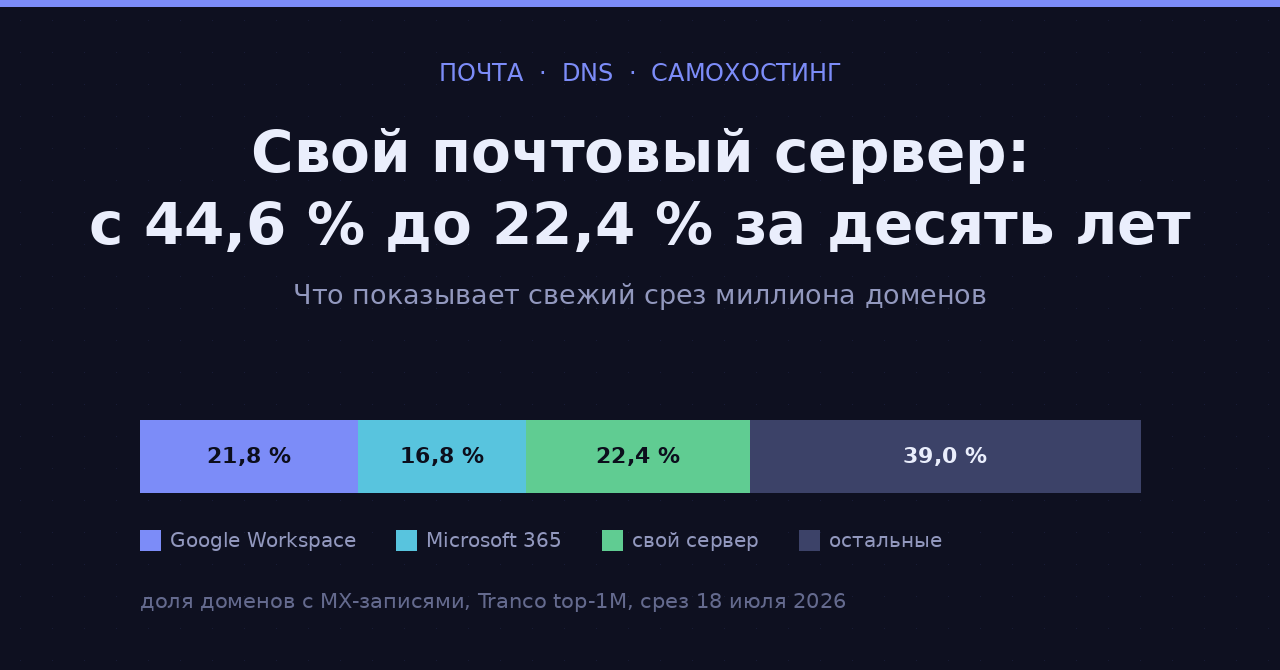
В свежем срезе Tranco top-1M только 22,4 % доменов, публикующих MX-записи, принимают почту на собственный сервер. Десять лет назад таких было 44,6 %. Данные — из исследования Артёма Березина на RIPE Labs (опубликовано 30 июля 2026, срез от 18 июля 2026, источник — ежедневные снимки DNS проекта OpenINTEL).
Цифра выглядит как приговор самохостингу почты, но это не совсем так. Ниже — что именно измерили, и справочник по симптомам: если письма не доходят, что запускать и что править.
Что показывают данные
- В типичный день в выборке около 659 000 доменов с MX-записями и 618 000 с SPF.
- Google Workspace принимает почту для 21,8 % доменов с MX, Microsoft 365 — для 16,8 %. Вместе 38,6 %.
- Следующий по величине названный провайдер — Proofpoint, у него 1,9 %. Разрыв между вторым и третьим местом почти девятикратный.
- DMARC-запись публикуют 458 467 доменов. Но реально что-то предписывают (
p=quarantineилиp=rejectприpct=100) только 46,9 % из них. - Самая частая DMARC-запись в датасете — буквально
v=DMARC1; p=none;, её публикуют 58 064 домена. Ещё 32 682 домена публикуют ту же строку без точки с запятой на конце.
Как определяется «свой сервер». Провайдер вычисляется по основной MX-записи — той, у которой наименьшее значение preference, — и сопоставляется со словарём известных провайдеров. Всё, что не совпало ни с одним шаблоном, попадает в корзину «самостоятельные». Это значит, что в 22,4 % сидят не только настоящие самохостеры, но и мелкие региональные хостеры, корпоративные шлюзы и всё, чего просто нет в словаре. Автор честно приводит и обратную цифру: 36 455 уникальных MX-хостов остались неопознанными.
Так что правильная формулировка — не «самохостинг умер», а «доля почты, которую принимают два американских провайдера, за десять лет выросла до 38,6 %, а всё остальное измельчало». Для 22,4 % от 659 тысяч это всё ещё порядка 148 тысяч доменов — не так уж мало.
Набор инструментов
Всё дальнейшее делается пятью программами. Ставятся они одной строкой:
# Debian/Ubuntu
sudo apt install dnsutils swaks openssl opendkim-tools netcat-openbsd libxml2-utils
dig(пакетdnsutils) — смотрим, что реально отдаёт DNS.swaks— отправляем письмо руками и видим весь SMTP-диалог целиком.openssl s_client— проверяем STARTTLS и сертификат.opendkim-testkey— сверяем приватный ключ с тем, что опубликовано в DNS.xmllint(пакетlibxml2-utils) — читаем агрегированные DMARC-отчёты.
Заведите отдельный почтовый ящик на Gmail и второй на Outlook.com специально для тестов. Проверять доставляемость на своём же домене бессмысленно: свой сервер сам себе всегда доверяет, а весь смысл — увидеть, что о вас думает чужая сторона.
Справочник: письма не доходят
Дальше — по симптомам. Порядок примерно соответствует частоте, с которой это встречается на практике.
Симптом: исходящие не уходят вообще, соединение висит
Причина. Порт 25 закрыт на стороне хостера. Это норма, а не авария: Hetzner, например, прямо пишет в FAQ, что порты 25 и 465 заблокированы по умолчанию на всех облачных серверах. Разблокировка — по запросу лимита, и только после месяца обслуживания и оплаты первого счёта. Порт 587 при этом не блокируется.
Диагностика. Три команды, ровно в этом порядке.
# 1. Куда вообще надо стучаться
dig +short MX gmail.com | sort -n | head -1
#    → 5 gmail-smtp-in.l.google.com.

# 2. Пускают ли нас туда с этого сервера
timeout 10 nc -vz gmail-smtp-in.l.google.com 25 ; echo "код возврата: $?"
#    успех → "succeeded!" и код 0; блокировка → таймаут и код 124

# 3. Что застряло в очереди и почему
postqueue -p | tail -20
journalctl -u postfix --since "1 hour ago" | grep -E "status=(bounced|deferred)"
Ответ вида connect to ...[...]:25: Connection timed out в третьей команде при живом интернете — это блокировка провайдера, а не проблема конфигурации.
Лечение — вариант А: открыть порт. Пишем в поддержку хостера запрос на снятие лимита. У Hetzner это возможно после месяца обслуживания и оплаты первого счёта; у других провайдеров условия свои, но принцип тот же. Одновременно проверьте, что вам пропишут PTR — без него открытый порт мало что даёт.
Лечение — вариант Б: отправлять через релей по 587. Официальная конфигурация Postfix для этого выглядит так:
# /etc/postfix/main.cf
smtp_sasl_auth_enable = yes
smtp_tls_security_level = encrypt
smtp_sasl_tls_security_options = noanonymous
relayhost = [mail.isp.example]:submission
smtp_sasl_password_maps = lmdb:/etc/postfix/sasl_passwd
# /etc/postfix/sasl_passwd
# destination                    credentials
[mail.isp.example]:submission    username:password
sudo postmap /etc/postfix/sasl_passwd
sudo chmod 600 /etc/postfix/sasl_passwd*
sudo systemctl reload postfix
У варианта Б есть неочевидная цена: репутацию перед Gmail и Microsoft зарабатывает релей, а не вы. Плюс в том, что чужая репутация обычно лучше вашей. Минус — вы больше не управляете доставляемостью: если релей попадёт в чёрный список, ваши письма поедут туда же, и сделать вы ничего не сможете. Для домашнего сервера, который шлёт уведомления мониторинга, это приемлемо. Для рабочей почты — уже спорно.
Симптом: Gmail принимает, но кладёт в спам или тормозит отправку
Причина. Чаще всего — неполный набор аутентификации либо превышение порога жалоб. Google формулирует требования конкретно: с 1 февраля 2024 года отправители более 5000 писем в день на адреса Gmail обязаны иметь одновременно SPF и DKIM, настроенный DMARC на отправляющем домене, прямую и обратную DNS-запись (PTR), передачу по TLS и односкликовую отписку для рассылок. Ключ DKIM для отправки на личные адреса Gmail — не короче 1024 бит. Доля спам-жалоб в Postmaster Tools должна держаться ниже 0,3 %, а рекомендуемый рабочий уровень — ниже 0,1 %.
Диагностика: сначала найдите код. Gmail не отказывает молча — он всегда возвращает код, и по коду сразу понятно, что чинить.
# вытащить последние отбойники с текстом ответа принимающей стороны
grep -E "said: (4|5)[0-9]{2}" /var/log/mail.log | tail -20

# или через journald
journalctl -u postfix --since today | grep -oE "said: .*" | sort | uniq -c | sort -rn
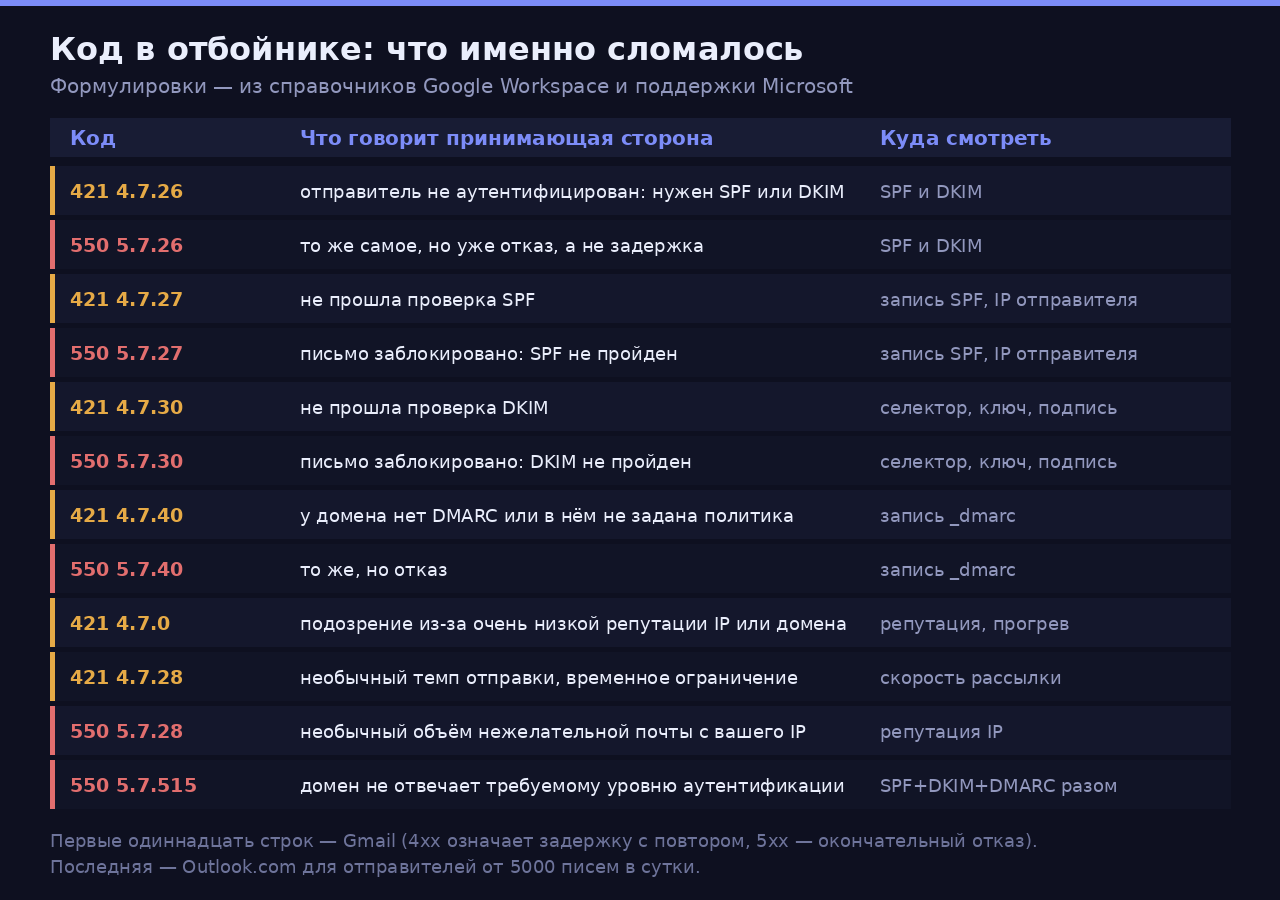
Формулировки — из справочника Google Workspace по ошибкам SMTP и из поддержки Microsoft
Коды 4xx означают временный отказ: Gmail попросил притормозить и примет письмо позже. Коды 5xx окончательны — письмо не доставлено и повторов не будет.
Лечение: SPF. Запись одна, на корне домена, тип TXT:
example.com. IN TXT "v=spf1 mx -all"
Проверяем, что она видна и единственная:
dig +short TXT example.com | grep spf1
Двух SPF-записей быть не должно — по RFC это ошибка обработки, и проверка вернёт permerror вместо pass. Если у вас домен обслуживает и почтовый сервер, и сторонний сервис рассылок, объединяйте всё в одну строку через include, а не публикуйте вторую запись.
Второй способ сломать SPF — превысить лимит DNS-запросов. RFC 7208 требует ограничивать число механизмов и модификаторов, требующих обращения к DNS, десятью на одну проверку; в счёт идут include, a, mx, ptr, exists и модификатор redirect. Три вложенных include от крупных сервисов легко съедают лимит целиком, и дальше проверка падает с permerror.
Лечение: DKIM. Генерация ключа на 2048 бит с ограничением на почтовое применение:
sudo mkdir -p /etc/dkimkeys
sudo opendkim-genkey -b 2048 -d example.com -s mail2026 -D /etc/dkimkeys -r
sudo chown opendkim:opendkim /etc/dkimkeys/mail2026.private
sudo chmod 600 /etc/dkimkeys/mail2026.private
Получится два файла: mail2026.private — приватный ключ для подписи, и mail2026.txt — готовая DNS-запись, которую надо опубликовать по имени mail2026._domainkey.example.com.
Минимальный /etc/opendkim.conf для одного домена:
Domain              example.com
Selector            mail2026
KeyFile             /etc/dkimkeys/mail2026.private
Mode                sv
Canonicalization    relaxed/simple
Socket              inet:8891@127.0.0.1
Подключение к Postfix:
# /etc/postfix/main.cf
smtpd_milters         = inet:127.0.0.1:8891
non_smtpd_milters     = $smtpd_milters
milter_default_action = accept
Проверка, что опубликованный публичный ключ соответствует приватному:
sudo opendkim-testkey -d example.com -s mail2026 -k /etc/dkimkeys/mail2026.private -vvv
# ожидаемый финал: "key OK"
Полный цикл проверки одной командой — отправляем письмо на свой тестовый ящик и смотрим весь диалог:
swaks --to test-inbox@gmail.com \
      --from postmaster@example.com \
      --server 127.0.0.1 \
      --helo mail.example.com \
      --header "Subject: deliverability check" \
      --body "тест"
В выводе смотрим на строку с кодом ответа. 250 2.0.0 OK означает, что письмо принято, — но это ещё не значит, что оно во «Входящих». Открываем письмо в Gmail, выбираем «Показать оригинал» и читаем заголовок Authentication-Results.
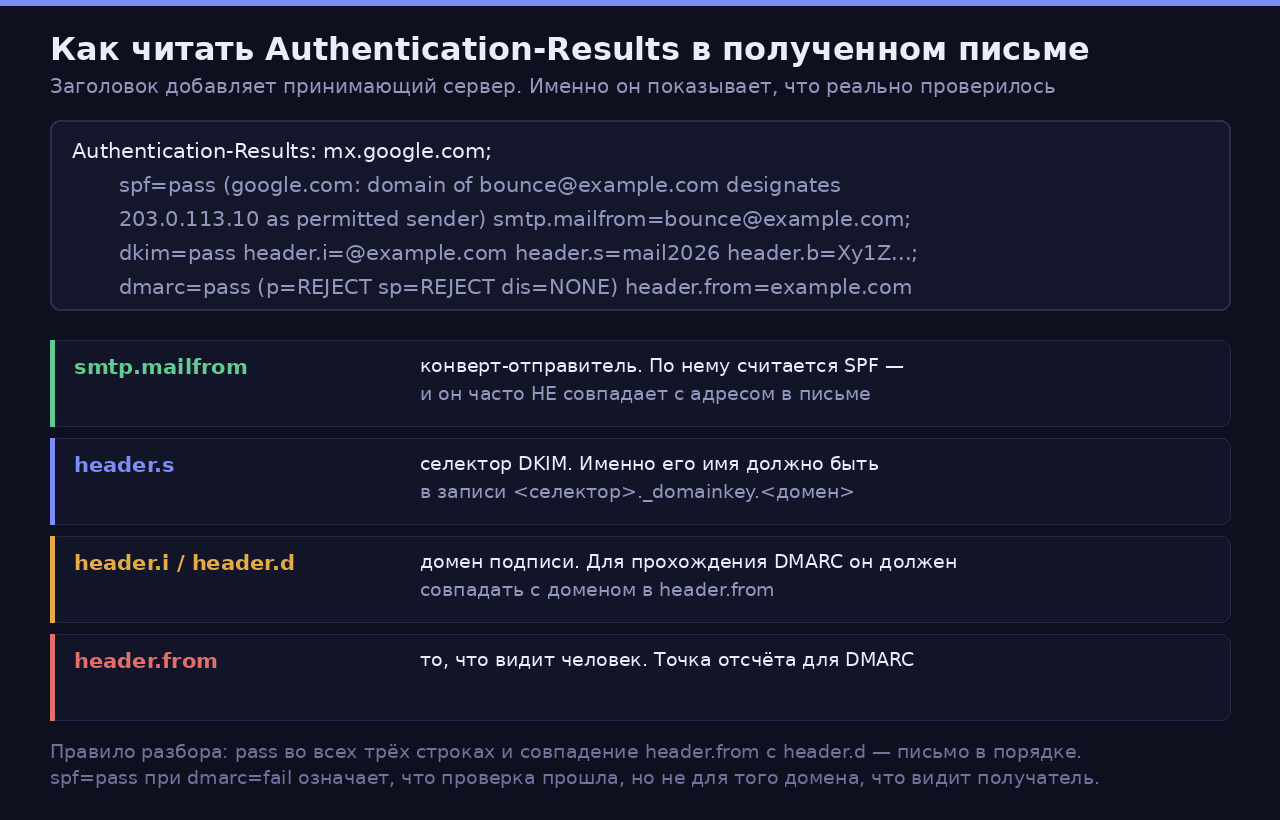
Разбор заголовка по полям; сам формат описан в RFC 8601
И последнее по этому симптому: подключите домен к Google Postmaster Tools. Без него доля спам-жалоб — та самая, которая должна быть ниже 0,3 %, — вам просто не видна, и вы правите вслепую.
Порог в 5000 писем в день многие читают как «меня это не касается, я шлю двадцать штук». Касается: базовые требования — SPF или DKIM, PTR, TLS и соответствие RFC 5322 — Google предъявляет всем отправителям, а не только массовым. Разница лишь в том, что у массовых список длиннее.
Симптом: Microsoft отбивает письма с кодом 550 5.7.515
Причина. Формулировка Microsoft дословно: 550 5.7.515 Access denied, sending domain <домен> does not meet the required authentication level. В переводе на человеческий — домен в адресе 5322.From не дотягивает до требований, которые Outlook.com предъявляет к отправителям от 5000 писем в сутки на свои потребительские адреса.
Лечение. Microsoft перечисляет три условия, которые должны выполняться одновременно:
- Опубликованы SPF и DKIM, и обе проверки проходят.
- Опубликована DMARC-запись — минимально достаточно
v=DMARC1; p=none. - DMARC проходит: SPF и/или DKIM выровнены с доменом в
5322.From.
Третий пункт — тот, на котором спотыкаются чаще всего. Проверить выравнивание можно прямо из заголовков полученного письма:
# 1. домен, который видит человек
grep -i "^From:" message.eml

# 2. домен, которым подписан DKIM
grep -i "^DKIM-Signature:" message.eml | grep -oE "d=[^;]+"

# 3. домен конверта, по которому считался SPF
grep -i "smtp.mailfrom" message.eml
Если d= из второй команды не совпадает с доменом из первой, DKIM формально проходит, а DMARC — нет. Ровно этот случай и даёт 5.7.515 при внешне «настроенном» DKIM.
Отдельная особенность Microsoft: он заметно чувствительнее к репутации подсети целиком, а не только вашего конкретного адреса. Дешёвый VPS в диапазоне, откуда полгода лили спам, будет проблемой независимо от того, насколько идеально у вас настроены подписи. Перед арендой имеет смысл проверить выданный IP по публичным чёрным спискам, а после — подписаться на программы обратной связи Microsoft: SNDS показывает статистику по вашему адресу, JMRP присылает уведомления о жалобах пользователей.
Симптом: часть писем доходит, часть — нет, закономерности не видно
Причина. Два кандидата. Первый — SPF, который проходит при прямой отправке и ломается на пересылке: когда получатель настроил форвард на другой ящик, письмо приходит уже с чужого IP, и SPF закономерно падает. Второй — несовпадение домена в From: с доменом подписи DKIM, то есть провал выравнивания DMARC. Второй особенно любит вылезать, когда часть писем шлёт сайт через сторонний сервис.
Диагностика. Собираем всю картину по домену одной пачкой:
DOM=example.com
echo "--- MX";      dig +short MX    "$DOM"
echo "--- SPF";     dig +short TXT   "$DOM" | grep spf1
echo "--- DMARC";   dig +short TXT   "_dmarc.$DOM"
echo "--- DKIM";    dig +short TXT   "mail2026._domainkey.$DOM"
echo "--- MTA-STS"; dig +short TXT   "_mta-sts.$DOM"
echo "--- TLS-RPT"; dig +short TXT   "_smtp._tls.$DOM"
echo "--- PTR";     dig +short -x    "$(dig +short A mail.$DOM)"
Отдельно проверяем, чем сервер представляется при соединении: имя в HELO, имя в PTR и имя в MX должны совпадать.
postconf myhostname smtp_helo_name
openssl s_client -starttls smtp -crlf -connect mail.example.com:25 2>/dev/null | head -5
Лечение. Против ломающегося на пересылке SPF есть ровно один рабочий приём: убедиться, что DKIM проходит независимо. DKIM переживает пересылку (подпись остаётся в письме), SPF — нет. Если DMARC выровнен хотя бы по DKIM, форвард перестаёт быть проблемой.
Против рассинхрона доменов: либо подписывать письма тем же доменом, что стоит в From:, либо, если письма шлёт сторонний сервис, настроить у него подпись вашим доменом — почти все крупные сервисы это умеют и просят опубликовать CNAME на их селекторы.
Симптом: DMARC настроен, отчёты идут, а спуфинг продолжается
Причина. Политика p=none. Это режим наблюдения: он ничего не предписывает принимающей стороне. Судя по данным RIPE Labs, на нём сидит подавляющее большинство — 58 064 домена публикуют ровно v=DMARC1; p=none;, и в целом больше половины доменов с DMARC не предписывают ничего.
Что вообще можно написать в записи. Теги из RFC 7489, которые реально применяются:
| Тег | Значения | По умолчанию | Зачем |
|---|---|---|---|
v |
DMARC1 |
— | обязателен, идёт первым |
p |
none, quarantine, reject |
— | что делать с непрошедшими |
sp |
none, quarantine, reject |
значение p |
политика только для поддоменов |
rua |
список URI | — | куда слать агрегированные отчёты |
ruf |
список URI | — | куда слать отчёты о конкретных сбоях |
pct |
0–100 | 100 | к какой доле писем применять политику |
adkim |
r, s |
r |
строгость выравнивания DKIM |
aspf |
r, s |
r |
строгость выравнивания SPF |
ri |
секунды | 86400 | как часто присылать агрегированные отчёты |
Лечение: ступени, а не рывок.
v=DMARC1; p=none; rua=mailto:dmarc@example.com; pct=100
        ↓  2–4 недели: собираем отчёты, опознаём все источники
v=DMARC1; p=quarantine; rua=mailto:dmarc@example.com; pct=25
        ↓  поднимаем pct: 25 → 50 → 100, наблюдая за отчётами
v=DMARC1; p=reject; sp=reject; rua=mailto:dmarc@example.com; pct=100
Как читать отчёты. Приходят они gzip-архивом с XML внутри. Смотреть глазами неудобно, поэтому:
# распаковать и отформатировать
zcat report.xml.gz | xmllint --format - | less

# что интересует в первую очередь: чужие IP, у которых обе проверки провалены
zcat report.xml.gz | xmllint --format - | \
  grep -A4 "<row>" | grep -E "source_ip|count"
В отчёте по каждому отправлявшему IP видно число писем и результаты spf/dkim. Знакомые адреса — ваши серверы и легальные сервисы, их надо привести в порядок. Незнакомые с провалом обеих проверок — это и есть спуфинг, ради которого DMARC затевался.
Чего делать нельзя — ставить p=reject сразу, не посмотрев отчёты. Вы почти наверняка не помните все системы, которые шлют письма от имени вашего домена: биллинг, форма обратной связи на сайте, мониторинг, старый скрипт на другом сервере. Все они начнут отбиваться в тот же час, и узнаете вы об этом от людей, а не из логов.
Отдельно про pct: он применяется к политике, а не к отчётам. pct=25 при p=quarantine означает, что в спам уедет четверть непрошедших писем, а не что четверть проверок отключена.
Симптом: письма ходят, но открытым текстом
Причина. STARTTLS не включён или предлагается, но не используется. Google требует TLS от всех отправителей с декабря 2023 года, так что это уже не «желательно».
Диагностика.
# предлагает ли ваш сервер STARTTLS входящим
openssl s_client -starttls smtp -crlf -connect mail.example.com:25 2>&1 | \
  grep -E "Verify return code|subject=|Protocol"
Лечение. Минимум в Postfix — по одной строке на каждое направление, как в официальном TLS_README:
# /etc/postfix/main.cf
smtpd_tls_security_level = may
smtpd_tls_cert_file      = /etc/letsencrypt/live/mail.example.com/fullchain.pem
smtpd_tls_key_file       = /etc/letsencrypt/live/mail.example.com/privkey.pem
smtp_tls_security_level  = may
smtp_tls_loglevel        = 1
Дальше — MTA-STS, который запрещает откат на нешифрованное соединение. Он состоит из двух частей: TXT-записи и файла политики, отдаваемого по HTTPS.
_mta-sts.example.com. IN TXT "v=STSv1; id=20260819120000Z;"
# https://mta-sts.example.com/.well-known/mta-sts.txt
# отдавать с Content-Type: text/plain
version: STSv1
mode: enforce
mx: mail.example.com
max_age: 604800
И TLS-RPT, чтобы получать отчёты о сбоях TLS:
_smtp._tls.example.com. IN TXT "v=TLSRPTv1;rua=mailto:tlsrpt@example.com"
Порядок здесь важен. Ставьте mode: testing, пока не убедитесь по отчётам TLS-RPT, что всё сходится. mode: enforce при опечатке в списке mx означает, что отправители, соблюдающие MTA-STS, откажутся вам писать вообще — а max_age: 604800 означает, что они будут помнить эту политику неделю. Меняется id при каждой правке политики, иначе кэш не обновится.
Минимальный набор, без которого не начинают
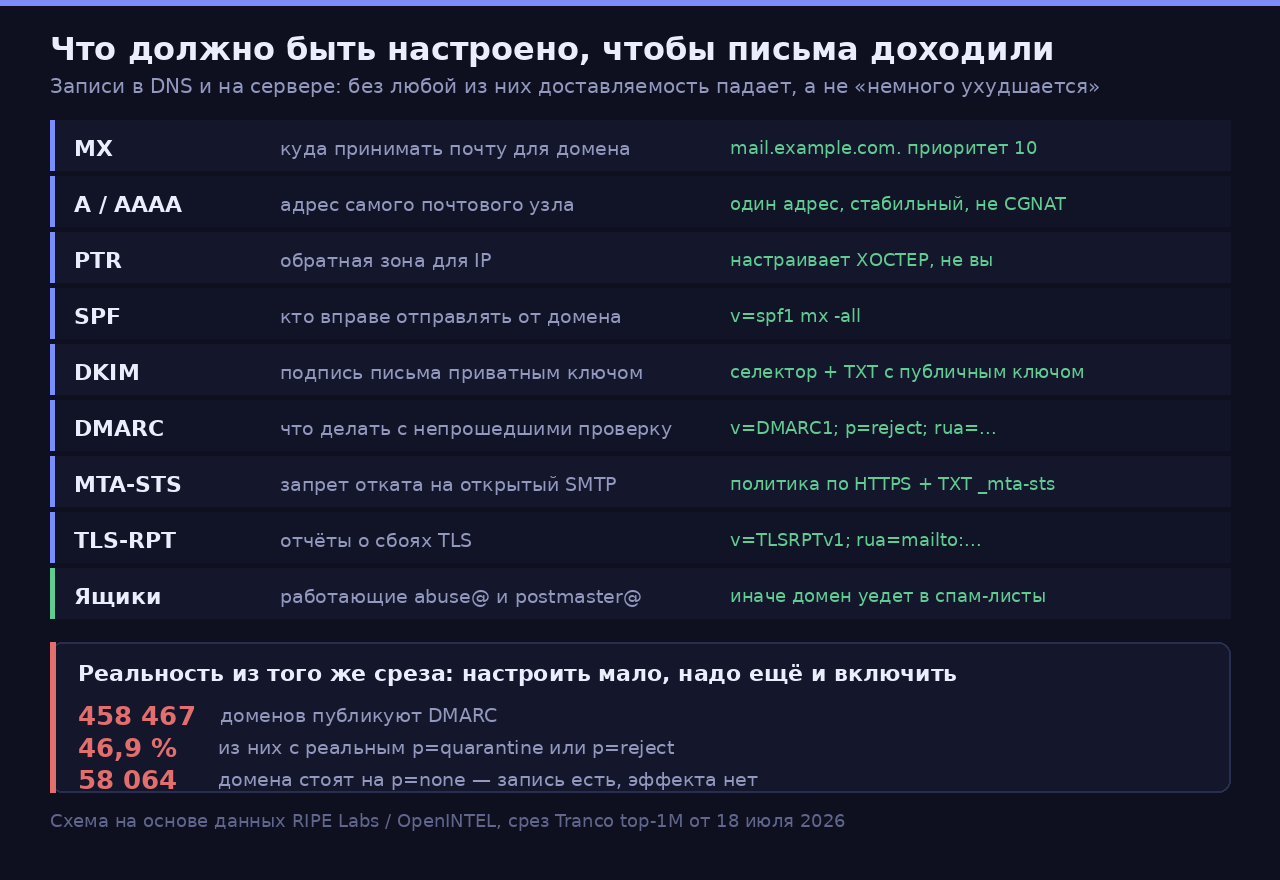
Схема на основе данных RIPE Labs и OpenINTEL, срез Tranco top-1M от 18 июля 2026
Порядок, в котором это делается:
- Убедиться, что хостер даёт исходящий 25-й порт и настраивает PTR на ваш домен. Без PTR остальное бессмысленно.
- Поднять MX и A/AAAA, проверить, что имя в PTR, имя в MX и
HELOсервера совпадают. - SPF с жёстким окончанием (
-all, а не~all), после того как перечислены все источники, и с оглядкой на лимит в 10 DNS-запросов. - DKIM с ключом от 1024 бит, лучше 2048; сверить
opendkim-testkey. - DMARC на
p=noneс рабочимrua=, две-три недели чтения отчётов, и только потом ужесточение. - TLS на обоих направлениях, затем MTA-STS в режиме
testingи TLS-RPT. - Тестовое письмо через
swaksна Gmail и на Outlook.com, разборAuthentication-Resultsв обоих.
Отдельно про то, о чём вспоминают в последнюю очередь: ящики abuse@ и postmaster@ должны существовать и читаться живым человеком. Это не формальность из RFC — именно туда приходят уведомления о том, что с вашего адреса пошёл спам, и именно молчание в ответ переводит домен из «разбираемся» в «блокируем».
Что из этого следует
Данные RIPE Labs не говорят «не поднимайте свой почтовый сервер». Они говорят другое: за десять лет требования к отправителю выросли настолько, что половина владельцев доменов предпочла отдать эту работу на аутсорс, а из тех, кто всё же настроил DMARC, больше половины так и не решилась его включить.
Если у вас есть время читать отчёты и держать репутацию — свой сервер работает. Если сервер поднимается по принципу «настроил и забыл», письма начнут теряться не сразу, а через несколько месяцев, и найти момент, когда всё сломалось, будет уже сложно.
Смежная тема, если выбираете площадку под такой сервер: приёмка нового VPS за первый час — в том числе про то, как проверять репутацию выданного IP.
У кого сейчас крутится свой почтовый сервер — сколько времени в месяц он отнимает и какой был самый неочевидный сбой доставляемости? И встречный вопрос к тем, кто съехал на Google или Microsoft: что стало последней каплей?
Источники
- RIPE Labs — Two Providers, a Stubborn Plateau, and a Very Long Tail: Email in the Tranco Top 1M, 30.07.2026
- Google — Email sender guidelines · Gmail SMTP errors and codes
- Microsoft Support — Fix NDR error 550 5.7.515 in Outlook.com · Outlook’s New Requirements for High-Volume Senders
- Hetzner Docs — Cloud Servers FAQ
- Postfix — TLS_README · SASL_README · MILTER_README
- OpenDKIM — opendkim.conf(5) · opendkim-genkey(8) · opendkim-testkey(8)
- swaks — SMTP-тестер
- RFC: 7208 (SPF) · 7489 (DMARC) · 8460 (TLS-RPT) · 8461 (MTA-STS) · 8601 (Authentication-Results)