Мониторинг Proxmox VE 9.0 через Prometheus с поддержкой OpenTelemetry (OTLP)
С выходом Proxmox Virtual Environment 9.0 появилась долгожданная поддержка источника метрик OpenTelemetry (OTLP). Это значит, что теперь можно собирать метрики напрямую в Prometheus, без использования сторонних прослоек вроде pve-exporter или InfluxDB, как я реализовывал ранее в статье «Мониторинг Proxmox с использованием InfluxDB v2 и Grafana».
Новое API /api/v1/otlp/v1/metrics позволяет подключить Proxmox VE как полноценный Prometheus target, упрощая архитектуру мониторинга.
Включаем OTLP в Prometheus (Docker Compose)
Если вы используете Prometheus в контейнере, нужно просто включить приём OTLP-метрик через параметр командной строки.
В docker-compose.yml добавляем в секцию command:
    command:
      - --web.enable-otlp-receiver
После перезапуска Prometheus начнёт слушать OTLP-потоки.
Настройка Proxmox VE
-
Перейдите в меню Центр обработки данных → Сервер метрик → Добавить → OpenTelemetry
-
Укажите адрес Prometheus-сервера и путь:
/api/v1/otlp/v1/metrics -
Сохраните и примените изменения.
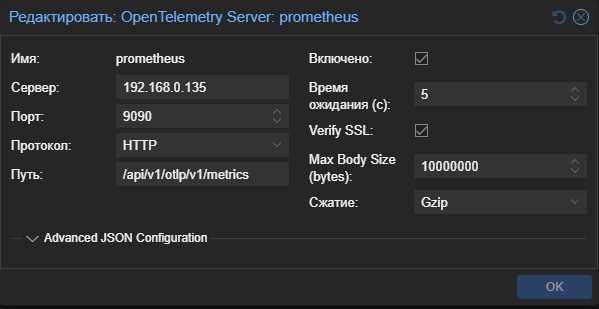
Проверяем результат
После настройки метрики Proxmox появятся в списке таргетов Prometheus под именем proxmox-ve.

Готовый дашборд для Grafana
Для визуализации можно использовать официальный дашборд:
Proxmox VE Dashboard (ID 23855) на Grafana Labs
Он уже поддерживает большинство стандартных метрик OTLP и быстро подключается.
Почему это важно
Добавление OpenTelemetry в Proxmox — шаг к унификации мониторинга self-hosted инфраструктуры.
Теперь:
- меньше прослоек (без
pve-exporterиinfluxdb), - больше стабильности при сборе метрик,
- и легче масштабировать систему наблюдения за кластером.
Если вы разворачиваете собственный мониторинг в рамках self-hosted инфраструктуры, связка Proxmox + Prometheus + Grafana + OpenTelemetry — на сегодняшний день одна из самых чистых и универсальных схем.
Ключевые слова для поиска:
proxmox monitoring, prometheus otlp, proxmox grafana, open telemetry, self-hosted monitoring, proxmox 9.0 metrics, proxmox prometheus setup, otlp receiver docker compose
23855_rev1.json (92,4 КБ)