Архивная статья. Сборки DWG и сопутствующие скрипты давно не обновлялись и требуют серьёзной актуализации. Материал сохранён как исторический.
Всем привет! Пишу ответ на популярный вопрос: как сделать, чтобы подключение к серверу WireGuard шло через порт, отличный от стандартного 51820.
WireGuard — это современный протокол VPN, который обеспечивает безопасное и приватное подключение к удалённым сетям. По умолчанию WireGuard использует порт 51820 для подключения к серверу, однако иногда может возникнуть необходимость изменить этот порт на другой.
Меняем порт в docker-compose.yml
Чтобы изменить порт подключения к серверу WireGuard, нужно внести изменения в файл docker-compose.yml, который используется для запуска контейнера WireGuard.
Вот пример исправленного кода в файле docker-compose.yml:
      - WG_PORT=8443
      - WG_DEFAULT_ADDRESS=10.10.10.x
      - WG_DEFAULT_DNS=10.2.0.100
      - WG_ALLOWED_IPS=10.2.0.0/24, 0.0.0.0/0, ::/0
      - WG_PERSISTENT_KEEPALIVE=25
      - WG_MTU=1280
    image: ditek/wg-easy
    container_name: wg-easy
    volumes:
      - .:/etc/wireguard
    ports:
      - "8443:51820/udp"
      - "51821:51821/tcp"
Что мы изменили
- Добавили переменную окружения
WG_PORT=8443— она позволяет задать новый порт подключения к серверу WireGuard. - В секции ports указали
"8443:51820/udp". Это означает, что внешний порт 8443 будет перенаправлен на внутренний порт 51820 контейнера WireGuard. Таким образом мы устанавливаем новый порт подключения для WireGuard.
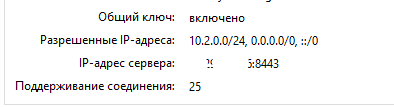
После внесения этих изменений и перезапуска контейнера подключение к серверу WireGuard будет осуществляться через порт 8443.
Проверяем работу
В варианте с DWG-CLI всё будет аналогично: меняем serverport и точно так же правим проброс портов.
Статья впервые опубликована 01.08.2023 на openode.xyz; перенесена и обновлена 04.08.2026.