17 августа GitHub не работал нормально семь с половиной часов. Не «подтормаживал» — именно не работал: пятая часть запросов к вебу и API падала с ошибкой, скачивание архивов и raw-содержимого репозиториев отваливалось в половине случаев. Через сутки после этого тред «Alternatives to GitHub» на Hacker News собрал больше пятисот голосов, а Cursor в тот же день открыл бету собственного хостинга репозиториев.
Ниже — не призыв «срочно съезжать», а разбор: что именно сломалось, что из этого вы можете держать у себя, во сколько это обойдётся в железе и часах, и где самохостинг сделает хуже, а не лучше.
13:40 UTC. Хронология по статус-странице
Все отметки — из официальной ленты инцидента на githubstatus.com, время UTC.
| Время | Что сообщили |
|---|---|
| 13:40 | «Мы расследуем сообщения о деградации производительности некоторых сервисов GitHub» |
| 13:45 | «Наблюдаем примерно 20 % ошибок в разных сценариях, включая Pull Requests, Issues и другие» |
| 14:58 | ~20 % ошибок на веб-трафике и API; скачивание архивов и raw-содержимого — примерно 50 % ошибок |
| 15:42 | Затронуты также аутентификация SAML и OIDC, SCIM и Team Sync |
| 17:34 | «Мы определили проблемный компонент и приняли меры», остаточное влияние сохраняется |
| 20:45 | Продолжаются спорадические сбои аутентификации Copilot; Copilot через CLI и GitHub App не затронут |
| 21:15 | Инцидент закрыт, подробный разбор причин обещан позже |
Итого 7 часов 35 минут от первого сообщения до закрытия. Под раздачу попали Git-операции, API, вебхуки, Issues, Pull Requests, Actions, Pages и Copilot — то есть практически всё, кроме статических страниц документации.
Обратите внимание на строку 15:42. Отвалилась не только «выдача страничек», а корпоративный вход через SAML/OIDC и синхронизация команд. Для организации, у которой доступ к репозиториям завязан на SSO, это означает, что в момент инцидента новый сотрудник или новая машина в CI не могли получить доступ вообще никак.
Чего вы лишаетесь вместе с GitHub — и что из этого реально ваше
Прежде чем выбирать замену, полезно разложить, что именно вы держите на чужом сервере. Список получается длиннее, чем «код»:
- Сами репозитории. Здесь всё хорошо: git распределённый, у каждого разработчика лежит полная копия истории. Это единственная часть, которая переживает исчезновение платформы автоматически.
- Issues, pull requests, обсуждения, ревью. Это уже не git. Живёт в базе платформы и выгружается только через API.
- Actions и артефакты сборки. Конфиги лежат в репозитории, а раннеры, кэши и секреты — нет.
- Releases и бинарники. Если ваш инсталлятор качает файл с
github.com/.../releases/download/..., то при падении GitHub ломается установка у всех ваших пользователей. - Реестр пакетов и контейнеров.
ghcr.io— тоже GitHub. - Pages. Сайт документации.
- Права доступа и SSO. Та самая строка 15:42.
Практический вывод, который не требует никакого переезда: если ваш продукт или ваш CI тянет файлы из releases или образы из ghcr.io на критическом пути — сделайте зеркало. Это дешевле, чем менять форж, и закрывает бо́льшую часть боли от подобных инцидентов.
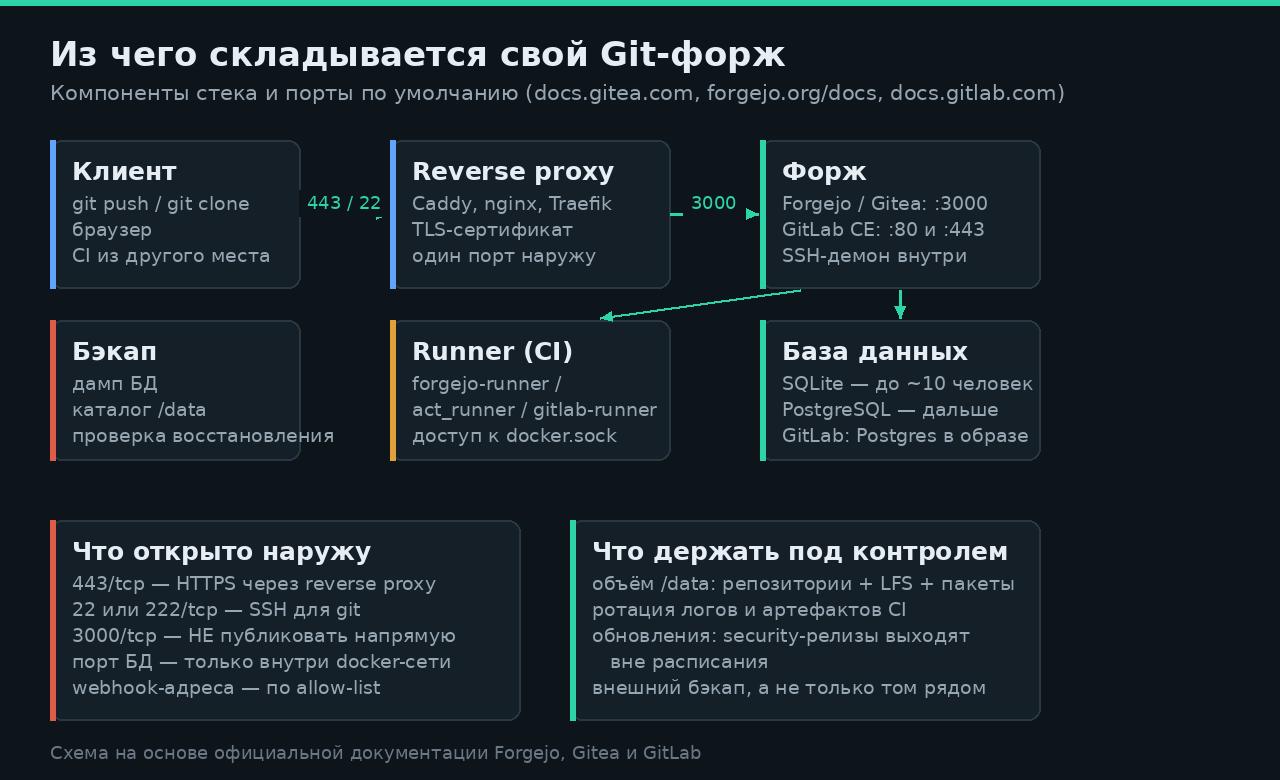
Схема на основе официальной документации Forgejo, Gitea и GitLab
Матрица выбора: от задачи, а не от списка фич
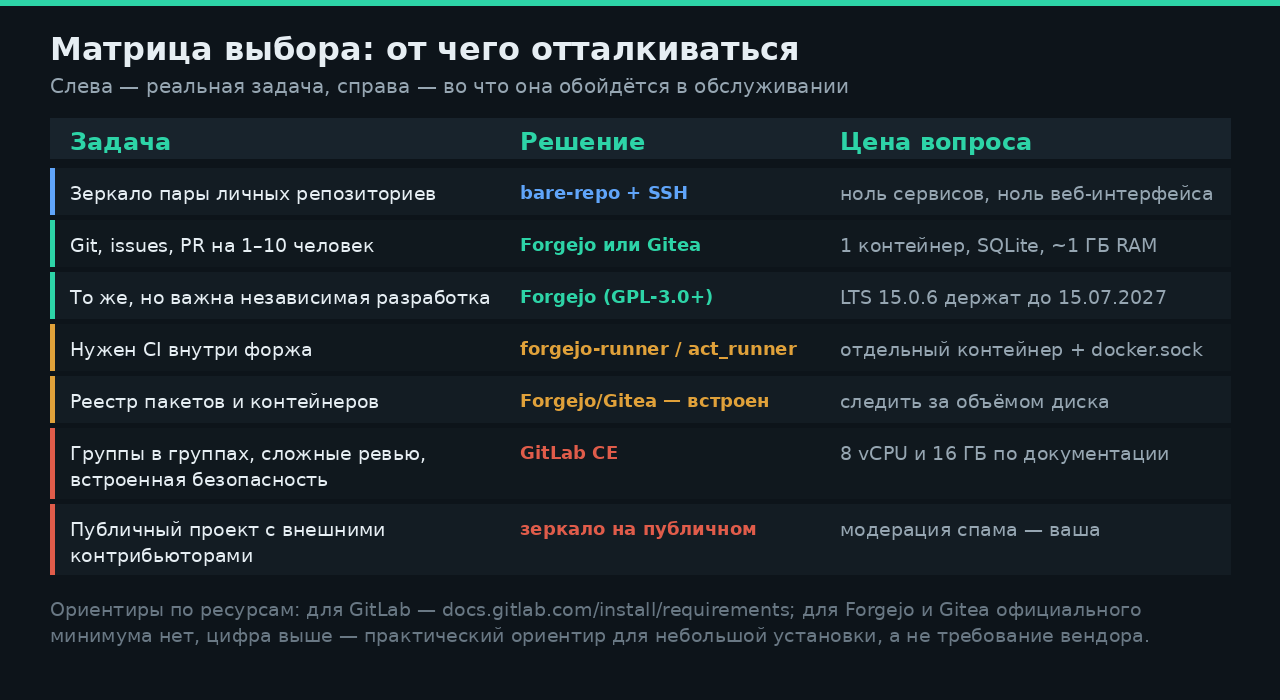
Сравнивать форжи по количеству галочек — плохая идея: у всех трёх есть issues, PR, вики, LFS и API. Разница вылезает в двух местах — в потреблении ресурсов и в том, кто и как принимает решения о развитии проекта.
Ориентиры по ресурсам: для GitLab — из docs.gitlab.com, для Forgejo и Gitea официального минимума в документации нет
Пройдёмся по строкам.
Вариант «никакого форжа»
Если задача — просто иметь свою копию нескольких репозиториев, форж не нужен. Голый bare-репозиторий по SSH решает её полностью:
# на сервере
sudo adduser --disabled-password git
sudo -u git mkdir -p /home/git/repos/myproject.git
sudo -u git git init --bare /home/git/repos/myproject.git

# на рабочей машине
git remote add mirror git@myserver:/home/git/repos/myproject.git
git push --mirror mirror
Ноль контейнеров, ноль обновлений, ноль поверхности атаки поверх sshd. Если сервер для этого только берётся — не пропустите приёмку VPS в первый час, пока действует moneyback. Нет веб-интерфейса, issues и CI — но их вы и не просили.
Forgejo и Gitea: один контейнер
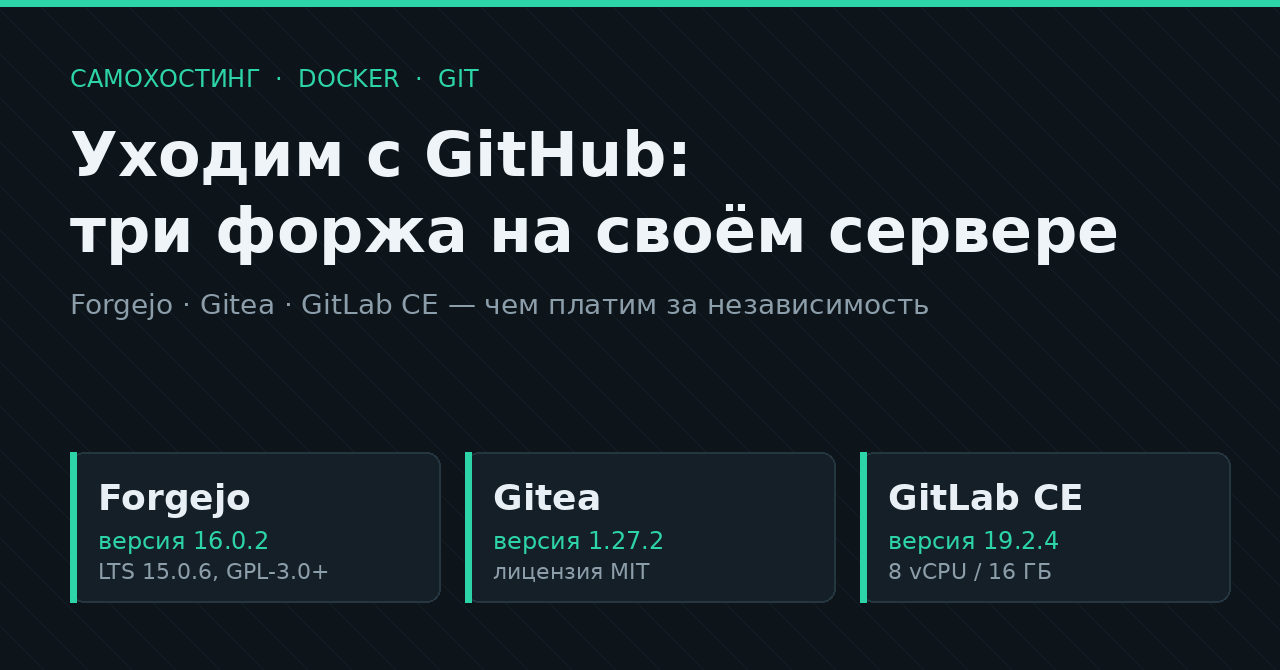
Это два очень близких родственника. Forgejo был создан в октябре 2022 года как форк Gitea и, по формулировке самого проекта, стал «жёстким форком» в начале 2024-го. Версии до v8.0 включительно распространялись под MIT, начиная с v9.0 — под GPL-3.0+; домены держит берлинская некоммерческая организация Codeberg e.V.
Смена лицензии — не абстракция: она напрямую влияет на то, можно ли вам собирать свою сборку и что придётся отдавать обратно. Как проверять такие вещи заранее, разбирали отдельно — чек-лист проверки самохост-проекта.
Сравнительная страница на сайте Forgejo с перечислением недостатков Gitea — это заявление одной из сторон, а не независимый аудит. Проверяемые факты оттуда: даты форка, смена лицензии и то, кому принадлежат домены. Оценочные формулировки про «максимизацию прибыли» оставьте на совести авторов и решайте сами.
Актуальные версии на момент публикации: Forgejo 16.0.2 (стабильная, вышла 30 июля 2026, поддержка до 29 октября 2026) и 15.0.6 в ветке LTS (поддержка до 15 июля 2027). У Gitea актуальна 1.27.2 от 14 августа 2026.
Официальный compose из документации Forgejo:
networks:
  forgejo:
    external: false

services:
  server:
    image: codeberg.org/forgejo/forgejo:16
    container_name: forgejo
    environment:
      - USER_UID=1000
      - USER_GID=1000
    restart: always
    networks:
      - forgejo
    volumes:
      - ./forgejo:/data
      - /etc/localtime:/etc/localtime:ro
    ports:
      - '3000:3000'
      - '222:22'
У Gitea он отличается ровно тремя вещами — именем сети, образом docker.gitea.com/gitea:1.27.2 и монтированием /etc/timezone:
services:
  server:
    image: docker.gitea.com/gitea:1.27.2
    container_name: gitea
    environment:
      - USER_UID=1000
      - USER_GID=1000
    restart: always
    volumes:
      - ./gitea:/data
      - /etc/timezone:/etc/timezone:ro
      - /etc/localtime:/etc/localtime:ro
    ports:
      - "3000:3000"
      - "222:22"
Не публикуйте 3000:3000 наружу и не оставляйте установщик открытым. Первый запуск Forgejo и Gitea показывает мастер установки без пароля — кто первым дошёл до формы, тот и админ. Правильный порядок: поднять контейнер с привязкой к 127.0.0.1:3000, поставить перед ним reverse proxy с TLS, и только потом идти по HTTPS-адресу проходить установку.
Минимальная привязка к локалхосту выглядит так — меняем строку портов:
    ports:
      - '127.0.0.1:3000:3000'
      - '222:22'
И два блока в Caddyfile (Caddy сам получит сертификат):
git.example.com {
    reverse_proxy 127.0.0.1:3000
}
Про порт 222. Внутри контейнера крутится собственный SSH-демон форжа — он не тот же, что системный sshd на 22. Поэтому клоны выглядят как ssh://git@git.example.com:222/user/repo.git. Если хочется привычного git@git.example.com:user/repo.git без номера порта, есть два пути: пробросить контейнерный SSH на 22, а системный sshd увести на другой порт, либо настроить проброс через хостовый authorized_keys с командой-обёрткой. Первый вариант проще, второй безопаснее при работе с несколькими сервисами.
Официального минимума по памяти в документации Forgejo и Gitea нет — ни на странице установки из бинарника, ни в docker-разделе. Практический ориентир для команды в несколько человек: одного гигабайта на весь стек с SQLite обычно хватает, но как только подключаются раннеры CI, планка сразу другая — сборка ест столько, сколько ест ваш проект.
Бэкап, который действительно бэкап
У обоих проектов есть встроенная команда дампа. Официальный вариант для Docker (в примере — Gitea; у Forgejo команда называется forgejo dump):
docker exec -u git -it -w /tmp $(docker ps -qf 'name=^gitea$') \
  bash -c '/usr/local/bin/gitea dump -c /data/gitea/conf/app.ini'
В получившемся ZIP лежат app.ini, каталог custom/, каталог data/ (вложения, аватары, LFS, индексы, файл SQLite), полная копия repos/, SQL-дамп gitea-db.sql и логи. Логи для восстановления не нужны — их можно выкидывать.
Документация Gitea прямо оговаривает: для консистентного дампа сервис должен быть остановлен. Дамп на живом инстансе может застать базу и файлы репозиториев в разном состоянии. Для домашней установки это означает короткое ночное окно с docker compose stop перед снятием копии, а не «снимем на ходу, авось совпадёт».
CI: тот самый момент, когда «один контейнер» кончается
И Forgejo, и Gitea умеют CI, синтаксически похожий на GitHub Actions. Именно похожий: документация Forgejo формулирует это прямо — «GitHub Actions и Forgejo Actions — не одно и то же, и что-то может не заработать сразу». Контекст github предоставляется как алиас к forgejo для переносимости, но паритет функций не гарантируется.
Что документировано как ограничение:
- у pull request из форков урезанный доступ к секретам и read-only токен;
- OIDC отключён для событий
pull_requestиз форков; - пользовательские образы контейнеров никогда не обновляются автоматически после первой загрузки;
- переход на летнее время и обратно ломает расписания: при переводе вперёд запуск пропускается, при переводе назад выполняется дважды;
- раскрытие переиспользуемых workflow работает только для локальных и внутриинстансных ссылок, не для репозиториев на другом сервере.
Раннер почти всегда просят дать доступ к /var/run/docker.sock. Это эквивалент root на хосте: кто может создавать контейнеры, тот может смонтировать корень файловой системы. Если в вашем форже есть публичные репозитории и внешние контрибьюторы, такой раннер запускать на том же хосте, где живёт сам форж, нельзя. Минимально приемлемая схема — отдельная виртуальная машина под раннер и явный запрет на выполнение workflow из форков.
GitLab CE: когда 16 ГБ оправданы
GitLab — другой класс тяжести. В документации по требованиям названы конкретные цифры для одноузловой установки: базовая линия — 8 vCPU и 16 ГБ памяти, в стеснённых условиях допускается 8 ГБ с оговоркой про производительность, и 40 ГБ дискового пространства под сам узел приложения плюс место под репозитории и базы.
Официальный запуск CE-редакции:
sudo docker run --detach \
  --hostname gitlab.example.com \
  --env GITLAB_OMNIBUS_CONFIG="external_url 'http://gitlab.example.com'" \
  --publish 443:443 --publish 80:80 --publish 22:22 \
  --name gitlab \
  --restart always \
  --volume $GITLAB_HOME/config:/etc/gitlab \
  --volume $GITLAB_HOME/logs:/var/log/gitlab \
  --volume $GITLAB_HOME/data:/var/opt/gitlab \
  --shm-size 256m \
  gitlab/gitlab-ce:<version>-ce.0
Внутри одного образа — Rails-приложение, PostgreSQL, Redis, Sidekiq, Nginx, Prometheus и ещё десяток компонентов. Отсюда и --shm-size 256m, и требования к памяти, и время старта в минуты, а не в секунды.
Что вы получаете взамен: подгруппы (Forgejo и Gitea их не поддерживают — это прямо указано в сравнительной таблице документации Gitea), разрешение конфликтов слияния в интерфейсе, встроенный CI без отдельной установки логики и заметно более развитые инструменты ревью.
И сразу цена этой развитости в обслуживании. 17 августа 2026 года — в тот же день, что и инцидент GitHub — GitLab выпустил критический патч-релиз 19.2.4, 19.1.6, 19.0.8 и 18.11.11. Закрыты CVE-2026-19478 (внедрение кода через директиву GraphQL, CVSS 9.4) и CVE-2026-19650 (CSRF в обработчике multiplex-запросов GraphQL, CVSS 7.1). Обе уязвимости затрагивают CE и EE начиная с 18.2. Самохостинг означает, что обновляться по такому уведомлению — ваша работа, и делать её надо в тот же день.
Переезд: что приезжает, а что остаётся
Gitea и Forgejo умеют импортировать репозитории с GitHub вместе с метаданными, и в интерфейсе миграции есть чекбоксы под issues, pull requests, релизы, метки и вехи. Документация Gitea по миграции при этом крайне лаконична: там сказано только, что для переноса таких элементов нужно указать как минимум имя пользователя, а подробного перечня переносимого и списка ограничений на странице нет. Для GitLab перенос делается сторонним инструментом, о котором документация Gitea тоже не рассказывает ничего.
Иными словами, обещаний в документации мало — проверять придётся на своих данных.
Порядок переезда, который не приводит к сюрпризам:
- Поднимаете форж и не трогаете рабочий процесс. GitHub остаётся основным.
- Импортируете один средний репозиторий с включёнными issues и PR. Смотрите глазами: сохранились ли авторы комментариев, даты, ссылки вида
#123, вложения. - Настраиваете зеркалирование остальных репозиториев в одну сторону — GitHub источник, форж копия.
- Живёте так минимум месяц, включая один цикл обновления форжа. Если обновление прошло без ручных вмешательств — можно думать о переключении.
- Меняете направление: форж становится источником, GitHub — зеркалом для внешних пользователей.
Пункт 4 пропускают чаще всего, и именно он отвечает на главный вопрос — потянете ли вы это в долгую.
Сколько это стоит на самом деле
Честный счёт выглядит так. Разовые затраты — вечер: развернуть контейнер, поставить reverse proxy, настроить бэкап, импортировать репозитории. Постоянные затраты — это уже не вечер:
- Обновления вне вашего графика. Security-релизы выходят тогда, когда выходят. Пример с GitLab 19.2.4 выше — ровно об этом.
- Бэкапы, которые вы проверяли. Дамп базы плюс каталог
/data— этого достаточно по составу, но резервная копия, которую ни разу не восстанавливали, не является резервной копией. - Рост диска. Репозитории, LFS, реестр пакетов и артефакты CI растут независимо друг от друга, и первым обычно заканчивается место под артефакты.
- Мониторинг. Форж, который лёг в пятницу и о котором вы узнали в понедельник, хуже отсутствия форжа. Минимум — уведомление о недоступности и о заканчивающемся месте; как поднять такое у себя, разбирали в материале про ntfy.
- Доступность. У GitHub 17 августа было 7 часов 35 минут простоя. У вашего VPS с одним диском и без реплики за год может выйти и больше — просто эти часы никто не считает и никто о них не пишет.
А что у вас на боевом? Кто уже переехал на Forgejo или Gitea — сколько времени в месяц уходит на обслуживание и что оказалось неожиданно неудобным после GitHub? И отдельно интересно про раннеры: держите их на том же хосте или вынесли на отдельную машину?
Источники
- GitHub Status — Incident with GitHub.com, 17.08.2026
- Forgejo Releases · Forgejo Docs — Installation with Docker · Forgejo Docs — Actions · Forgejo — Compare to Gitea · Forgejo FAQ
- Gitea Blog — релизы · Gitea Docs — Install with Docker · Gitea Docs — Comparison · Gitea Docs — Migration
- GitLab Docs — Installation requirements · GitLab Docs — Install with Docker · GitLab Critical Patch Release 19.2.4, 17.08.2026
- Cursor Changelog — Origin, 17.08.2026