Всем привет! Docker Hub ограничил доступ к образам для пользователей из РФ — при попытке скачать образ демон возвращает ошибку 403 Forbidden. В этой заметке я покажу два простых способа обойти блокировку с помощью зеркал Docker Hub.
Как выглядит ошибка
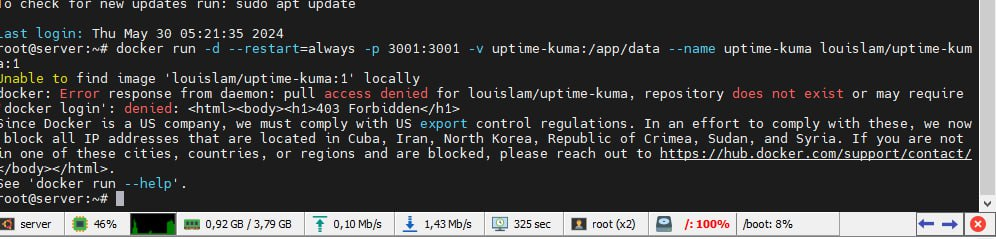
Сегодня стали появляться сообщения с такой ошибкой:
Error response from daemon: pull access denied for nginx, repository does not exist or may require ‘docker login’: denied:
403 Forbidden
Since Docker is a US company, we must comply with US export control regulations. In an effort to comply with these, we now block all IP addresses that are located in Cuba, Iran, North Korea, Republic of Crimea, Sudan, and Syria. If you are not in one of these cities, countries, or regions and are blocked, please reach out to https://hub.docker.com/support/contact/
Ошибка связана с ограничением в отношении РФ.
Способ 1. Зеркала в конфиге Docker (daemon.json)
Первый вариант — прописать зеркала docker.io в конфигурации демона. Ищем файл daemon.json:
- Linux (обычная установка) →
/etc/docker/daemon.json - Linux (rootless) →
~/.config/docker/daemon.json - Windows →
C:\ProgramData\docker\config\daemon.json
Вносим корректировки:
{
  "registry-mirrors": [
    "https://mirror.gcr.io",
    "https://docker.mirrors.ustc.edu.cn",
    "https://hub-mirror.c.163.com",
    "https://hub.openode.xyz"
  ]
}
Способ 2. Явное указание адреса через зеркало
В самом Docker или в docker-compose, когда вы указываете image:, вместо классического library/alpine:latest можно написать то же самое, но с адресом зеркала из списка выше: hub.openode.xyz/library/alpine:latest.
Детальная страница: https://hub.openode.xyz/
Статья впервые опубликована 30.05.2024 на openode.xyz; перенесена и обновлена 04.08.2026.