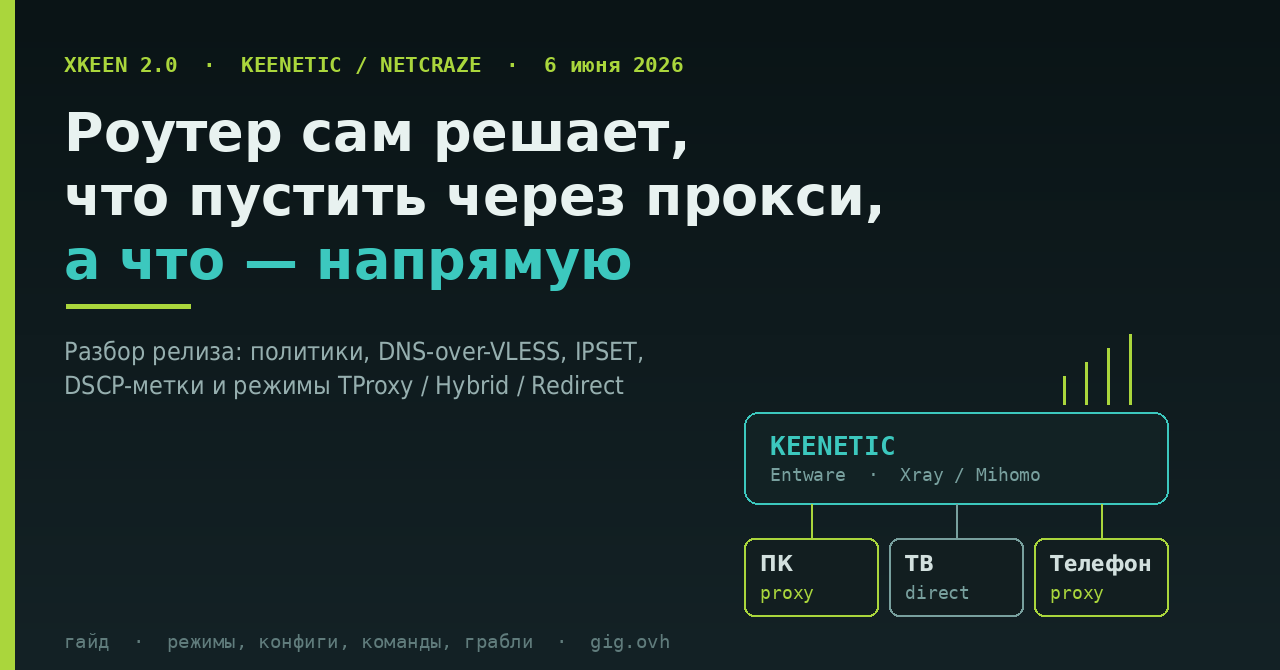
У нас на форуме уже есть установка XKeen на ядре Mihomo и дополнение про подписку Remnawave с HWID. Обе про то, как поставить. Этот материал — про то, что изменилось дальше: 6 июня вышла XKeen 2.0, и в ней поменялись вещи, из-за которых старые инструкции местами устарели.
Разбираем по-фичево: что появилось, зачем оно нужно и что придётся перенастроить.
Кому это вообще надо. XKeen — POSIX-shell утилита, которая поднимает на роутере Keenetic (в России бренд переименован в Netcraze) прозрачное проксирование через Xray или Mihomo. Смысл: маршрутизация решается на роутере, а не в каждом клиенте. Телевизор, консоль, умная лампочка, гостевой ноутбук — всё это никогда не получит клиент sing-box, но получит нужный маршрут от роутера.
Для работы нужен Entware на USB-накопителе с ext4 — без него ничего не будет.
Изменение 1. Пользовательские политики
Раньше XKeen жил в одной жёстко заданной политике Keenetic. Теперь в 2.0 заявлена работа с пользовательскими политиками — вы создаёте в «Приоритетах подключений» свою политику, назначаете в неё нужные устройства, и XKeen работает именно с ней.
Практический смысл: разные группы устройств можно вести по-разному, не выдумывая обходные пути. Плюс отдельно допилена совместимость со встроенной политикой Keenetic «Нет доступа к интернету» — раньше их сочетание давало странные эффекты.
Изменение 2. Проксирование DNS и DNS-over-VLESS
Это, пожалуй, самое ценное. Обычная схема «трафик через прокси, DNS через провайдера» дырявая: сам список доменов, которые вы резолвите, остаётся у провайдера, а DPI по нему прекрасно понимает, куда вы ходите.
XKeen 2.0 умеет проксировать DNS (xkeen -dns), а в wiki проекта отдельно описана схема DNS-over-VLESS — когда DNS-запросы уезжают внутрь того же VLESS/Reality-туннеля, а не в отдельный DoH.
Схема сводится к трём кускам конфига Xray: dokodemo-door на отдельном порту с tproxy, отдельный outbound с "protocol": "dns", и правило маршрутизации, отправляющее порт 53 в этот outbound:
{ "port": 53, "outboundTag": "dns-out" }
Грабля из той же wiki: многие серверные конфиги блокируют geoip:private, а туда попадает системный резолвер 127.0.0.53. С таким правилом DNS-over-VLESS просто не заработает — правило надо убрать или отправить этот адрес в direct.
Отдельно про режим xkeen -dns: он корректно работает для устройств, которые не сидят в политике XKeen, только если у них не дефолтные настройки DNS. Проверять результат стоит не по ощущениям, а глядя, куда реально уходят UDP-пакеты на 53-й порт.
Изменение 3. IPSET и исключение российских подсетей
В 2.0 появилась работа с IPSET и возможность исключить из проксирования российские IP-подсети — это выбирается прямо на этапе установки (шаг 7 инсталлятора).
Наборов четыре пары (IPv4 + IPv6), и понимание, кто за что отвечает, экономит часы отладки:
| Набор | Что в нём |
|---|---|
user_exclude / user_exclude6 |
Ваши собственные адреса и подсети |
geo_exclude / geo_exclude6 |
Российские подсети |
geo_override / geo_override6 |
Исключения из исключений — то, что всё-таки надо проксировать |
ext_exclude / ext_exclude6 |
Сюда пишут сторонние приложения |
Свои адреса кладутся в /opt/etc/xkeen/ip_exclude.lst, по одной записи на строку, пустые строки и комментарии игнорируются.
Живой сценарий из FAQ проекта: если у вас периодически рвутся соединения, авторы прямо пишут, что Xray не рассчитан на стриминговый трафик. Лечится добавлением IP сервиса с маской /32 в ip_exclude.lst — либо переходом на ядро Mihomo.
Изменение 4. Маршрутизация по DSCP: одна программа — свой маршрут
Самая нестандартная фича релиза. Роутер видит пакеты, но не видит, какое приложение их породило. DSCP-метки решают это на стороне клиента:
- DSCP 63 — принудительно загнать трафик в обычную цепочку XKeen (то есть в прокси), даже если по портам он бы туда не попал;
- DSCP 62 — наоборот, исключить из проксирования.
На Windows метка ставится через политику QoS: gpedit.msc → «QoS на основе политики» → создать политику, указать исполняемый файл, метку DSCP, при желании адреса, протокол и порты. Перед этим нужен твик реестра:
[HKEY_LOCAL_MACHINE\SYSTEM\CurrentControlSet\Services\Tcpip\QoS]
"Do not use NLA"="1"
После создания политики достаточно перезапустить само приложение, перезагрузка системы не нужна.
Ограничение: gpedit.msc есть только в полных редакциях Windows. В Home придётся лезть в реестр вручную. И да, это работает ровно для Windows — на телевизоре или Android-приставке такого рычага нет.
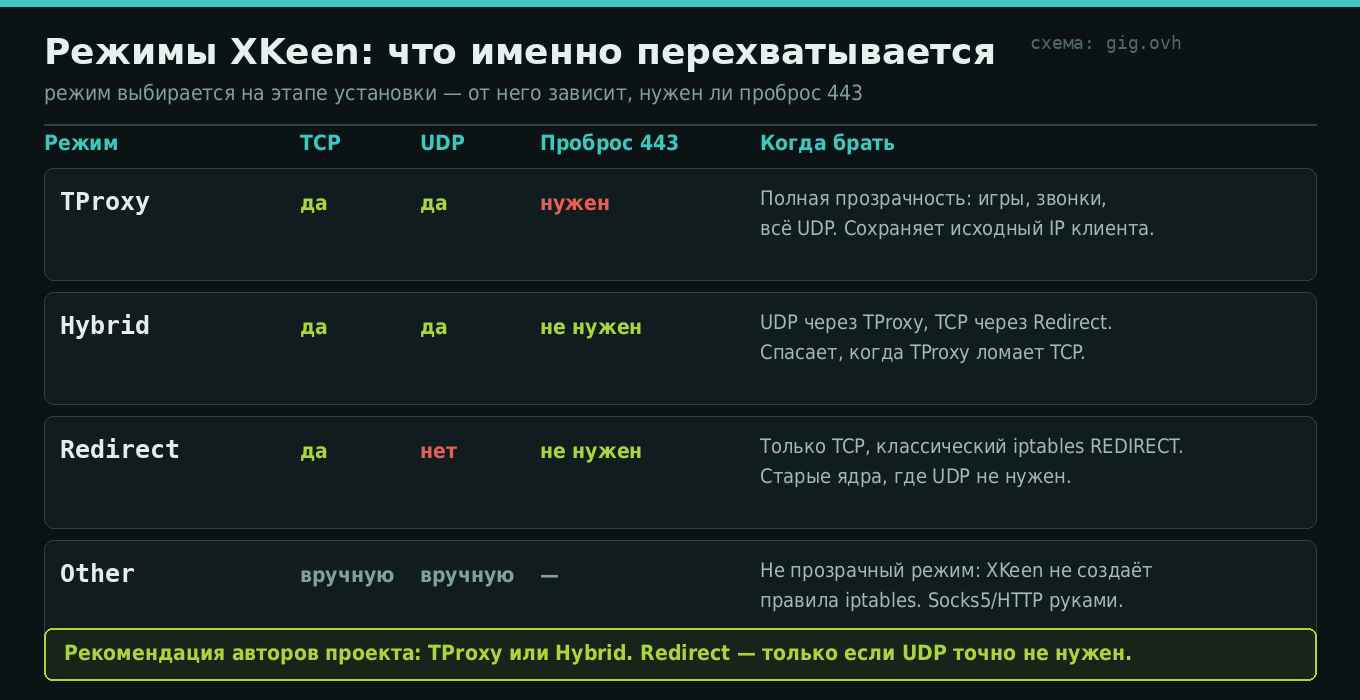
Изменение 5. Mixed стал Hybrid, и порт 443 нужен не всем
Режим, который раньше назывался Mixed, теперь называется Hybrid. Если вы копируете конфиг или инструкцию годичной давности — имейте в виду.
Куда важнее второе: проброс порта 443 теперь требуется только для режима TProxy. Раньше пункт «перевесить веб-конфигуратор Keenetic с 443 на 8443/5443» был обязательным ритуалом для всех. Теперь при Hybrid его можно пропустить.
Что ещё поменялось по мелочи
- Файлы портов свели к двум:
port_proxying.lst(что проксировать) иport_exclude.lst(что не проксировать). Одновременно они не работают — если заполнены оба, приоритет у списка проксирования. - Появилась поддержка своего GitHub-прокси через
gh_proxyв/opt/etc/xkeen/xkeen.json— актуально, когда GitHub с роутера не отдаётся. - Настраиваются повторы скачивания:
retries_download(по умолчанию 1) иretry_delay_download(2 секунды). Полезно поднять, если инсталлятор падает на середине. - Лимиты файловых дескрипторов вынесены в конфиг:
arm64_fd(по умолчанию 40000) иother_fd(10000). - AdGuard Home наконец показывает IP конкретного клиента, а не роутера — командой
xkeen -aghfix on(для 2.0+) либо параметром"routeOnly": trueв конфиге Xray. - Проксируется трафик самого Entware.
Справочник: команды, которые реально нужны
| Команда | Что делает |
|---|---|
xkeen -start / -stop |
Запуск и остановка проксирования |
xkeen -status |
Текущее состояние |
xkeen -ux |
Смена версии ядра Xray, включая откат назад |
xkeen -dns |
Проксирование DNS |
xkeen -aghfix on |
Починить определение клиента в AdGuard Home |
xkeen -fd |
Включить контроль файловых дескрипторов |
xkeen -d <секунды> |
Задержка старта после загрузки роутера |
xkeen -diag |
Собрать диагностический отчёт |
xkeen -io |
Офлайн-установка (архив и бинарники заранее в /opt/sbin/) |
xkeen -h |
Полный актуальный список — единственный надёжный источник |
Установка, если ставите с нуля (Entware уже должен быть):
opkg update && opkg install curl tar && cd /tmp
sh -c "$(curl -sSL https://raw.githubusercontent.com/jameszeroX/XKeen/main/install.sh)"
Инсталлятор проведёт по девяти шагам: версия XKeen → выбор ядер проксирования → их версии → базы GeoSite → базы GeoIP → исключать ли российские подсети → автообновление гео-файлов и его расписание → автозапуск при старте роутера.
Конфиги после установки лежат в /opt/etc/xray/configs/ (или /opt/etc/mihomo/): 03_inbounds.json — режим прослушивания, 04_outbounds.json — данные вашего сервера, 05_routing.json — правила маршрутизации.
Железо: на чём это поедет, а на чём будет мучиться
| Архитектура | Модели (частично) | Реальность |
|---|---|---|
| aarch64 — брать это | Peak KN-2710, Ultra/Titan KN-1811/1812, Giga KN-1012, Hopper KN-3811/3812/2312, Hero 5G KN-4110 | Нормальные скорости, рекомендованный вариант |
| mipsel | Giga/Hero KN-1010/1011, Ultra KN-1810, Viva/Skipper KN-1910/1912/1913, Giant KN-2610, Hero 4G KN-2310/2311, Hopper KN-3810 | Поставится, но «высоких скоростей интернета не даст» |
| mips | Ultra SE/Peak DSL KN-2510, Giga SE/Hero DSL KN-2410, DSL/Omni KN-2010, Hopper DSL KN-3610 | Бюджетный вариант, часть моделей на 580 МГц |
Отдельно названы KN-3810 и KN-3610 на процессорах EcoNet: они физически не тянут Xray. Если у вас такой — единственное, что помогает, это ограничить проксирование портами 80/443 и урезать наборы geosite/geoip. Ожидать гигабит бессмысленно. Ещё одна конкретная грабля: на архитектуре mipsle не берите ядро Xray 26.3.27.
Веб-панель: XKeen-UI
Если возиться в SSH не хочется, есть сторонний проект XKeen-UI — панель на TypeScript и Rust, которая даёт редактирование конфигов с валидацией, просмотр логов с фильтрацией, переключение и обновление ядер Xray/Mihomo, генерацию outbound-ссылок и работу с Clash API для Mihomo.
curl https://raw.githubusercontent.com/zxc-rv/XKeen-UI/main/setup.sh | sh
Панель поднимается на порту 1000, порт меняется в /opt/etc/init.d/S99xkeen-ui. Управление — тем же скриптом: start, restart, stop, status.
Авторы панели сами предупреждают: открывать доступ к ней из интернета без дополнительной защиты — прямой путь к компрометации роутера. Держите её только в локальной сети, а если нужен внешний доступ — заворачивайте в VPN, а не пробрасывайте порт. Напомню, почему это не паранойя: в ноябре 2025 Keenetic принудительно обновлял устройства на KeeneticOS ниже 4.3 именно потому, что автоматические сканеры паролей ломали роутеры с открытым наружу веб-конфигуратором и слабым паролем.
Чего XKeen не сделает
Честный список ограничений — он есть прямо в FAQ проекта, и это хороший признак.
Ping и tracert через прокси не пойдут. ICMP живёт на сетевом уровне, прокси работает на прикладном. Это не баг, это несовместимость по устройству. Диагностировать связь привычными инструментами через туннель не получится.
Реклама в YouTube не режется ни маршрутизацией, ни DNS — она приходит с тех же адресов, что и видео. Помогают только SmartTube и подобные клиенты либо подписка.
Утечки WebRTC и QUIC остаются возможны — реальный IP может всплыть мимо туннеля. Лечится отключением WebRTC в браузере или блокировкой UDP/443.
Роутер — это узкое место. Прозрачное проксирование целиком лежит на процессоре роутера. Разница между aarch64 и mips здесь не «немного медленнее», а разные порядки величин.
И общее соображение: XKeen решает задачу маршрутизации, но не задачу устойчивости самого транспорта. Если ваш VLESS/Reality душит DPI — правила на роутере не помогут, проблема ниже по стеку. Про это отдельно есть разбор блокировок по симптомам и как устроен сам Reality.
Источники
- jameszeroX/XKeen — репозиторий актуального форка
- Release 2.0 — список изменений
- Wiki: Configuration — xkeen.json, IPSET, списки портов
- Wiki: XKeen modes — TProxy / Hybrid / Redirect / Other
- Wiki: FAQ — типовые поломки и ограничения
- Wiki: DNS over VLESS
- Wiki: Маршрутизация по DSCP
- Wiki: Routers Info — таблица совместимости моделей
- Wiki: Порядок установки
- zxc-rv/XKeen-UI — веб-панель
- Corvus-Malus/XKeen — инструкция от сообщества
- Официальный блог Keenetic: об обязательном обновлении до KeeneticOS 4.3
Кто уже переехал на 2.0 — что отвалилось при обновлении, и пришлось ли перенастраивать политики? И отдельно интересно про DSCP: пользуется ли этим кто-нибудь на практике, или проще развести приложения по разным устройствам?