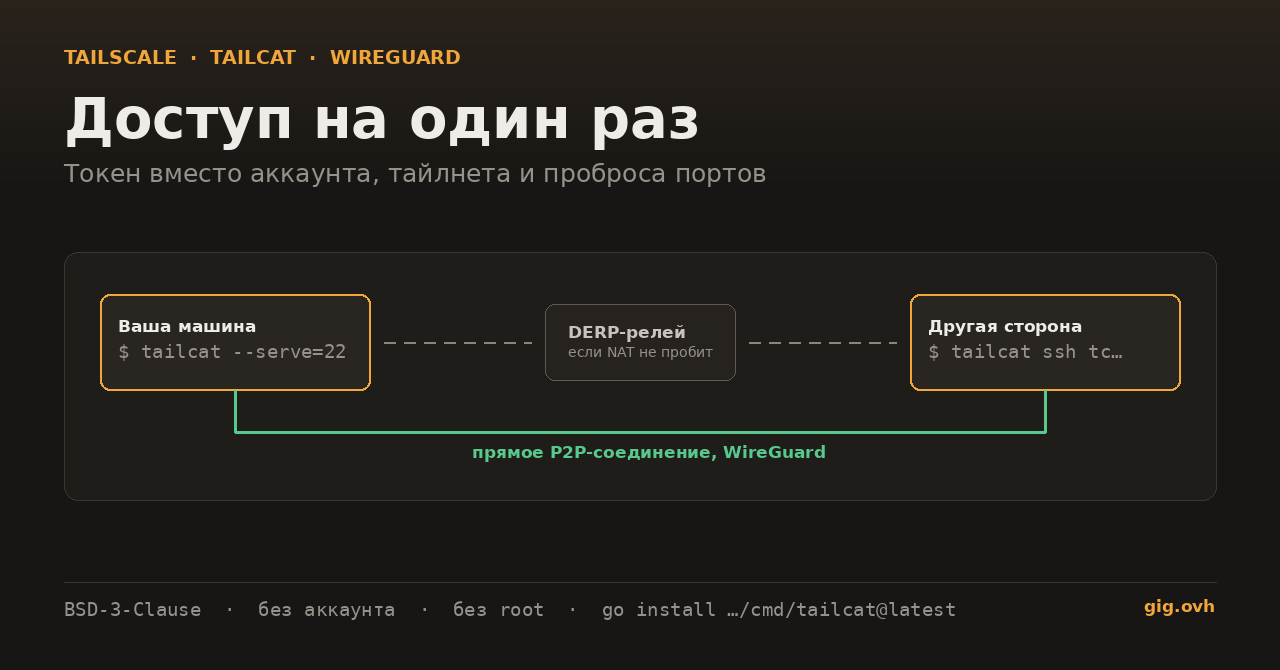
26 августа репозиторий tailscale/tailcat за сутки собрал на Hacker News больше пятисот голосов, и это тот редкий случай, когда однострочное описание проекта исчерпывающее: «как netcat, только поверх дата-плейна Tailscale и без её контрол-плейна». Компания взяла собственные открытые куски — WireGuard в пространстве пользователя, magicsock для пробивания NAT, сетевой стек netstack из gVisor и релеи DERP — и собрала из них один бинарник, которому не нужны ни аккаунт, ни права root, ни постоянно поднятая сеть. В README это сформулировано ещё короче: «Tailscale без Tailscale, от Tailscale».
Повод посмотреть на инструмент внимательно — совершенно будничный. Человеку (или CI-джобе, или ИИ-агенту в песочнице) надо на полчаса попасть на машину, которая стоит дома за NAT. Дальше — три способа это сделать и то, чем каждый расплачивается.
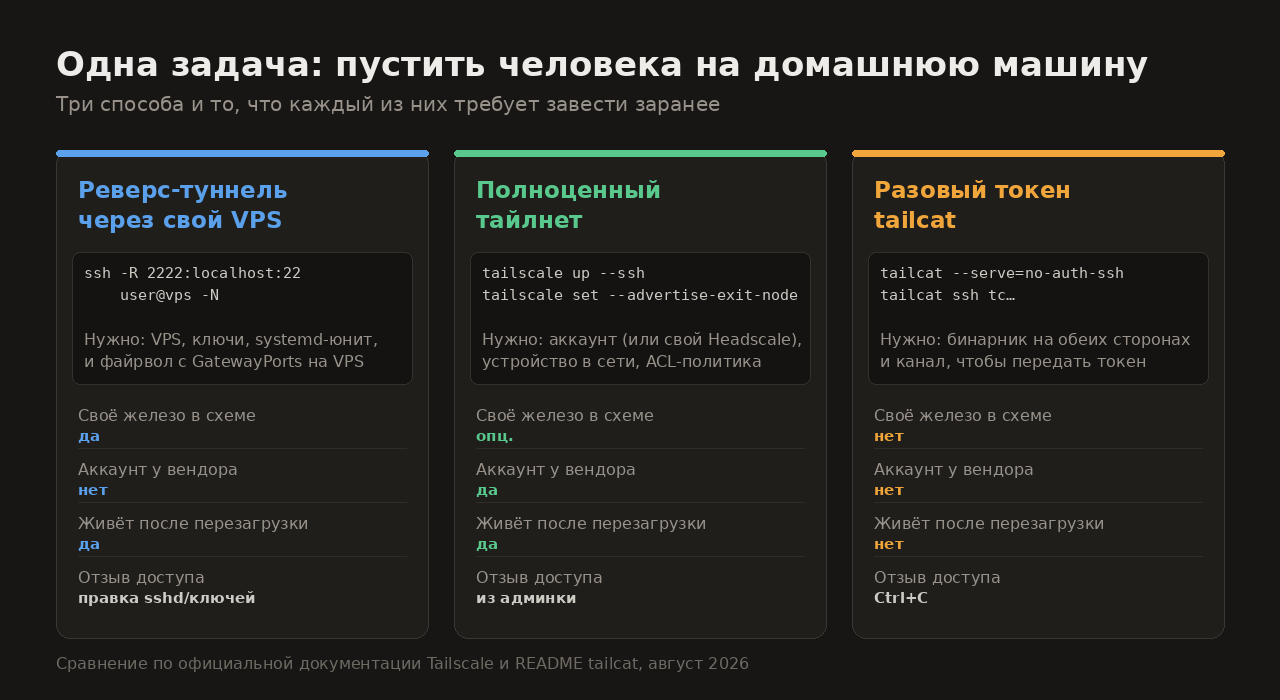
Сравнение по README tailcat и документации Tailscale, август 2026
Способ 1. Реверс-туннель через собственный VPS
ssh -R 2222:localhost:22 user@vps -N
Классика без единой сторонней зависимости. Цена — инфраструктура вокруг: нужен VPS, в его sshd_config — GatewayPorts yes, ключи, systemd-юнит, чтобы туннель переподнимался после обрыва, и правило файрвола на 2222. Точка входа висит на публичном адресе постоянно, и убрать доступ — это править ключи и конфиг. Про то, когда без этого не обойтись, на форуме есть отдельный разбор: Серый IP и CGNAT: пять маршрутов к домашнему серверу.
Способ 2. Завести полноценный тайлнет
tailscale up --ssh
Правильный ответ, когда доступ нужен надолго и не одному человеку: устройства, политики доступа, журнал, отзыв прав из админки. Но и требования соответствующие — аккаунт у вендора либо свой Headscale, машина, постоянно состоящая в сети, и продуманный ACL. Ради получаса это заметный перебор.
Способ 3. Токен, который умирает вместе с процессом
# на домашней машине
tailcat --serve=no-auth-ssh
# печатает адрес вида tcXXXXXXXX…

# на другой стороне
tailcat ssh tcXXXXXXXX
Всё. Токен — около 50 байт, если в нём лежит числовой идентификатор региона. Ставится через go install github.com/tailscale/tailcat/cmd/tailcat@latest или nix run github:tailscale/tailcat, лицензия BSD-3-Clause. Соединение по возможности прямое, точка-точка; если пробить NAT не удалось — трафик идёт через DERP-релей. Закрыли терминал — доступа больше нет, отзывать нечего.
--serve=no-auth-ssh — это буквально SSH без аутентификации: вся защита сводится к тому, что токен знают только двое. Официальная страница проекта говорит об этом прямо — адрес нужно «treat it like a password», не логировать, не коммитить и не пересылать тем, кому доступ не полагается. Круг клиентов сужается ключом узла:
tailcat --serve=22 --allow=nodekey:cfb6bf…ddfd16
Что ещё влезло в один бинарник
--serve=8080,8443(или--serve=all) — проброс TCP-портов, на клиентеtailcat <токен> 8080;tailcat socks <токен>— SOCKS5 поверх того же туннеля; альтернативы без Tailscale разбирались в теме Свой SOCKS5 на голом сервере;--serve=exit-node— выход в интернет через удалённую машину;tailcat genkeyс флагами--region=nyc,--fixed-region,--client— стабильный ключ вместо эфемерного--key=new, чтобы адрес не менялся от запуска к запуску;- публикация токена в DNS:
my-server.example.com. 300 IN TXT "tailcat=tcXXXXXXXXX"— имя дальше работает везде, где командная строка принимает токен; - свой релей вместо публичного:
tailcat genkey --region=derp.example.com.
Три ограничения, о которых авторы пишут сами. Стабильность интерфейса не обещана — ни командная строка, ни формат обмена, так что закреплять tailcat в скриптах на годы рано. У публичных релеев нет SLA. И главное: хостинговый релей «keeps metadata logs and isn’t intended for privacy» — метаданные соединений пишутся, приватность не заявлена. Нужен приватный сценарий — поднимайте свой DERP.
Чем это не является: заменой Tailscale. Здесь нет управления устройствами, нет политик, нет админки и аудита — сознательно. Постоянная многопользовательская сеть по-прежнему делается тайлнетом или Headscale, а tailcat закрывает узкую задачу «пусти сюда вот этого и вот сейчас».
Источники
- github.com/tailscale/tailcat — репозиторий, README, флаги и лицензия
- tailscale.com/tailcat — официальная страница проекта, сценарии и оговорки про релеи
Разовый доступ к домашней машине вы сейчас как раздаёте — реверс-туннелем через свой VPS, тайлнетом, Cloudflare Tunnel или чем-то ещё? И готовы ли пускать в дом SSH, у которого вся аутентификация — знание одной строки?