
PostgreSQL крутится под капотом у половины нашего самохостинга — Immich, Nextcloud, Paperless, Gitea, куча панелей и ботов хранят данные именно в нём. Но что реально происходит внутри, когда вы делаете INSERT, знают немногие. Проект PGSimCity, две недели продержавшийся в топе Hacker News (~930 очков), объясняет внутренности PostgreSQL нестандартно — как интерактивный 3D-город, по которому можно погулять. Отличный повод разобраться, что там на самом деле происходит.
Что это
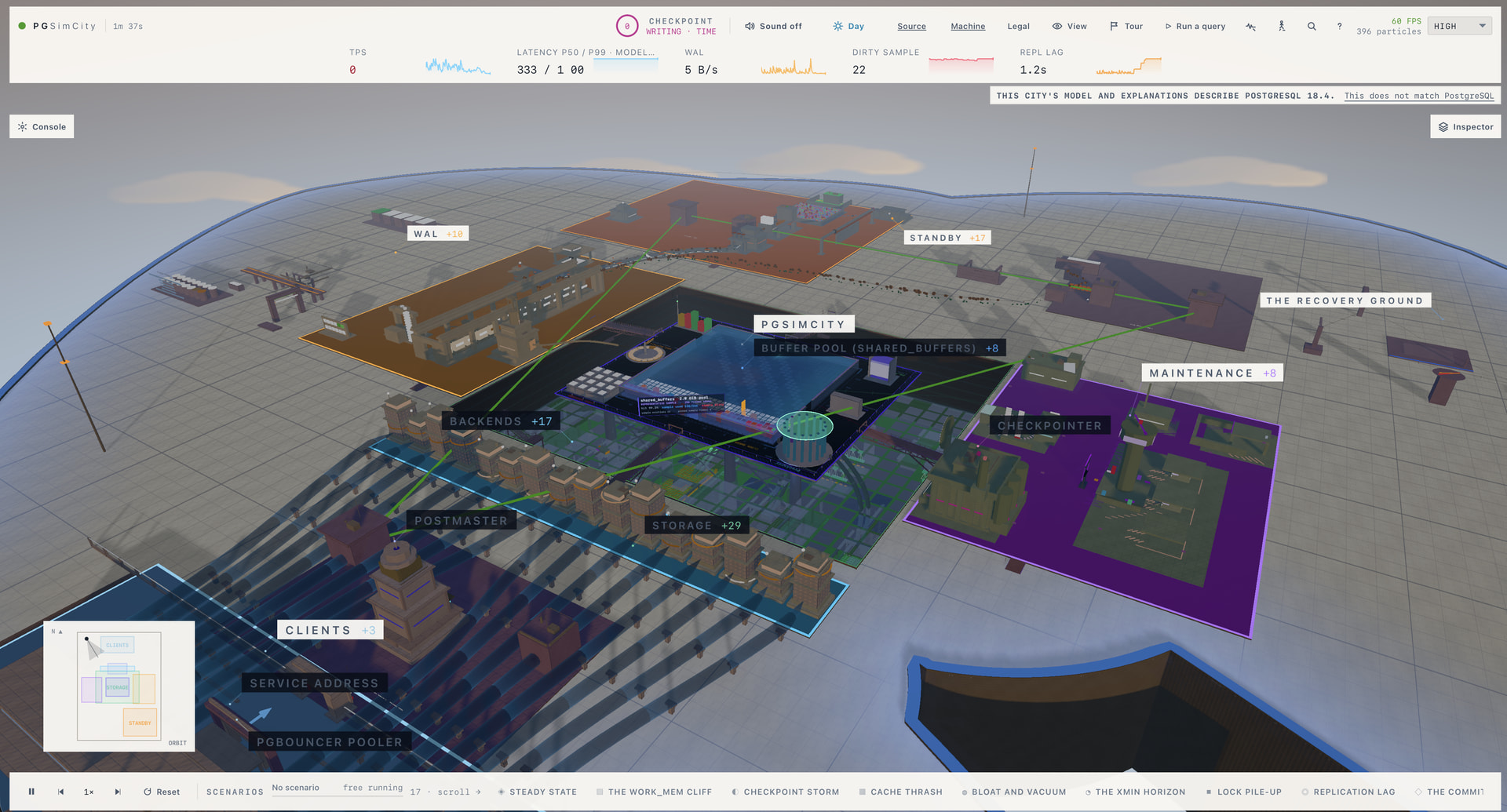
PGSimCity — независимая некоммерческая образовательная визуализация внутреннего устройства PostgreSQL (моделируется версия 18.4). Вместо стены документации вам показывают трёхмерный город (нужен браузер с WebGL2), где разные «районы» — это подсистемы СУБД:
- WAL (Write-Ahead Log) — журнал упреждающей записи;
- storage — как данные лежат на диске;
- standbys / recovery / continuity — реплики, восстановление, отказоустойчивость;
- maintenance — обслуживание (autovacuum и прочее).
Отдельная фишка — «Machine room», где рядом с моделью работает настоящий PostgreSQL, чтобы можно было сопоставить абстракцию с реальным поведением.
Почему стоит понимать эти внутренности
Это не праздное любопытство — три вещи из «города» напрямую бьют по вашему self-hosted сервису:
- WAL. Каждое изменение сначала пишется в журнал, и только потом — в основные файлы. Отсюда растут две практические темы: как настроена запись WAL, тем самым определяется устойчивость к сбою питания; а сам WAL — основа репликации и point-in-time recovery. Если вы делаете бэкапы Immich/Nextcloud «на живую» без понимания WAL — вы рискуете получить неконсистентный дамп.
- Autovacuum. PostgreSQL из-за MVCC не удаляет старые версии строк сразу — их подчищает autovacuum. Забили на него — получаете «раздувание» (bloat), распухшую базу и тормоза. Классические грабли на долгоживущих self-hosted инсталляциях.
- Checkpoints и storage. Понимание, когда грязные страницы сбрасываются на диск, объясняет периодические всплески I/O, из-за которых «тормозит Nextcloud» на слабом NAS.
Трезвая оценка
Расставим ожидания честно.
- Это ранний прототип. Авторы прямо помечают проект как «early, reviewed prototype» и приглашают присылать исправления модели и объяснений. То есть это обучающая иллюстрация, а не истина в последней инстанции и не замена документации.
- Модель ≠ реальность. 3D-город — это метафора; детали упрощены. Для продакшн-тюнинга всё равно нужны официальная документация PostgreSQL,
EXPLAIN,pg_stat_*и здравый смысл. - Нужен WebGL2. На слабой машине или в аскетичном браузере 3D может тормозить — это интерактивная визуализация, а не текст.
- Практических «сделай так» из неё вы не вынесете — это про понимание модели, а конкретные команды берите из доков.
Что делать
- Погуляйте по «городу» и сопоставьте районы с тем, что крутится у вас: WAL ↔ ваши бэкапы, maintenance ↔ autovacuum, storage ↔ диск на сервере.
- Проверьте autovacuum на своих инсталляциях:
SELECT relname, n_dead_tup FROM pg_stat_user_tables ORDER BY n_dead_tup DESC;— если мёртвых строк много, пора разбираться с настройками. - Пересмотрите стратегию бэкапов с учётом WAL: для боевых баз —
pg_dumpна консистентном снапшоте или физический бэкап + архив WAL, а не копирование файлов «на живую». - Используйте как онбординг — это отличный способ объяснить джуну или себе, что такое WAL и vacuum, за 20 минут вместо главы мануала.
Источники
- PGSimCity — интерактивная 3D-визуализация внутренностей PostgreSQL
- Обсуждение на Hacker News (~930 очков)
А вы копались во внутренностях своей СУБД или она для вас «чёрный ящик, который просто работает»? Ловили bloat или тормоза из-за autovacuum на self-hosted сервисах — как чинили?