Антидетект-браузеры окружены двумя мифами. Первый: «это волшебная кнопка, после которой тебя не забанят». Второй: «это исключительно инструмент мошенников». Оба неверны. На деле это довольно скучная инженерная штука — изолированные браузерные окружения с управляемыми отпечатками, — и работает она ровно настолько, насколько аккуратно вы её настроили.
Это руководство собрано по официальной документации Octo Browser и разборам механик фингерпринтинга. Оно длинное и последовательное: сначала теория (без неё вы будете тыкать галочки наугад), потом практика по шагам, потом автоматизация, тарифы, типичные ошибки и честный разговор о границах. Если вы уже понимаете, что такое Canvas-хеш, — первые две части можно пролистать.
Регистрация: ** 🔥 Best Multiaccount Browser. Secure and Fast.**
Кому это действительно нужно: агентствам, ведущим рекламные кабинеты нескольких клиентов; продавцам на маркетплейсах с несколькими юрлицами; QA-инженерам, которым надо проверить сайт с десятка «разных» устройств; OSINT-специалистам, работающим с исследовательскими аккаунтами; арбитражникам трафика.
Кому не нужно: если вам просто хочется приватности в личном сёрфинге — берите обычный браузер с ужесточёнными настройками и VPN, антидетект тут избыточен и дорог.
Часть 1. Как вас узнают ещё до логина
Главное заблуждение новичка — «сменил IP, почистил куки, значит я новый пользователь». Нет. IP это один признак из нескольких десятков, и далеко не самый информативный.
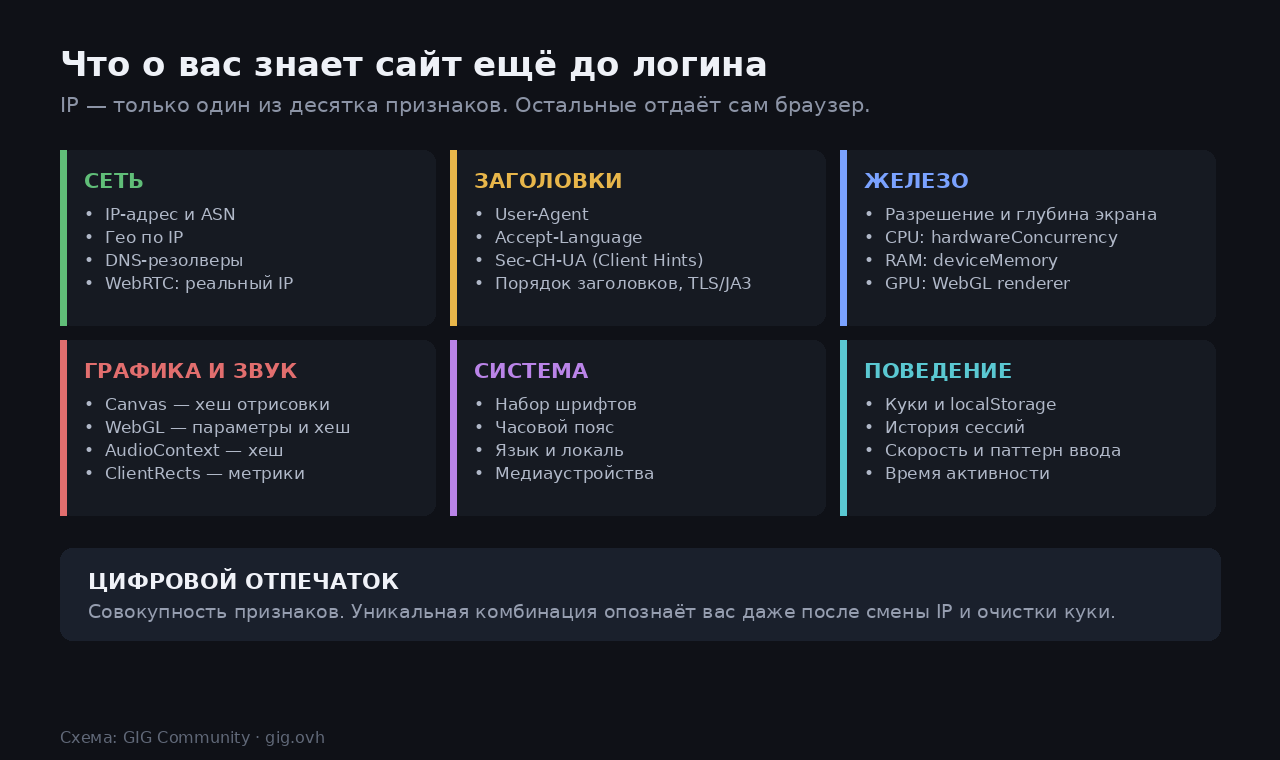
Современные системы вроде CreepJS собирают порядка 52 отдельных параметров. Разберём самые важные механики, потому что именно ими вы будете управлять в настройках профиля.
Canvas. Скрипт рисует в невидимом элементе текст с наложенными фигурами, затем переводит результат в Base64 и берёт хеш. Фокус в том, что разные ОС, драйверы и графические чипы по-своему сглаживают шрифты и выполняют субпиксельный рендеринг. Картинка визуально одинаковая, а байты — разные. Получается стабильный идентификатор вашей связки «железо + драйвер + ОС».
WebGL. Здесь ещё интереснее: через параметры UNMASKED_VENDOR_WEBGL и UNMASKED_RENDERER_WEBGL сайт напрямую спрашивает модель видеокарты, а потом дополнительно рендерит тестовую 3D-сцену и снимает хеш — различия драйверов AMD, NVIDIA и Apple дают разные результаты.
AudioContext. Тот же принцип, но со звуком: браузер обсчитывает аудиосигнал, и микроразличия в реализации дают ещё один хеш.
Остальное — набор системных шрифтов, разрешение и глубина экрана, hardwareConcurrency (число ядер), deviceMemory, часовой пояс, языки, медиаустройства, WebRTC (который умеет выдать ваш настоящий IP в обход прокси), заголовки Client Hints и даже порядок полей в TLS-рукопожатии.
Парадокс шума
Вот момент, который нужно понять до того, как вы начнёте крутить ползунки. Наивная защита — подмешивать в Canvas случайный шум, чтобы хеш каждый раз был новым. Проблема в том, что отсутствие данных и нестабильность — это тоже отпечаток. Обычный пользователь при десяти перезагрузках страницы даёт один и тот же Canvas-хеш. Если у вас он каждый раз новый, вы не «слились с толпой» — вы подняли флаг «здесь антидетект».
Отсюда второй принцип современных антифрод-систем: анализ непротиворечивости. Система не столько ищет уникальность, сколько проверяет, бывает ли такая комбинация в природе. iPhone с разрешением 1920×1080 и набором виндовых шрифтов, немецкий прокси при часовом поясе America/New_York, восьмиядерный процессор при мобильном User-Agent — всё это ловится тривиально.
Главный принцип, из которого следует всё остальное: цель не в том, чтобы стать уникальным, а в том, чтобы стать неотличимым от обычного пользователя. Уникальность — это и есть то, по чему вас находят.
Часть 2. Два подхода к подмене — и какой у Octo
Антидетект-браузеры решают задачу двумя способами.
Шум (noise). В вывод Canvas/WebGL/Audio добавляются незаметные глазу искажения, из-за чего хеш меняется. Дёшево в реализации, но упирается ровно в парадокс выше.
Подмена реальными отпечатками (substitution). Профилю выдаются параметры, снятые с настоящих устройств, — они согласованы между собой и выглядят естественно. Именно этот подход заявляет Octo: в маркетинге компании это называется «высококачественные отпечатки на основе реальных устройств», а подмена происходит на уровне движка браузера, а не JavaScript-обёрткой поверх страницы (обёртку легко обнаружить, проверив, не переопределены ли нативные функции).
На практике Octo комбинирует оба: базовые параметры (renderer, экран, шрифты, ядра, память) берутся из реальных наборов, а поверх опционально включается аппаратный шум для Canvas, WebGL, Audio и ClientRects.
Часть 3. Что конкретно можно крутить
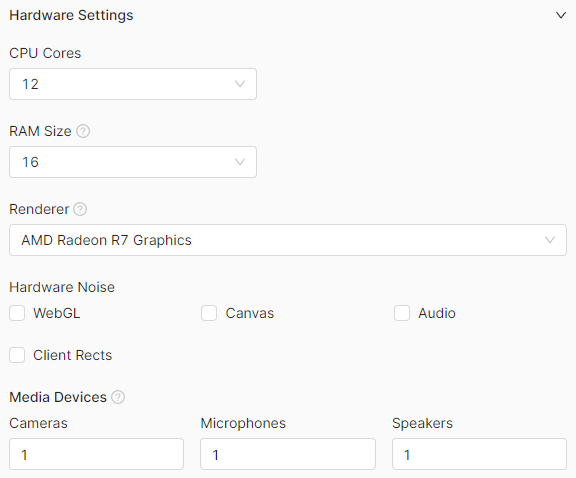
Это то, ради чего платят. Ниже — реальный набор параметров профиля по документации API; в интерфейсе они же разложены по вкладкам.
| Группа | Параметр | Значения |
|---|---|---|
| Система | os |
win, mac, lin, android |
| Система | os_arch / os_version |
x86/arm; Windows 10/11, Android 13–15 |
| Железо | cpu |
2, 4, 6, 8, 10, 11, 12, 14, 16, 20, 24 ядра |
| Железо | ram |
2, 4, 8, 12, 16, 24, 32, 64 ГБ |
| Железо | screen |
например 1920x1080, список из /fingerprint/screens |
| Железо | renderer |
модель GPU из /fingerprint/renderers |
| Браузер | user_agent |
строка до 255 символов |
| Система | fonts |
массив системных шрифтов |
| Локаль | languages |
тип ip / real / manual + теги BCP-47 |
| Локаль | timezone |
тип ip / real / manual + зона IANA |
| Локаль | geolocation |
тип ip / real / manual + широта, долгота, точность (1–999 м) |
| Сеть | webrtc |
ip, real, disable_non_proxied_udp |
| Сеть | dns |
свой DNS-сервер |
| Антидетект | noise |
флаги для webgl, canvas, audio, client_rects |
| Медиа | media_devices |
video_in, audio_in, audio_out — по 0–5 |
| Мобильное | device_type / device_model |
phone/tablet; модель из справочника |
Обратите внимание на типы ip / real / manual у языков, таймзоны и геолокации. Режим ip — это автоподстройка под IP прокси, и в 95% случаев вам нужен именно он: он автоматически закрывает самый частый источник противоречий.
Отдельно про webrtc: режим real отдаст ваш настоящий IP в обход прокси — это дыра размером с ворота, сводящая на нет всю остальную работу. Рабочие варианты — ip (подставить адрес прокси) либо disable_non_proxied_udp.
Скриншот: официальная документация Octo Browser
Часть 4. Первый профиль: пошагово
Скриншот: официальная документация Octo Browser
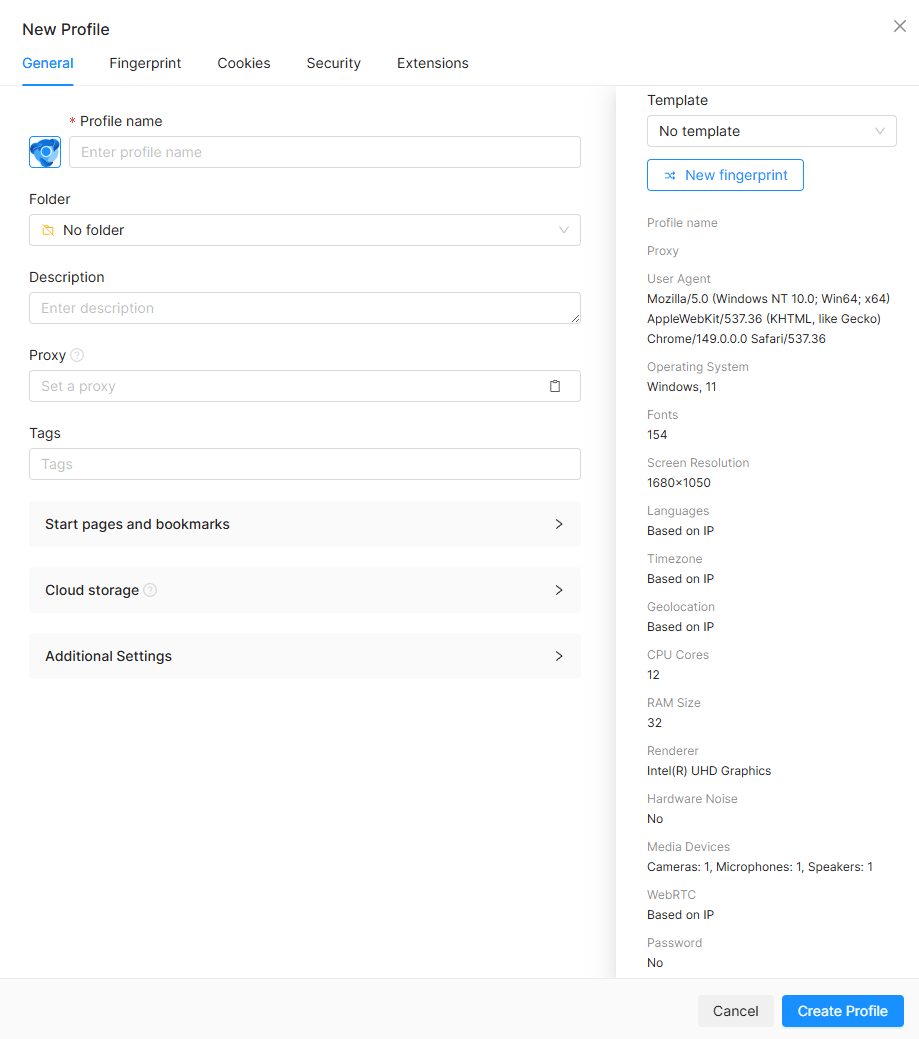
Шаг 1. Выберите способ создания. Есть «Быстрый профиль» — кликаете по иконке ОС (Windows, macOS Intel, macOS ARM, Android), и система сама генерирует согласованные случайные параметры и имя. И есть «Создать профиль» — полная ручная настройка. Новичкам честно рекомендую первый: меньше шансов сломать непротиворечивость руками.
ОС у уже созданного и сохранённого профиля поменять нельзя. Определяйтесь до создания — иначе профиль придётся заводить заново.
Шаг 2. Заполните общие настройки. Имя (обязательно), иконка, описание, теги для фильтрации, стартовые страницы (до 20), закладки (до 100).
Шаг 3. Настройте хранилище. Отдельными переключателями задаётся, что профиль запоминает между сессиями: куки, пароли, расширения, localStorage, история, закладки, service workers. Для «долгоживущих» аккаунтов включайте всё — накопленная история сессий сама по себе выглядит естественно.
Шаг 4. Проверьте отпечаток.
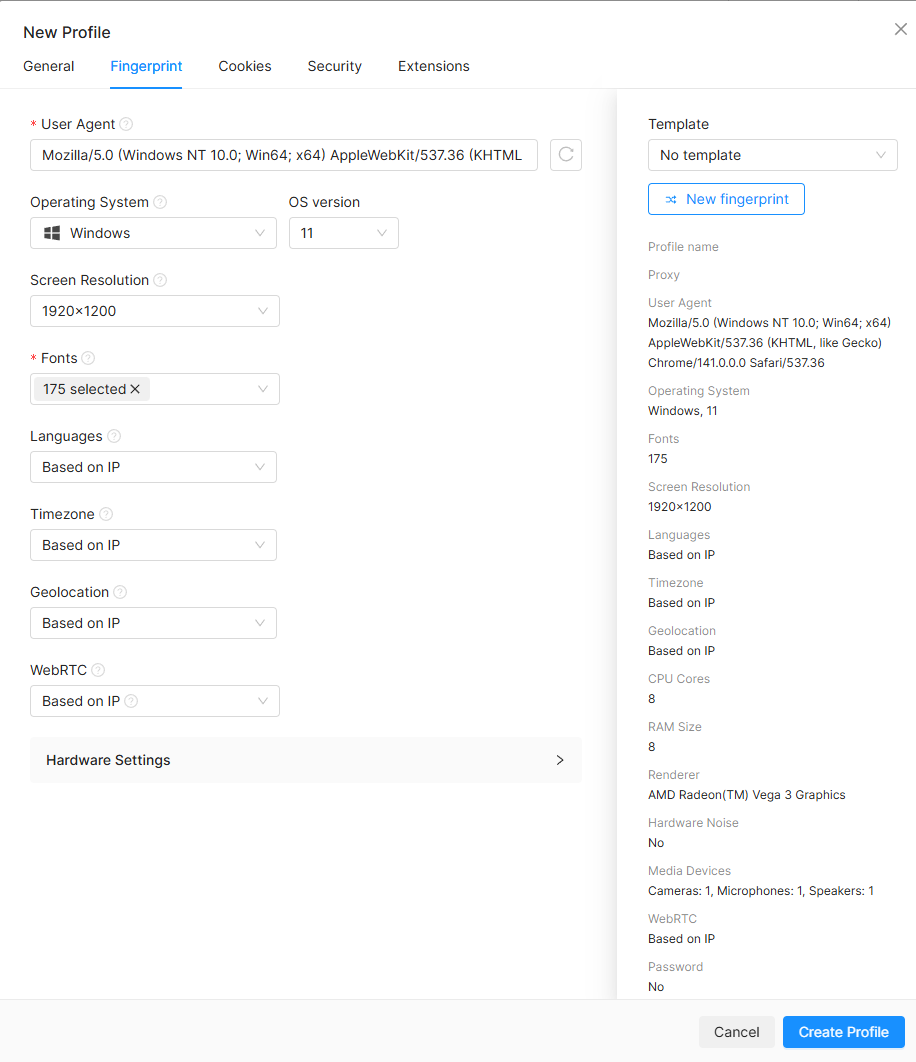
Скриншот: официальная документация Octo Browser
User-Agent генерируется под выбранную ОС автоматически — менять его руками не надо. Документация прямо предупреждает: ручная правка ломает целостность отпечатка, и вы своими руками создаёте то самое противоречие, которое ищет антифрод.
Языки, таймзону и геолокацию оставьте в режиме привязки к IP. Кнопка «Новый отпечаток» перегенерирует версию ОС, разрешение, шрифты, ядра, память и рендерер разом.
Шаг 5. Проверьте результат до работы. Запустите профиль и зайдите на любой чекер отпечатков (browserleaks, whoer, creepjs). Смотрите не на «уникальность», а на непротиворечивость.
Чек-лист перед началом работы: гео прокси совпадает с таймзоной профиля · реальный IP не течёт через WebRTC · платформа в отпечатке соответствует заявленной ОС · Canvas-хеш стабилен между перезагрузками страницы.
Полезные мелочи: пароль на профиль (4–255 символов, сквозное шифрование), защита от сканирования портов включена всегда и не отключается, есть лимит на размер подгружаемых изображений (по умолчанию 10 КБ) для экономии трафика на прокси.
Часть 5. Прокси — то, на чём всё держится
Хороший антидетект с плохим прокси бесполезен. Это самая частая причина провала.
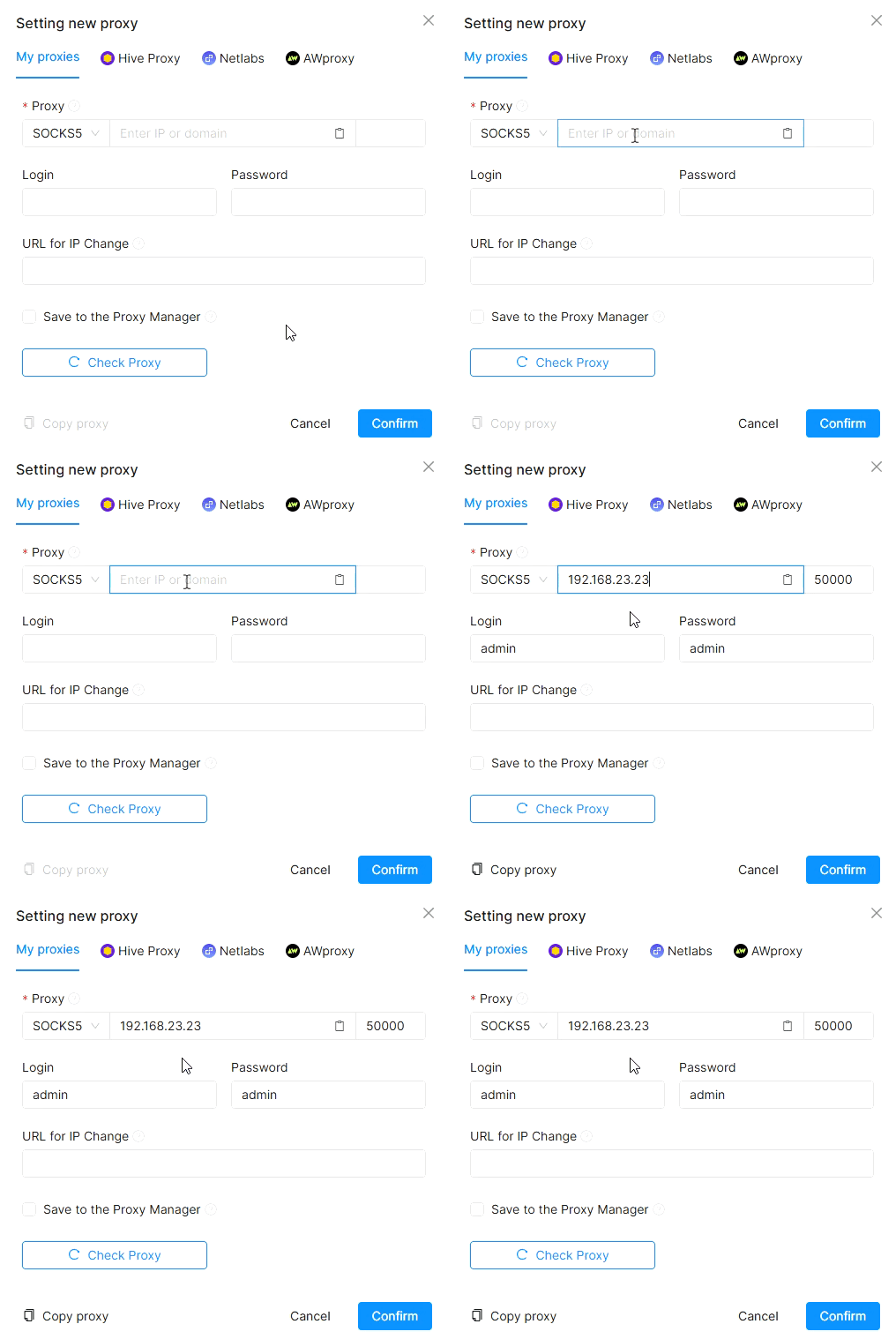
Скриншот: официальная документация Octo Browser
Поддерживаются http, https, socks, socks5 и ssh. Добавлять можно строкой формата ip:port:login:password. Прокси либо сохраняется в общий менеджер и переиспользуется по UUID, либо задаётся инлайном только для одного профиля. У сохранённого прокси есть поле change_ip_url — ссылка для ротации адреса.
Три правила, которые определяют результат:
Одно окружение — один прокси. Никогда не запускайте два профиля через один адрес, если они не должны быть связаны. Совпадение IP связывает аккаунты мгновенно и намертво — это самая дорогая ошибка из всех возможных.
Тип прокси под задачу. Дата-центровые адреса дёшевы и быстры, но их принадлежность к хостингу видна по ASN, и на чувствительных площадках они горят. Резидентские и мобильные выглядят как обычные пользователи и стоят дороже. У Octo есть встроенный магазин резидентских прокси, но никто не обязывает им пользоваться — свои подключаются свободно.
Проверьте прокси до того, как заводить аккаунт. Адрес не должен числиться в чёрных списках, скорость и стабильность важнее «свежести», а гео должно совпадать с тем, что вы декларируете в профиле.
Часть 6. Куки и «прогрев»
Свежесозданный профиль, который сразу идёт логиниться в важный сервис, выглядит подозрительно: пустая история, ноль куки, никакого прошлого.
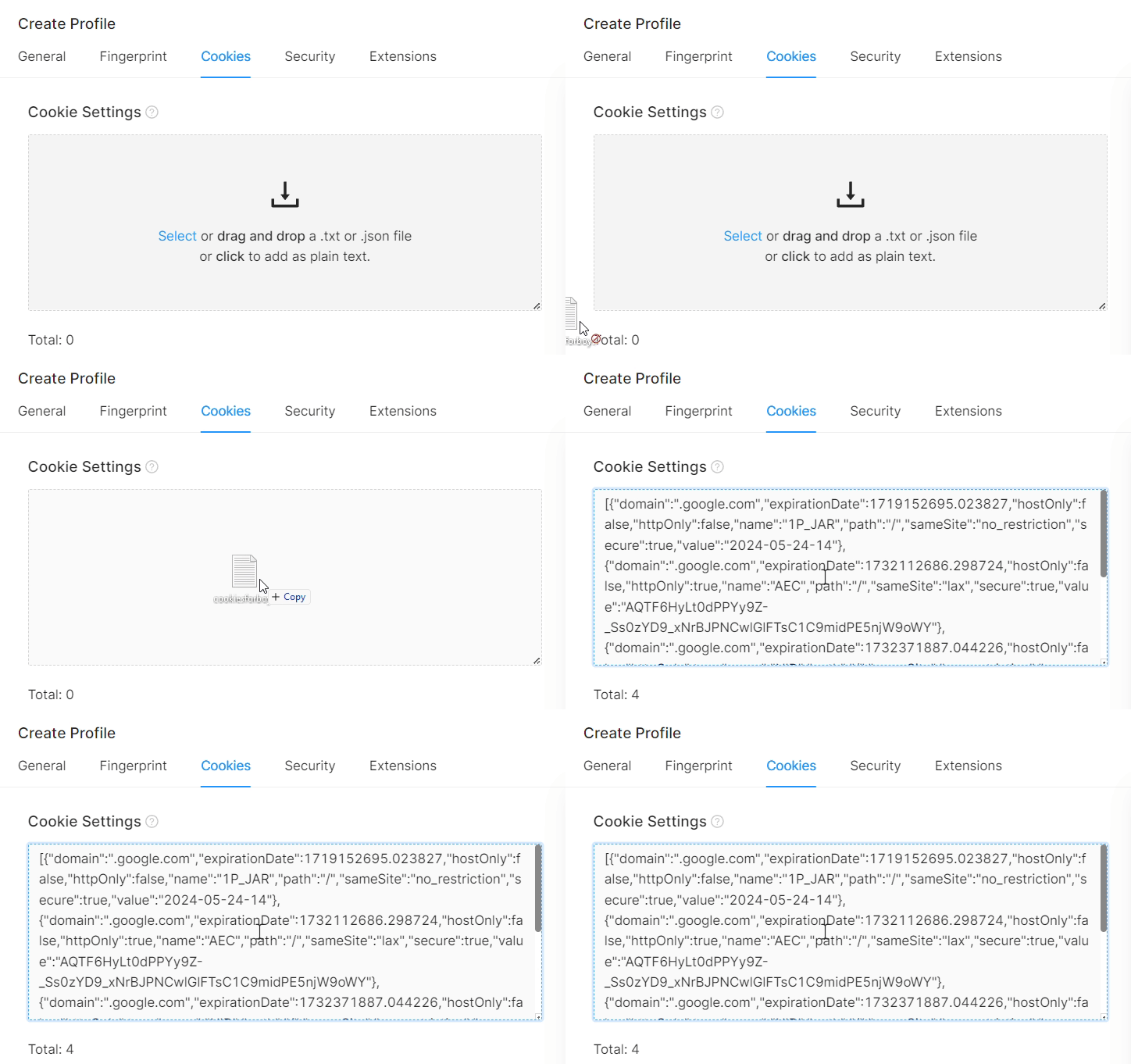
Скриншот: официальная документация Octo Browser
Octo принимает куки в форматах JSON и Netscape — перетаскиванием файла или вставкой текста. Куки можно и выгрузить, что удобно при переносе или бэкапе.
Практика простая: дайте профилю пожить обычной жизнью. Походите по нейтральным сайтам, поищите что-нибудь, посмотрите видео. Полчаса естественной активности дают профилю историю, которая делает последующий вход органичным.
Часть 7. Работа командой
Тут Octo довольно силён, и это его основной аргумент для агентств.
Профили расшариваются между участниками команды с настраиваемыми правами: доступ можно выдавать по тегам, то есть сотрудник видит только свой пул. Есть пароли на отдельные профили, есть журнал действий (Action Log), чтобы понимать, кто что запускал и менял. API-токен при этом видит только владелец мастер-аккаунта — участникам команды он недоступен.
Пара оргвыводов из этой механики: раздавайте доступ по тегам с самого начала, иначе через месяц у вас будет каша из шестисот профилей; и помните, что при увольнении сотрудника менять придётся не только доступ в Octo, но и пароли самих аккаунтов, к которым у него были сессии.
Часть 8. Автоматизация
Здесь начинается самое интересное для тех, кто на форуме сидит не ради кнопок. Архитектура состоит из двух разных API, и путаница между ними — типичный источник вопросов.
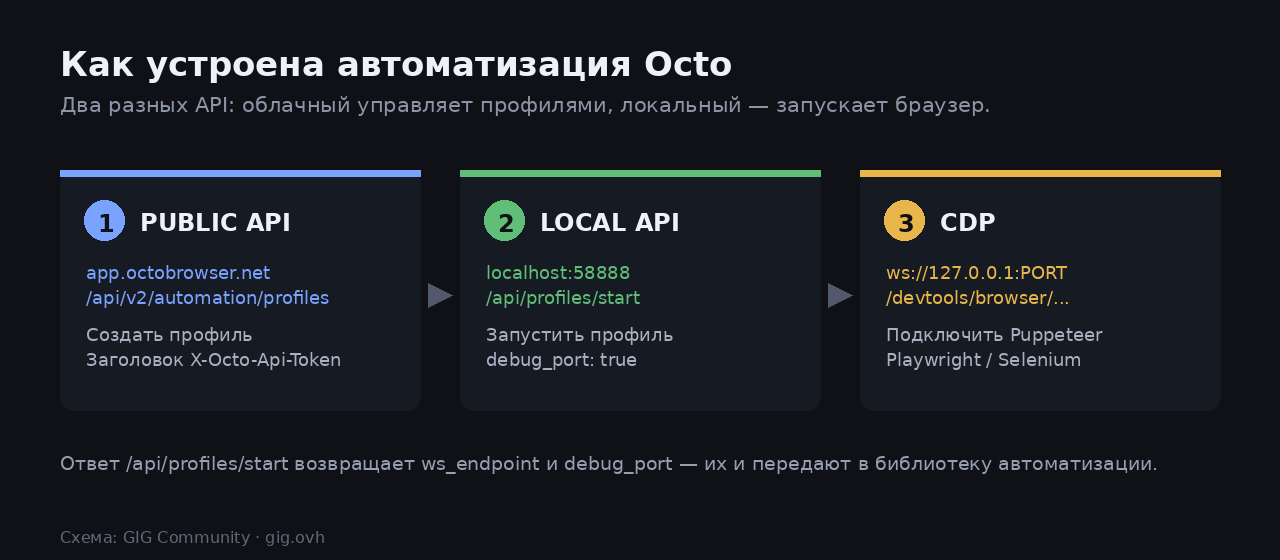
Public API живёт в облаке и управляет сущностями: создаёт профили, теги, прокси. Базовый адрес — https://app.octobrowser.net/api/v2/automation/profiles, авторизация заголовком X-Octo-Api-Token.
Local API работает на вашей машине, слушает строго 127.0.0.1:58888 (без удалённого доступа) и отвечает за запуск и остановку браузера.
Токен берётся в настройках мастер-аккаунта на вкладке «Additional». API доступен начиная с тарифа Base.
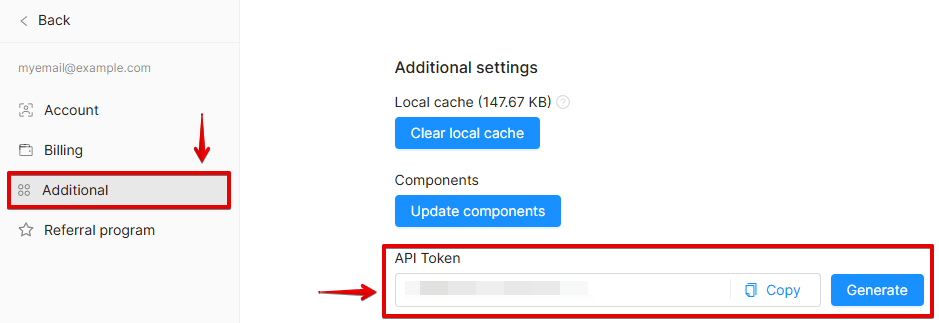
Скриншот: официальная документация Octo Browser
Шаг 1. Создать профиль
const axios = require('axios');

const data = JSON.stringify({
  "title": "Test profile",
  "fingerprint": { "os": "win" }
});

axios({
  method: 'post',
  url: 'https://app.octobrowser.net/api/v2/automation/profiles',
  headers: {
    'Content-Type': 'application/json',
    'X-Octo-Api-Token': '<YOUR_TOKEN>'
  },
  data
}).then(r => console.log(r.data));
Шаг 2. Запустить его локально
curl --location 'http://localhost:58888/api/profiles/start' \
  --header 'Content-Type: application/json' \
  --data '{
    "uuid": "2bbfd1dbaf3349cf979787f15a9e413d",
    "headless": false,
    "debug_port": true,
    "timeout": 120,
    "only_local": true
  }'
Ответ содержит ровно то, что нужно для подключения:
{
  "uuid": "2bbfd1dbaf3349cf979787f15a9e413d",
  "ws_endpoint": "ws://127.0.0.1:54739/devtools/browser/4d05ab38-...",
  "debug_port": "54739",
  "state": "STARTED"
}
Шаг 3. Подключить библиотеку
ws_endpoint скармливается Puppeteer или Playwright через CDP, debug_port — Selenium.
const puppeteer = require('puppeteer-core');

const browser = await puppeteer.connect({
  browserWSEndpoint: 'ws://127.0.0.1:54739/devtools/browser/4d05ab38-...',
  defaultViewport: null
});

const page = await browser.newPage();
await page.goto('https://browserleaks.com/canvas');
Остановить профиль — POST /api/profiles/stop, посмотреть запущенные — GET /api/profiles/active.
Одноразовые профили. Профиль создаётся и запускается одним запросом, а после закрытия удаляется автоматически — идеально для парсинга и разовых проверок. В лимитах считается за 4 запроса.
Лимиты Public API зависят от тарифа: Base — 50 запросов в минуту и 500 в час, Team — 100 и 1500, Advanced — от 200 и 3000. При 429 смотрите заголовки X-Ratelimit-Remaining и Retry-After.
Часть 9. Сколько это стоит
Цены актуальны на момент написания статьи (август 2026), помесячная оплата. Перед покупкой сверьтесь с официальной страницей тарифов — вендоры их пересматривают.
| Тариф | Цена | Профилей | Команда | API |
|---|---|---|---|---|
| Lite | €10 | 3 | — | нет |
| Starter | €29 | 30 (+20) | — | нет |
| Base | €79 | 200 (+100) | — | 50 RPM / 500 RPH |
| Team | €169 | 600 (+250) | 6 (+3) | 100 RPM / 1500 RPH |
| Advanced | €329 | 100 000 | 8 и больше | 200+ RPM / 3000+ RPH |
Скидки за предоплату: 10% за 3 месяца, 20% за 6, 30% за год. Бесплатного тарифа и триала нет — минимальный вход это Lite за €10.
Практическая рекомендация по выбору: если вам нужен API — это сразу Base, ниже его просто нет. Если работаете в одиночку с десятком аккаунтов, Starter закрывает потребность. Team имеет смысл именно ради командных ролей, а не ради количества профилей.
Регистрация: 🔥 Best Multiaccount Browser. Secure and Fast. (реферальная ссылка форума)
Часть 10. Ошибки, которые сжигают профили
Собрано из практики и разборов — почти все провалы сводятся к этому списку.
Работа без прокси или с чужого IP. Самая грубая: заявляете американского пользователя, а приходите с домашнего адреса из другой страны.
Логические противоречия в отпечатке. Мобильный User-Agent с десктопным разрешением, Android с набором виндовых шрифтов, 24 ядра у телефона. Именно поэтому не стоит править параметры руками без понимания.
Рассогласование гео. Немецкий прокси, американская таймзона, русский язык интерфейса. Держите языки/таймзону/геолокацию в режиме привязки к IP — и проблема исчезает сама.
Один прокси на несколько профилей. Связывает аккаунты надёжнее, чем что-либо ещё.
Смешение профилей. Открыли ссылку из одного аккаунта в обычном браузере, где залогинен другой, — и связали их через куки и реферер.
Утечка WebRTC. Режим real при активном прокси сводит на нет всю работу.
Отсутствие прогрева. Пустой профиль, который сразу идёт на важное действие.
Резкие движения. Двадцать регистраций за час с одной подсети выглядят ровно так, как выглядят.
Часть 11. Границы: закон, правила площадок и здравый смысл
Тут нужно говорить прямо, без маркетингового тумана.
Сам по себе антидетект-браузер — легальный коммерческий софт, и его использование не является правонарушением. Изоляция окружений, тестирование, исследовательские аккаунты, ведение нескольких клиентских кабинетов по доверенности — нормальные сценарии.
Правила площадок — это отдельная от закона история. Многие сервисы прямо запрещают несколько аккаунтов на пользователя, и обход этого ограничения нарушает их ToS: последствия — блокировка аккаунтов, заморозка средств, потеря рекламных кабинетов. Юридически это не преступление, но коммерчески может быть дорого, и ответственность целиком на вас.
Использование антидетекта для мошенничества — фальшивых аккаунтов ради обмана людей, кардинга, накрутки и злоупотребления бонусами, обхода банов за нарушения — это уже противоправная деятельность, и никакая технология не делает её законной. Это не тема нашего форума и не то, ради чего писался этот гайд.
Гарантий не существует. Это гонка вооружений: платформы улучшают детекцию, антидетекты догоняют. Отпечаток, который проходил вчера, может гореть завтра — и хорошая новость лишь в том, что вендор обязан выпускать обновления. Любой, кто обещает стопроцентную непробиваемость, продаёт сказку.
Часть 12. Альтернативы и как читать сравнения
На рынке кроме Octo есть Multilogin, Dolphin Anty, GoLogin, AdsPower и десяток решений поменьше.
Полезный навык: почти все статьи вида «топ-10 антидетект-браузеров» написаны самими вендорами или их партнёрами — и, что забавно, каждый в своём рейтинге оказывается первым. Читая сравнение, первым делом посмотрите, чей домен его хостит.
Разумный способ выбирать — не по рейтингам, а по вашим требованиям: нужен ли API (и с какого тарифа он включён), нужны ли командные роли, поддерживается ли Linux, какие типы прокси принимаются, есть ли мобильные отпечатки. И проверять на своих задачах в первый оплаченный месяц.
FAQ
Заменяет ли антидетект VPN? Нет. Это разные слои: VPN/прокси меняет сетевой путь и IP, антидетект — то, что о вас рассказывает сам браузер. Без прокси антидетект почти бесполезен.
Хватит ли режима «инкогнито» или отдельных профилей Chrome? Нет. Инкогнито изолирует куки, но отпечаток железа и графики остаётся тем же самым.
Можно ли обойтись бесплатными решениями? Есть открытые проекты и профили Firefox с ужесточёнными настройками, но они дают шум вместо согласованных отпечатков и не решают задачу масштаба и командной работы.
Работает на Linux? Да, поддерживаются Windows, macOS (Intel и ARM) и Linux; есть мобильные отпечатки Android.
Что делать, если аккаунт всё равно забанили? Разбирать причину, а не менять инструмент: в 90% случаев это прокси, рассогласование гео или поведенческий фактор, а не «плохой антидетект».
Источники
- Официальный сайт Octo Browser и страница тарифов
- Документация: настройки профиля браузера
- Документация: работа с API и Local Client API
- Документация: параметры отпечатка и прокси
- Официальный гайд по автоматизации через API
- Хабр: отпечатки браузера — как работает технология
- vc.ru: как устроены антидетект-браузеры
Кто уже работает с антидетектом — на чём остановились и почему? И главный вопрос к практикам: что у вас чаще оказывалось причиной бана — прокси, отпечаток или всё-таки поведение?