Container is running, but health check reports an error
Контейнер unhealthy, а Docker его не перезапускает. Почему?
In compose.yaml there is restart: always. The site isn’t opening, the container is marked unhealthy, but its uptime keeps growing. You can change interval, increase retries and wait for the next check. It won’t restart because of that.
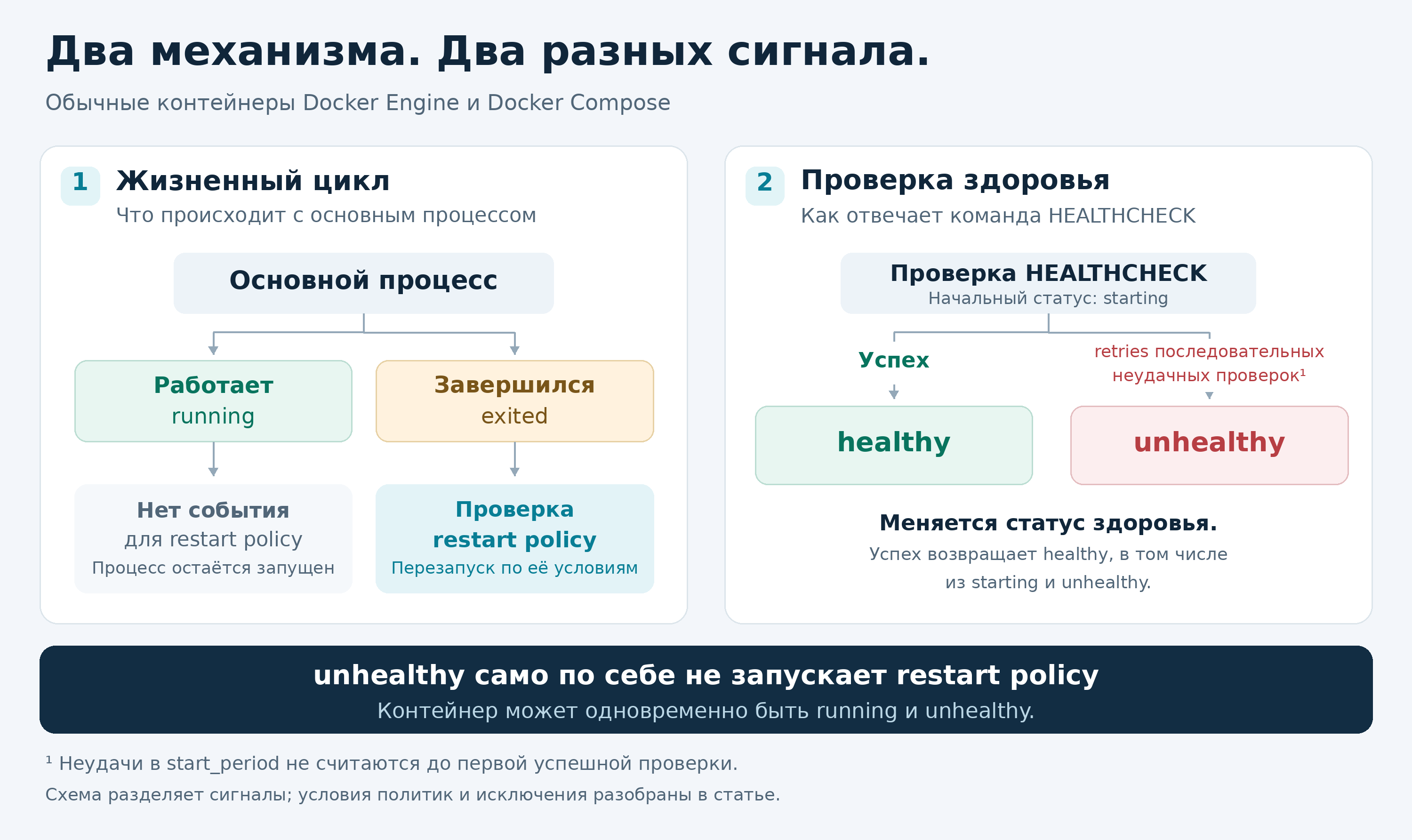
For ordinary containers of Docker Engine, including those started via docker compose, the restart policy reacts to the container stopping. Healthcheck runs a separate command and records its result. This command can exit with an error every five seconds while the main process keeps running. Therefore running and unhealthy can coexist in one container.
A simpler way to check this is on a small HTTP server. It will respond 503 to any request, but will continue to accept connections. No need to remove network, break the database, or cause a real hang for demonstration.
Check it on a single container
Save this compose.yaml in a separate directory on a test machine. You need Compose v2. The project name gig-health-demo must be free; host ports are not published, there are no volumes or mounts in the example.
services:
  app:
    image: python:3.13-slim
    restart: unless-stopped
    command:
      - python
      - -u
      - -c
      - |
        from http.server import HTTPServer, BaseHTTPRequestHandler
        class Handler(BaseHTTPRequestHandler):
            def do_GET(self):
                self.send_error(503, "Demo: not ready")
        HTTPServer(("0.0.0.0", 8080), Handler).serve_forever()
    healthcheck:
      test:
        - CMD
        - python
        - -c
        - >-
          from urllib.request import urlopen;
          urlopen('http://127.0.0.1:8080/', timeout=1).close()
      interval: 5s
      timeout: 2s
      retries: 3
      start_period: 5s
Here everything uses the standard Python library, no curl needed. The server returns 503, urlopen raises an exception, the healthcheck command exits with code 1. The main Python process stays alive.
From this directory, run the demo project. Docker will create the container and the network; it will pull the image if it isn’t present:
docker compose -p gig-health-demo up -d
About half a minute later, in the same Bash or sh, read the state:
cid="$(docker compose -p gig-health-demo ps -q app)"
docker inspect --format \
  '{{.State.Status}} {{.State.Health.Status}} {{.RestartCount}}' \
  "$cid"
Expected output for the new container:
running unhealthy 0
If it’s still starting, wait a few seconds. Zero at the end means there were no automatic restarts. After three consecutive health check failures, Docker marked unhealthy and kept checking the server. A successful response will return the status to healthy.
In the example it’s restart policy: unless-stopped. Replacing with always won’t change the result. Even on-failure here won’t help: it requires the main process to exit with a non-zero code, not the healthcheck command. The difference between always and unless-stopped is important after a manual stop: always may bring up the container on the next Docker daemon startup, unless-stopped will keep it stopped.

After the experiment, remove only this demo project from the same directory. The container and its network will be removed, the image will remain:
docker compose -p gig-health-demo down
What to look at on a running server
Start with the health check output itself. For a working container, replace “$cid” with its exact name or ID. These commands do not restart anything:
docker inspect --format '{{json .State.Health}}' "$cid"
docker inspect --format '{{json .Config.Healthcheck}}' "$cid"
docker logs --tail 50 "$cid"
In State.Health.Log you’ll find the results of the last attempts, including ExitCode and Output. In our example there will be an HTTP 503 error. Through docker logs you can see stdout/stderr of the application; the output of the healthcheck command should be found in the inspect output.
If curl is not found there, first fix the image or the healthcheck command. A missing curl won’t be installed by itself. If you get Connection refused, verify the port and address: localhost inside the container points to this container. The published host port is not necessarily relevant here. Also check Config.Healthcheck: the actual check may come from the image and differ from what you expect to see.
With a 503 response, things get more interesting. The application could have lost its database or exhausted the connection pool. You can’t distinguish a single unhealthy reason. Before restarting, it’s useful to save logs: after a restart the symptom may disappear, but the underlying cause may remain unknown. Just don’t post a full inspect on the forum without reviewing it: the configuration may contain secrets.
If the shared database failed, restarting all applications will add new connections and warm them up. It’s more useful here to restore the database connection with pauses between attempts. And if the application can determine its own unrecoverable state, it can shut down gracefully with a non-zero exit code. Then the restart policy really has a reason to trigger.
For stalls that the application itself doesn’t notice, you’ll need an external controller. It should have a limited number of retries and restart frequency; otherwise one failed healthcheck will cause an endless loop. Access to /var/run/docker.sock should also be considered before installing autoheal: the API of a normal rootful Docker allows managing containers and potentially gaining root access to the host.
depends_on with condition: service_healthy does not solve this task: Compose waits for a healthy dependency when starting the service. There is no continuous monitoring with automatic recovery here. And restart: true inside depends_on refers to explicit Compose operations on the dependency, not its automatic restart after a failure.
If you’ve seen descriptions where Docker itself replaces an unhealthy container, check whether it’s about Swarm. The orchestrator there can indeed terminate an unhealthy task and create a replacement according to the service settings. A regular docker compose up has no such controller.
How to add health checks to your container and connect Kuma
It’s not possible to add a healthcheck to a running container via docker update. If the service is already described in Compose, add the healthcheck block at the image level and the restart. Do not change the rest of the config. This fragment is intended for an image with sh and curl:
healthcheck:
  test:
    - CMD-SHELL
    - >-
      curl -fsS --max-time 3
      http://127.0.0.1:8080/health || exit 1
  interval: 30s
  timeout: 5s
  retries: 3
  start_period: 30s
The address and port here are conditional. First verify that the application indeed has such an endpoint and that it responds from inside the container. If curl is absent, use the built-in application health check or add the utility to the image during build. Manually installing in a live container will be lost on recreation.
Up will recreate the container with the changed configuration. There will be a downtime for the single instance. Beforehand ensure that important data is stored in volumes or bind mounts: what’s written only in the container layer will disappear. A normal compose restart will not apply the new check.
From the project directory, check the configuration and apply the change to a single service. Replace app with its name; keep project-level options -f and -p if you use them:
docker compose config -q && \
  docker compose up -d --no-deps app
docker compose ps app
After starting, wait for healthy.
In Uptime Kuma, start with an HTTP(s) monitor: provide the real external URL of the service, the expected response code, for example 200, the interval of 60 seconds, and two retries. Set up the notification channel and send a test message. Such a check will also notice domain access and reverse proxy issues. It’s better to run Kuma on a separate machine so that a server crash doesn’t take down monitoring.
For the status of the container itself there is a Docker Container monitor: specify the Docker host and the container name. In Kuma 2.5.5, unhealthy is considered an error and leads to DOWN with retries; without a healthcheck a running container is considered UP. This option requires access to the Docker API. Do not expose it via an open port or an indiscriminately connected docker.sock; for HTTP(s) checks it is not needed at all. Kuma will send a notification, but it will not restart the container itself.
Documentation: HEALTHCHECK, restart policies, depends_on, Swarm tasks, access to the Docker daemon, urllib.request, docker update, compose up, compose restart, Docker monitor in Kuma, Kuma 2.5.5 logic.