Cloudflare выкатила Kitesurf — браузер, который не является Chromium и вообще не содержит движка в привычном смысле. Он работает поверх Workers, в изолятах V8, и рассчитан не на человека, а на ИИ-агента и на скрипт. Заявка звучит громко, поэтому разберёмся по существу: что там внутри, какие цифры компания показывает (и почему это цифры вендора), и главное — в каких задачах его имеет смысл ставить вместо привычной связки Playwright + headless Chromium, а в каких он бесполезен от слова совсем.
Из чего он собран
Kitesurf разложен на три части, каждая — отдельный компонент на Workers:
- Engine — принимает соединения по Chrome DevTools Protocol (тот же CDP, что у Puppeteer и Playwright) и HTTP API, держит состояние сессии.
- PageScript — под каждую страницу поднимает отдельный долгоживущий изолят через Dynamic Workers. HTML разбирает парсер Blitz, CSS — Stylo, тот самый движок стилей из Firefox, написанный на Rust.
- PageRenderer — превращает вычисленное дерево в пиксели: отрисовка через blitz-paint, шейпинг шрифтов через Parley, на выходе растровый буфер.
Ключевые архитектурные решения — компоненты без состояния (одноразовые, параллелятся горизонтально), каждая загрузка страницы считается недоверенной и изолируется, тяжёлые части написаны на Rust и скомпилированы в WebAssembly.
Проще говоря: вместо того чтобы гонять полноценный браузер с вкладками, расширениями, композитингом и 60 fps ради того, чтобы забрать текст со страницы, Cloudflare собрала конвейер «HTML → CSS → раскладка → картинка» из готовых Rust-кирпичей и запустила его в той же песочнице, где живут Workers. Для агента, которому нужен текст или один скриншот, весь остальной браузер — накладные расходы.
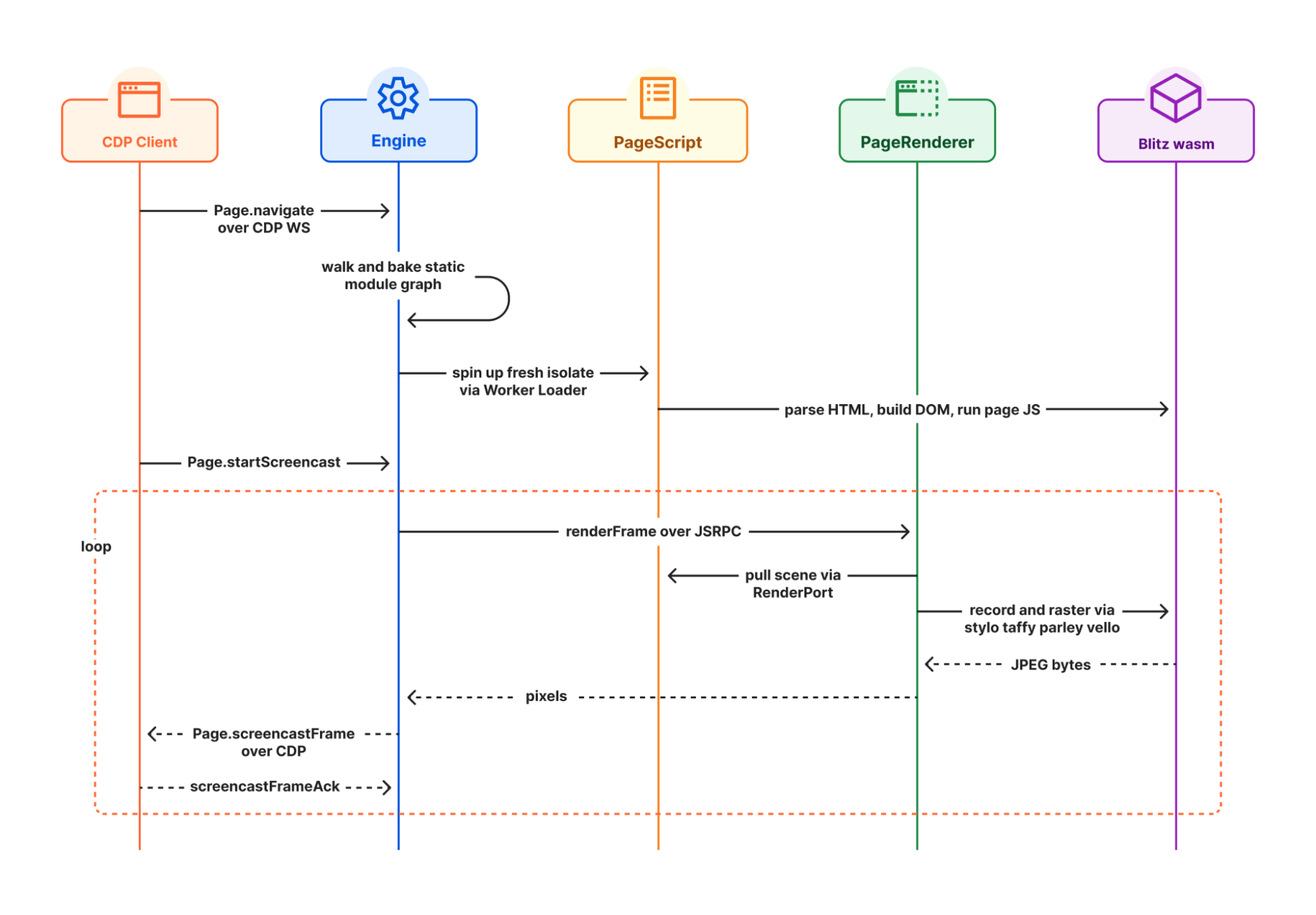
Жизненный цикл запроса: Engine → PageScript → PageRenderer. Иллюстрация Cloudflare
Цифры вендора
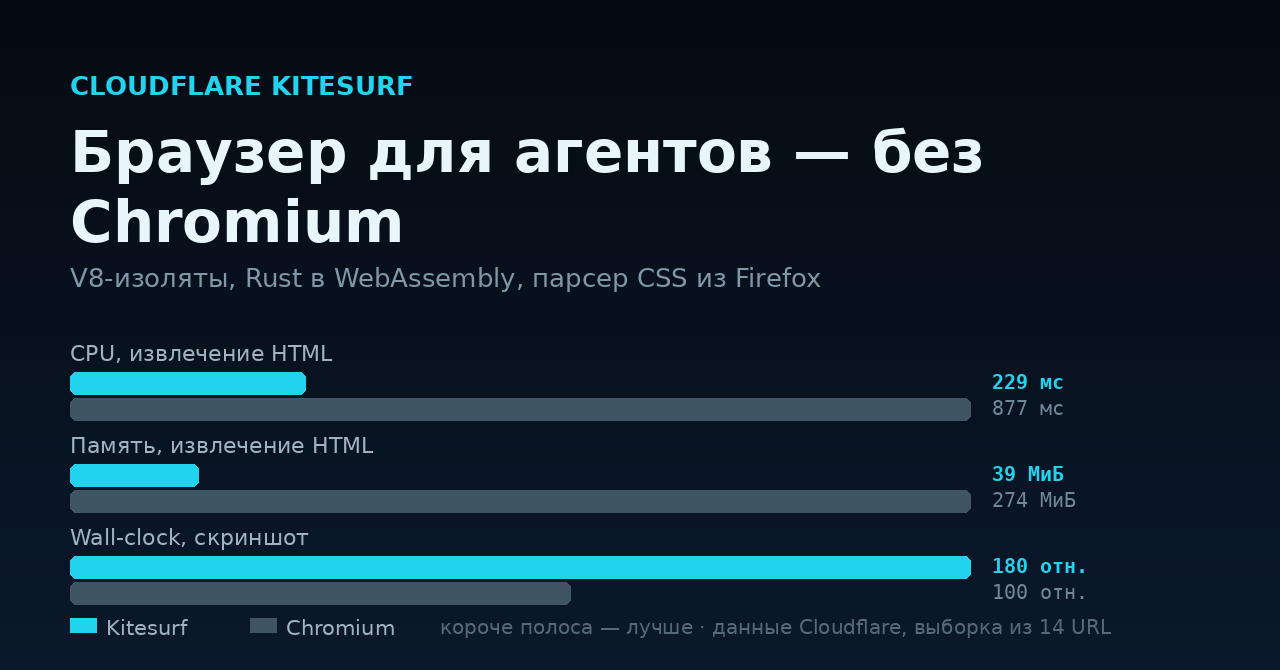
Cloudflare приводит замеры на выборке из 14 URL. Подчеркну: это бенчмарк производителя на собственной выборке, независимого подтверждения пока нет.
| Метрика | Kitesurf | Chromium | Разница |
|---|---|---|---|
| CPU, скриншот | 380 мс | 1 173 мс | ×3,1 в пользу Kitesurf |
| CPU, извлечение HTML | 229 мс | 877 мс | ×3,8 |
| Память, скриншот | 57,8 МиБ | 271,0 МиБ | ×4,7 |
| Память, извлечение HTML | 39,4 МиБ | 273,7 МиБ | ×7,0 |
| Wall-clock, скриншот | медленнее | быстрее | ×1,8 в пользу Chromium |
Последняя строка — самая честная часть публикации, и Cloudflare её не прячет: по «времени на стене» Chromium быстрее почти вдвое. Аргумент компании в том, что счёт вам выставляют за процессорное время и память, а не за секундомер. Это верно для их же биллинга Workers — и, что важно, менее верно для вас, если вы гоняете парсер на своём железе, где секунды тоже стоят денег.
Совместимость: заявлено прохождение порядка 215 000 тестов Web Platform Tests, с упором на CSS, DOM, HTML, выделение текста, SVG и XHR.
Матрица выбора
Полезнее всего разложить это по задачам. Ограничения Kitesurf компания перечислила сама, и они жёсткие: нет воспроизведения видео, нет WebGL, нет согласования антибот-челленджей с настоящими TLS-отпечатками, нет сохранения авторизованных сессий с состоянием.
| Задача | Чем делать | Почему |
|---|---|---|
| Скриншот или PDF статичной страницы | Kitesurf | Ровно тот сценарий, под который он написан |
| Извлечь текст/HTML для RAG или агента | Kitesurf | Лучший показатель по памяти, ×7 по заявленным данным |
| Массовый обход десятков тысяч URL | Kitesurf | Выигрыш по CPU и памяти масштабируется, wall-clock компенсируется параллелизмом |
| SPA, которая рисует контент только после гидратации | Chromium | Полноценный JS-рантайм и таймлайн загрузки |
| Сайт за антибот-защитой | Chromium (и то не факт) | Kitesurf прямо заявлен как неспособный пройти челлендж по TLS-отпечатку |
| Работа под логином, корзины, многошаговые формы | Chromium | Состояние сессии не сохраняется |
| Видео, WebGL, canvas-графика | Chromium | Не поддерживается |
| Антидетект и мультиаккаунтинг | Ни то ни другое | Нужен управляемый отпечаток — это отдельный класс инструментов |
Отдельно для тех, кто пришёл сюда из парсинга: Kitesurf — не инструмент обхода защит. Он не эмулирует отпечаток реального браузера, наоборот — он честно ходит как облачный клиент Cloudflare. Если ваш сценарий сегодня держится на подмене JA3/JA4, user-agent и WebGL-отпечатка, Kitesurf вам не подойдёт ни в каком виде.
Ирония и практический смысл
Забавная деталь: Cloudflare одновременно продаёт защиту сайтов от ботов (включая платный доступ для ИИ-краулеров) и браузер для ИИ-агентов, который ходит по этим сайтам. Противоречия тут меньше, чем кажется, — компания последовательно строит модель «агенты ходят по вебу легально и опознаваемо, а не притворяются людьми». Kitesurf с его отсутствием маскировки идеально в неё ложится: он оптимизирован для сайтов, которые согласны на визит агента.
Для нашей аудитории практический вывод такой. Если вы собираете агентный пайплайн — веб-поиск для локальной LLM, наполнение RAG-базы, регулярные скриншоты дашбордов — Kitesurf стоит попробовать: доступ по CDP означает, что существующий код на Puppeteer или Playwright переключается параметром browser=kitesurf, есть REST-эндпоинты Quick Actions для одношаговых операций и интерфейс MCP для агентов.
curl -X POST \
  'https://api.cloudflare.com/client/v4/accounts/<accountId>/browser-run/screenshot?browser=kitesurf' \
  -H 'Authorization: Bearer <apiToken>' \
  -d '{"url": "https://example.com"}'
На время беты доступ бесплатный, с лимитами на аккаунт. Что будет с ценой после беты — не объявлено, и это главный неизвестный параметр в любых расчётах экономии.
Здравая стратегия — не «переезжаем на Kitesurf», а двухуровневая: сначала дешёвая попытка через Kitesurf, при неудаче (пустой DOM, челлендж, нужен логин) — фолбэк на полноценный Chromium. Так вы снимаете выигрыш по ресурсам на массе простых страниц и не теряете сложные.
Источники
- Cloudflare Blog — Kitesurf: agent-first browser — первоисточник, архитектура, бенчмарки и заявленные ограничения
- Обсуждение на Hacker News — независимые реакции разработчиков
- Связанная тема форума: 99 % трафика — боты: восемь рубежей обороны сайта — взгляд с другой стороны баррикад
Кто уже пробовал гонять агентов по вебу в проде — на чём остановились: свой headless Chromium в докере, облачный рендеринг или самописный HTTP-клиент с парсером? И сколько у вас в итоге страниц отваливается на антибот-защите?