SQLite — самая проверенная база на планете по количеству запусков: она внутри каждого браузера, каждого телефона и половины того, что вы у себя самохостите. Тем интереснее история, которую 12 августа опубликовала команда Tailscale: они полгода ловили повреждения базы, дошли до платной поддержки самих разработчиков SQLite — и вместе нашли гонку в механизме checkpoint, прожившую в коде не меньше шестнадцати лет.
Ниже — хронология: как это выглядело, как искали, что нашли, и что из этого следует для домашнего сервера, где на SQLite работает половина сервисов.
Как это выглядело: 19 повреждений за полгода
Симптом был тупой и неприятный: база время от времени оказывалась повреждённой. Не «медленно работает», не «блокировки» — именно порча файла. За шесть месяцев — 19 инцидентов.
Такое обычно списывают на что угодно, кроме самой СУБД: сбойный диск, сетевую файловую систему, убитый по SIGKILL процесс, кривой бэкап поверх живой базы. Список подозреваемых длинный, и каждый из них правдоподобнее, чем «баг в SQLite» — библиотеке с одним из самых плотных наборов тестов в индустрии.
Что такое WAL и checkpoint в двух абзацах. В режиме журнала предзаписи транзакция не пишет страницы сразу в файл базы. Она дописывает их в отдельный WAL-файл — это быстро и не блокирует читателей.
Рано или поздно накопленное надо перенести в основной файл. Эта операция называется checkpoint. Официальная документация описывает её штатный режим так: «By default, SQLite will automatically checkpoint whenever a COMMIT occurs that causes the WAL file to be 1000 pages or more in size, or when the last database connection on a database file closes».
Когда checkpoint закончился и WAL никто не читает, происходит то самое «сбрасывание в начало»: «the writer will rewind the WAL back to the beginning and start putting new transactions at the beginning of the WAL». Именно этот момент — reset WAL — и оказался местом преступления.
Как искали: шим поверх виртуальной файловой системы
Обычная отладка тут не работает: воспроизвести гонку, которая случается раз в несколько недель под нагрузкой, нельзя. Поэтому в ход пошёл приём, который стоит запомнить.
SQLite обращается к диску не напрямую, а через слой VFS — абстракцию с подменяемой реализацией. Разработчики SQLite написали шим tmstmpvfs, который встаёт между библиотекой и настоящей файловой системой и протоколирует все дисковые операции с временными метками. Дальше оставалось дождаться очередного инцидента и разобрать журнал.
Это, пожалуй, главный переносимый урок истории. Когда баг не воспроизводится, но повторяется, — не пытайтесь поймать его отладчиком. Поставьте инструментирование в самое узкое место интерфейса (у SQLite это VFS) и ждите. Дешевле по усилиям и почти всегда результативнее.
Что нашли: checkpoint, который поверил в несделанную работу
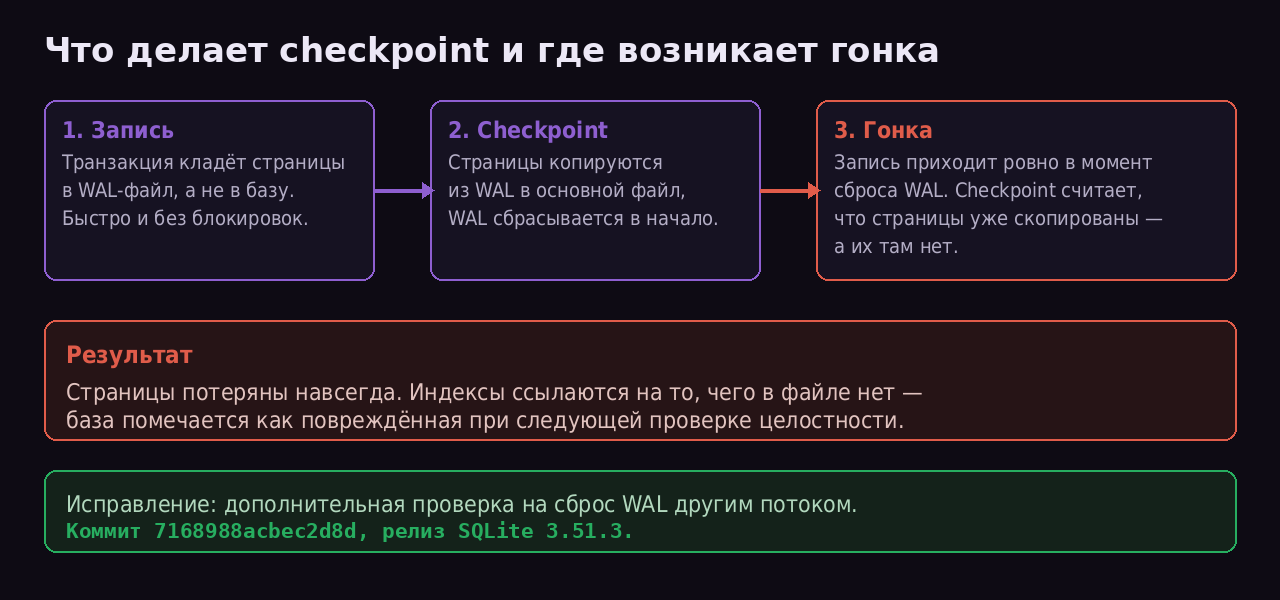
Схема на основе разбора Tailscale и документации Write-Ahead Logging
Механика в изложении Tailscale: если запись приходит в конкретный момент во время checkpoint, «the checkpointing process gets confused — it thinks some of the pages have been copied from the WAL into the main database file, but they haven’t».
Дальше — цепочка, которая и делает баг разрушительным: «Those pages never get written to the database file, and that data is permanently lost. The database file becomes corrupt, because other pages which reference those pages — such as an index — are written to the database».
То есть теряются не просто данные. Теряются страницы, на которые ссылаются другие, успешно записанные страницы. Индекс указывает в пустоту — и файл становится структурно битым, а не просто неполным.
Возраст бага разработчики SQLite оценили минимум в 16 лет. Условия срабатывания — редкие: ручное управление checkpoint в сочетании с агрессивной частотой их запуска. Настолько редкие, что для тестирования пришлось добавлять код, вызывающий гонку намеренно.
Что исправили и когда
Исправление — дополнительная проверка в функции checkpoint, которая замечает, что WAL был сброшен другим потоком. Коммит 7168988acbec2d8d.
Дальше — деталь, из-за которой многие пропустили новость. Смотрим официальный changelog SQLite:
- 3.51.3, 13 марта 2026 — «Fix the WAL-reset database corruption bug».
- 3.52.0, 6 марта 2026 — релиз отозван; все запланированные в нём возможности перенесены в 3.53.0.
То есть заплатка вышла ещё в марте, тихо, в патч-релизе ветки 3.51 — а публичный разбор появился только в августе. Пять месяцев баг был исправлен, но почти никто не знал, что именно исправлено.
Практический вывод не «срочно обновляйтесь», а «проверьте, какая у вас версия». Ключевая цифра — 3.51.3. Всё, что старше, содержит баг.
Сложность в том, что «у вас» — понятие расплывчатое. Системный sqlite3 и SQLite внутри приложения — это, как правило, разные библиотеки: многие программы на Go, Rust и Python несут собственную сборку. Обновление пакета в дистрибутиве не чинит приложение со вкомпилированной старой версией.
Как посмотреть:
# системная библиотека
sqlite3 --version

# версия, которую реально видит конкретная база
sqlite3 /path/to/app.db "SELECT sqlite_version();"

# проверка целостности (на копии, не на живой базе)
sqlite3 /path/to/copy.db "PRAGMA integrity_check;"
Насколько это касается домашнего сервера
Честный ответ: скорее всего, слабо — и вот почему.
Условие срабатывания, названное в разборе, — ручное управление checkpoint плюс высокая частота их запуска. Подавляющее большинство самохостящихся приложений на SQLite ничего такого не делают: они полагаются на автоматический checkpoint по порогу в 1000 страниц. Tailscale же управляли checkpoint явно и запускали их часто — конфигурация нечастая.
Из этого не следует, что можно расслабиться. Из этого следует, что если вы видели повреждения базы у себя и списали их на диск — стоит перепроверить версию SQLite в конкретном приложении, прежде чем менять SSD.
И отдельно: копирование живой базы обычным cp — по-прежнему способ получить повреждённый файл собственными руками, независимо от всяких гонок. Штатные варианты — sqlite3 db ".backup out.db" или VACUUM INTO 'out.db'; оба умеют работать с базой, которую в этот момент пишут.
Что имеет смысл сделать за пятнадцать минут:
- Собрать список сервисов, которые у вас на SQLite. Обычно это больше, чем кажется: медиасервер, читалка RSS, менеджер паролей, панель мониторинга, история умного дома.
- Для каждого — выяснить версию SQLite:
SELECT sqlite_version();через штатную консоль приложения или на копии файла. - Настроить снятие копий штатным способом (
.backup/VACUUM INTO), а неcpпо расписанию. - Раз в месяц гонять
PRAGMA integrity_check;на копии. Это единственный способ узнать о порче раньше, чем приложение упрётся в неё само.
История полезна ещё и как напоминание о масштабе: код, который прогоняют через один из самых плотных наборов тестов в открытом ПО, шестнадцать лет носил в себе гонку, приводящую к потере данных. Не потому что кто-то плохо работал, а потому что окно срабатывания измеряется микросекундами и требует конкретного паттерна использования. «Проверено временем» и «проверено во всех режимах» — не одно и то же.
Источники
- Tailscale: We tracked down the 16-year-old WAL-reset SQLite bug — хронология, 19 инцидентов, шим
tmstmpvfs, механика гонки - SQLite changelog — «Fix the WAL-reset database corruption bug», версия 3.51.3 от 13.03.2026, отозванный 3.52.0
- SQLite: Write-Ahead Logging — автоматический checkpoint при 1000 страницах, механика перемотки WAL в начало
- Коммит 7168988acbec2d8d — сам фикс
Вопрос к тем, кто ловил у себя «битую базу» и не докопался до причины: чем в итоге кончилось — заменой диска, переустановкой сервиса, восстановлением из копии? И кто-нибудь вообще проверяет integrity_check регулярно, или все узнают о порче в тот момент, когда приложение перестаёт запускаться?