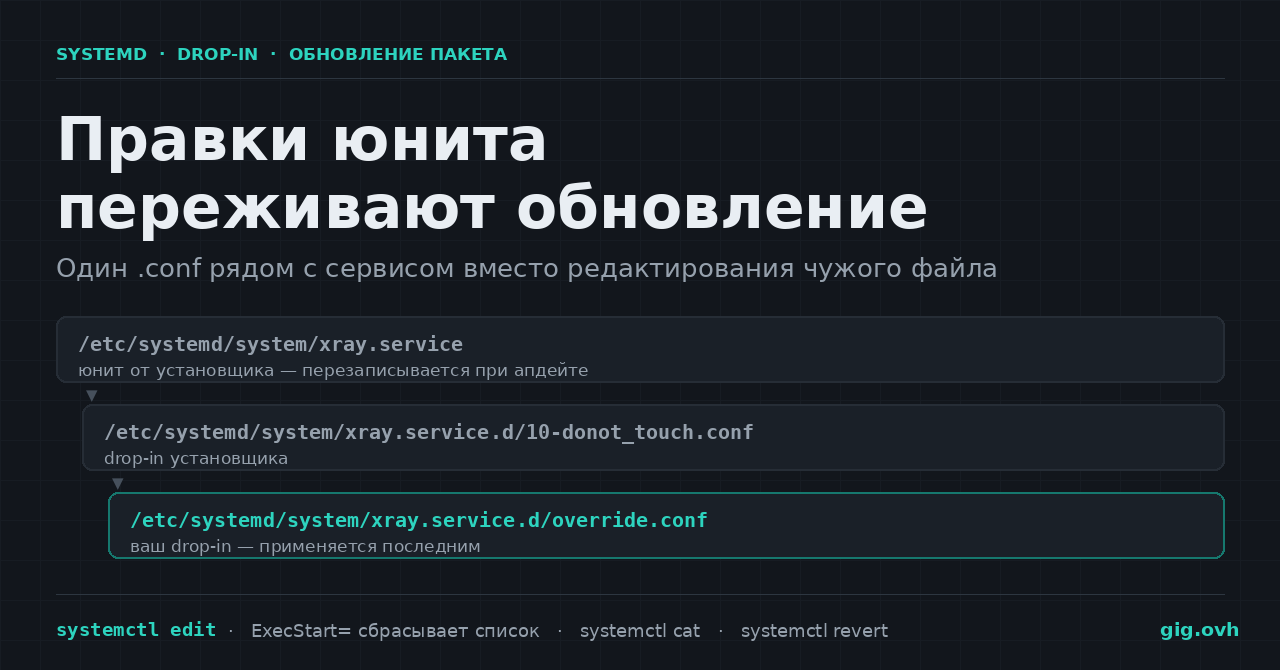
Установщик Xray переписывает /etc/systemd/system/xray.service при каждом обновлении, и всё, что вы дописали в этот файл руками, исчезает молча. Скрипт XTLS предупреждает об этом прямо в комментарии внутри собственного drop-in-файла: «Or all changes you made will be lost!». С docker.service из пакета история та же — апдейт вернёт вендорскую версию.
Штатный ответ systemd — не «скопировать юнит в /etc и править копию»: копия отвяжется от апстрима и тихо устареет через пару релизов. Инструмент называется drop-in: маленький .conf рядом с юнитом, переопределяющий отдельные строки.
Как systemd собирает итоговый юнит
Для foo.service менеджер ищет каталог foo.service.d/ и после разбора основного файла подмешивает оттуда все файлы с суффиксом .conf. Каталогов три, приоритет растёт: /usr/lib/systemd/system/ → /run/systemd/system/ → /etc/systemd/system/. В systemd.unit(5) это сформулировано так: «Drop-in files in /etc/ take precedence over those in /run/ which in turn take precedence over those in /usr/lib/».
Деталь, которую пропускают чаще всего: порядок применения задают имена файлов, а не каталоги — «Multiple drop-in files with different names are applied in lexicographic order, regardless of which of the directories they reside in». Поэтому override.conf, который создаёт systemctl edit, ляжет после установочного 10-donot_touch_single_conf.conf: цифры в ASCII идут раньше букв.
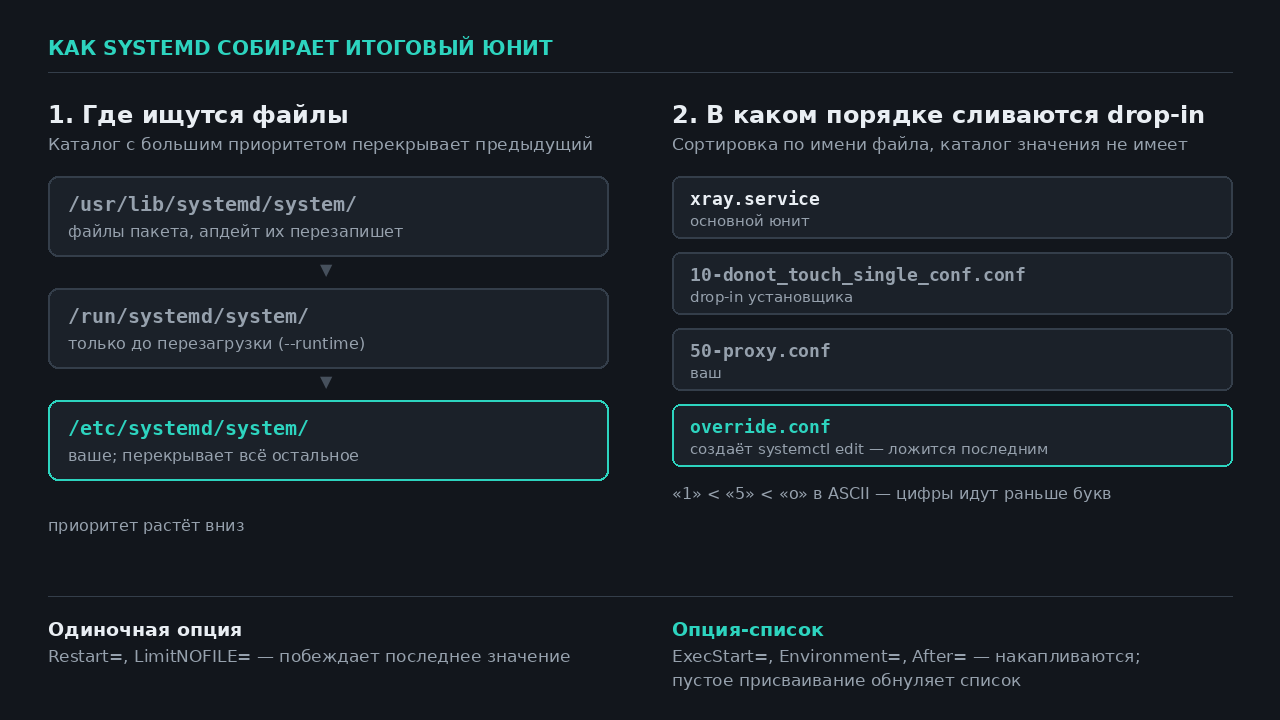
Схема по документации systemd.unit(5)
Кроме именных каталогов работает верхнеуровневый service.d/ — сразу для всех сервисов системы. Для инстансов шаблона просматривается foo@bar.service.d/, затем foo@.service.d/; у юнитов с дефисами добавляются обрезанные варианты вроде foo-.service.d/.
Прокси для демона Docker без правки docker.service
Демон читает не ~/.docker/config.json, а переменные окружения своего процесса, поэтому официальная документация предлагает именно drop-in:
sudo mkdir -p /etc/systemd/system/docker.service.d
sudo tee /etc/systemd/system/docker.service.d/http-proxy.conf >/dev/null <<'EOF'
[Service]
Environment="HTTP_PROXY=http://proxy.example.com:3128"
Environment="HTTPS_PROXY=http://proxy.example.com:3128"
Environment="NO_PROXY=localhost,127.0.0.1,.corp"
EOF
sudo systemctl daemon-reload
sudo systemctl restart docker
Контрольная команда — systemctl show --property=Environment docker: должна прийти строка с тремя парами. Пусто — файл лежит не в том каталоге либо не сделан daemon-reload. В rootless-режиме каталог другой: ~/.config/systemd/user/docker.service.d/, команды с --user и без sudo.
Подменить команду запуска: почему ExecStart сначала обнуляют
Здесь стоит главная ловушка. ExecStart= — опция-список: строка из drop-in не заменяет исходную, а добавляется к ней. А systemd.service(5) требует: «Unless Type= is oneshot, exactly one command must be given». Две команды на обычном сервисе — юнит не загрузится.
Сначала список обнуляют пустым присваиванием — «If the empty string is assigned to this option, the list of commands to start is reset» — и только потом задают своё:
[Service]
ExecStart=
ExecStart=/usr/local/bin/xray run -confdir /usr/local/etc/xray/
Именно так устроен и штатный drop-in Xray: две строки, первая пустая. То же правило действует для ExecStartPre=, Environment=, After= и прочих накапливающихся опций.
Не правьте /usr/lib/systemd/system/*.service напрямую: каталог принадлежит пакетному менеджеру. И не копируйте юнит целиком через systemctl edit --full ради одной строки — копия перестанет получать исправления апстрима, а узнаете вы об этом на следующем сломавшемся релизе.
Лимиты и политика рестарта: тут обнулять не надо
Это одиночные опции: побеждает последнее присвоенное значение.
sudo systemctl edit --drop-in=90-limits.conf xray.service
[Service]
LimitNOFILE=1048576
Restart=always
RestartSec=5
systemctl edit сам перезагружает конфигурацию после выхода из редактора — «equivalent to systemctl daemon-reload». Проверяют не файл, а то, что применил менеджер: systemctl show -p LimitNOFILE -p Restart xray.service. Для сравнения, установщик Xray уже ставит LimitNOFILE=1000000 и LimitNPROC=10000 — дескрипторы там поднимать незачем, а вот Restart=on-failure на always меняют часто.
Три команды после любой правки:
systemctl cat xray.service— покажет основной файл и все drop-in с полными путями, в порядке применения;systemd-analyze verify xray.service— найдёт синтаксические ошибки до перезапуска;systemd-delta— выведет по всей системе, что и чем перекрыто.
systemctl revert xray.service откатывает юнит к вендорскому состоянию — и сносит каталог xray.service.d/ целиком, вместе с чужими drop-in. Для Xray это означает потерю установочного 10-donot_touch_*.conf с путём к конфигу. Если нужно убрать только своё, удаляйте свой файл и делайте daemon-reload.
Отдельный сценарий — флаг --runtime: правка уедет в /run/systemd/system/ и не переживёт перезагрузку. Удобно, когда сервис нужно подержать с Restart=no полчаса и гарантированно ничего за собой не оставить.
Смежное на форуме: как устроен journald и что в нём настраивать и приёмка нового VPS за первый час.
Источники
- systemd.unit(5) — каталоги drop-in, приоритет и лексикографический порядок
- systemd.service(5) — сброс
ExecStart=пустым присваиванием - systemctl(1) —
edit,--drop-in=,--runtime,revert,cat - Docker Docs: Configure the daemon to use a proxy
- XTLS/Xray-install: install-release.sh
А вы держите свои правки юнитов в отдельных drop-in или всё-таки правите скопированный файл целиком? И был ли случай, когда апдейт пакета молча вернул вендорский .service и что-то из-за этого встало?